🤖 Magma: A Foundation Model for Multimodal AI Agents

[Jianwei Yang](https://jwyang.github.io/)*1  [Reuben Tan](https://cs-people.bu.edu/rxtan/)1  [Qianhui Wu](https://qianhuiwu.github.io/)1  [Ruijie Zheng](https://ruijiezheng.com/)2  [Baolin Peng](https://scholar.google.com/citations?user=u1CNjgwAAAAJ&hl=en&oi=ao)1  [Yongyuan Liang](https://cheryyunl.github.io)2 [Yu Gu](http://yu-gu.me/)1  [Mu Cai](https://pages.cs.wisc.edu/~mucai/)3  [Seonghyeon Ye](https://seonghyeonye.github.io/)4  [Joel Jang](https://joeljang.github.io/)5  [Yuquan Deng](https://scholar.google.com/citations?user=LTC0Q6YAAAAJ&hl=en)5  [Lars Liden](https://sites.google.com/site/larsliden)1  [Jianfeng Gao](https://www.microsoft.com/en-us/research/people/jfgao/)1 1 Microsoft Research; 2 University of Maryland; 3 University of Wisconsin-Madison 4 KAIST; 5 University of Washington * Project lead First authors Second authors Leadership

To Appear at CVPR 2025

📄 arXiv Paper   🌐 Project Page   🤗 Hugging Face Model ☁️ Azure AI Foundry 📺 Video

The Path Towards Multimodal AI Agents
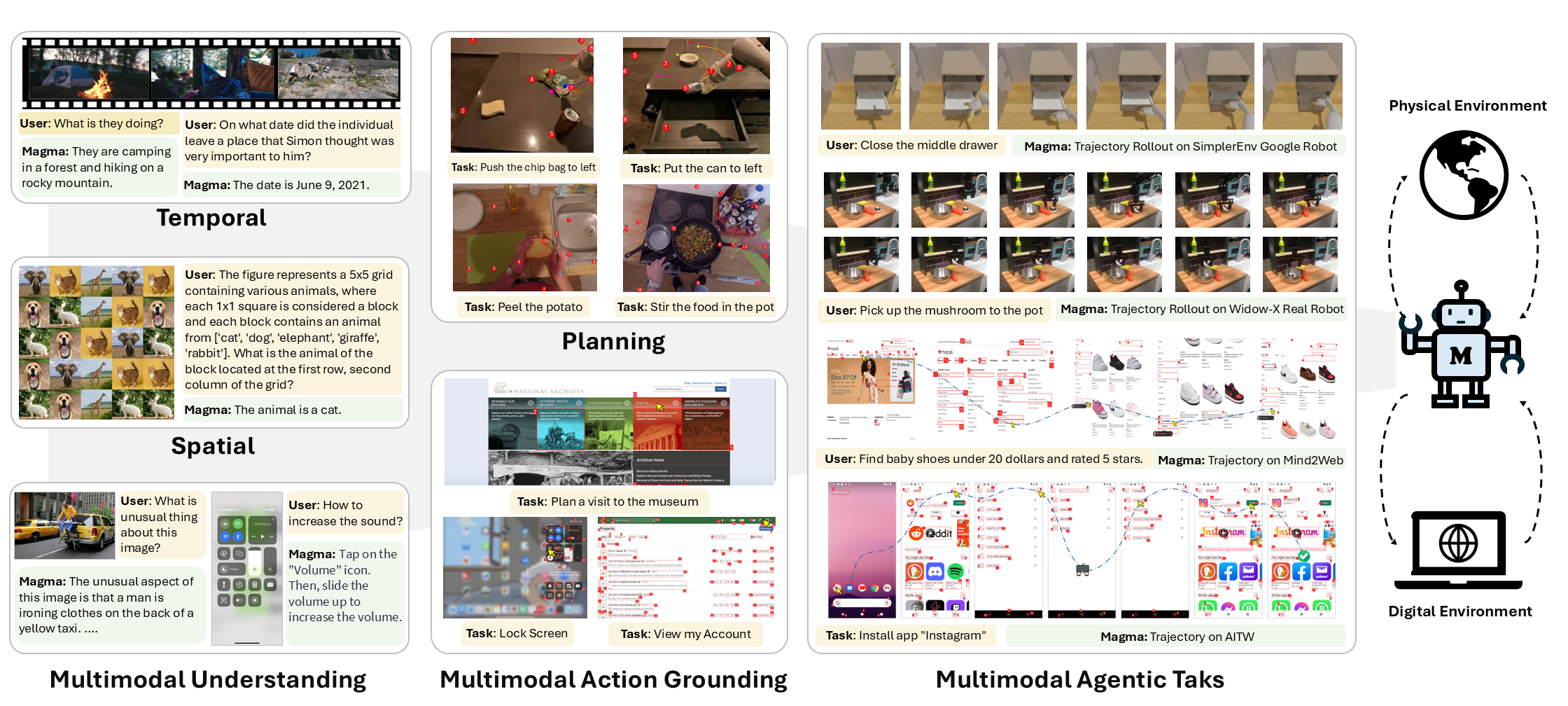
## :sparkles: Highlights * **Digital and Physical Worlds:** Magma is the first-ever foundation model for multimodal AI agents, designed to handle complex interactions across both virtual and real environments! * **Versatile Capabilities:** Magma as a single model not only possesses generic image and videos understanding ability, but also generate goal-driven visual plans and actions, making it versatile for different agentic tasks! * **State-of-the-art Performance:** Magma achieves state-of-the-art performance on various multimodal tasks, including UI navigation, robotics manipulation, as well as generic image and video understanding, in particular the spatial understanding and reasoning! * **Scalable Pretraining Strategy:** Magma is designed to be **learned scalably from unlabeled videos** in the wild in addition to the existing agentic data, making it strong generalization ability and suitable for real-world applications! ## :fire: News * **[2025.04.12]** 🔥We released the pretraining videos with visual traces on hugging face [Magma-Video-ToM](https://huggingface.co/datasets/MagmaAI/Magma-Video-ToM). * **[2025.04.06]** Open X-Embodiment pretraining data with visual traces can be downloaded from [Magma-OXE-ToM](https://huggingface.co/datasets/MagmaAI/Magma-OXE-ToM). * **[2025.03.16]** We released the demo code for generating SoM and ToM for instructional videos (i.e., Alg. 2 in our paper) in [SoM/ToM Generation](#som-and-tom-generation). * **[2025.03.09]** 🔥 We released Magma training code, and an exampler for training Magma-8B on Magma-820K dataset. Check out the [Model Training](#model-training) * **[2025.03.06]** We released a new demo for showing robot planning capabilities. Run `python agents/robot_traj/app.py` to start the demo! * **[2025.02.28]** We released two demos, [Magma-UI](https://huggingface.co/spaces/microsoft/Magma-UI) and [Magma-Gaming](https://huggingface.co/spaces/microsoft/Magma-Gaming) on Hugging Face. Check out our model's action grounding and planning capabilities! * **[2025.02.26]** ⭐ Exciting News! Magma got accepted by CVPR 2025! * **[2025.02.25]** 🎉 Big News! We are releasing the Magma model on [Hugging Face](https://huggingface.co/microsoft/Magma-8B) and [Azure AI Foundry](https://ai.azure.com/explore/models/microsoft-magma-8b/version/1/registry/HuggingFace?tid=72f988bf-86f1-41af-91ab-2d7cd011db47)! * **[2025.02.23]** We released the Magma Inference code! * **[2025.02.20]** Magma has reached the top spot on [Hacker News](https://news.ycombinator.com/front)! * **[2025.02.19]** We will be releasing our code, model and UI navigation demo by [MSR Forum on 02.25 next Tuesday](https://researchforum.microsoft.com/)! * **[2025.02.18]** Our Flagship Project Magma at MSR is released on [arXiv](https://www.arxiv.org/pdf/2502.13130)! ## :bookmark_tabs: Todos We will be releasing all the following contents: - [x] Model inference code - [x] Add UI and Gaming agent Demos - [x] Model checkpoint - [x] Training code - [x] Open-XE pretraining data with traces - [x] Video pretraining data with traces ## :clipboard: Outline - [What is Magma?](#what-is-magma) - [How we pretrain Magma?](#how-we-pretrain-magma) - [Installation](#installation) - [Data Preprocessing](#data-preprocessing) - [SoM and ToM Generation](#som-and-tom-generation) - [Model Training](#model-training) - [Pretraining on Open-X without SoM/ToM](#pretraining-on-open-x-without-somtom) - [Finetuning on Magma-820K](#finetuning-on-magma-820k) - [Model Usage](#model-usage) - [Inference](#inference) - [Inference with Huggingface Transformers](#inference-with-huggingface-transformers) - [Inference with local code from this repo](#inference-with-local-code-from-this-repo) - [Inference with bitsandbytes](#inference-with-bitsandbytes) - [Benchmarking](#benchmarking) - [Evaluation with lmms-eval](#evaluation-with-lmms-eval) - [Evaluation with SimplerEnv](#evaluation-with-simplerenv) - [Multi-images or Video](#multi-images-or-video) - [Agent Demos](#agent-demos) - [UI Agent](#ui-agent) - [Gaming Agent](#gaming-agent) - [Robot Visual Planning](#robot-visual-planning) - [Citation](#citation) - [Acknowledgements](#acknowledgements) ## What is Magma?
**Magma is a foundation model for multimodal AI agents**. As the bedrock for multimodal agentic models, it should possess strong capabilities to perceive the multimodal world AND takes goal-driven actions precisely (see above figure). With this in mind, we are striving for the following goals: * **Verbal and spatial-temporal intelligence:** Magma is supposed to have both strong verbal and spatial-temporal intelligence to understand images and videos, ground its actions on the observations, and further translate the external goal into action plan and executions. * **Digital and physical world:** Magma should not be limited to either the digital world (e.g., web navigation) or the physical world (e.g., robotics manipulation), but rather be able to work across both worlds, just like humans ourselves. With this in mind, we developed a new pretraining data, which mostly consists of unlabeled videos in the wild plus the existing annotated agentic data, and a new pretraining framework, which unifies the training of all three modalities (text, image, and action), to train a new foundation model for multimodal AI agents, named Magma. ## How we pretrain Magma?
We pursue the goal through two dimensions: * **Large-scale heterogeneous training data**: we curate a large amount of data in the wild, including existing multimodal understanding data, UI navigation data, and robotics manipulation data, and unlabeled videos in the wild. We also propose a new data collection pipeline to collect unlabeled videos in the wild, which is scalable and cost-effective. To attain useful action supervision from raw videos and robotics trajectories, we meticulously removed the camera motions in the videos and then transform the motions into "action" supervisions for our model training. These provide unique signals for the model to learn the cross-modal connections and long-horizon action prediction and planning. * **Universal pretraining objectives**: texts and actions are inherently different and thus cause a huge gap, while visual tokens are continuous. We propose a universal pretraining framework that unifies the training of all three modalities, and we show that this is crucial for the model to learn the cross-modal connections. More specifically, we proposed Set-of-Mark and Trace-of-Mark as the auxiliary tasks for our model pretraining, as the bridge of different output modalities. In this way, we are building a great alignment between the text and action modalities, and also between the image and action modalities. ## Installation 1. Clone this repo to your local machine: ```bash git clone https://github.com/microsoft/Magma cd Magma ``` 2. Install the dependencies: ```bash conda create -n magma python=3.10 -y conda activate magma pip install --upgrade pip pip install -e . ``` 3. Install packages for training: ```bash pip install -e ".[train]" ``` 4. Install packages for agents: ```bash pip install -e ".[agent]" ``` 5. Other probably needed packages: * Co-tracker ```sh # Install co-tracker git clone https://github.com/facebookresearch/co-tracker cd co-tracker pip install -e . pip install imageio[ffmpeg] cd ../ ``` * Kmeans ```sh # Install kmeans_pytorch, note: install with pip will leads to error git clone https://github.com/subhadarship/kmeans_pytorch cd kmeans_pytorch pip install -e . cd ../ ``` * Misc ```sh # Install others packages pip install ipython pip install faiss-cpu pip install decord ``` ⚠️ Please make sure you have installed the transformers with correct version (>=4.49.0). If you see some abnormal behavior, please check the version of transformers, and probably see below for the customized transformers.
Click to expand ### Customized Transformers ⚠️ One important thing to note is that our model uses [ConvNext](https://github.com/huggingface/pytorch-image-models/blob/main/timm/models/convnext.py) as the backbone, which contains a layer scaler parameter [gamma](https://github.com/huggingface/pytorch-image-models/blob/e44f14d7d2f557b9f3add82ee4f1ed2beefbb30d/timm/models/convnext.py#L144). This leads to a bug of Transformers library as it automatically replace the 'gamma' with 'weight' when loading the model. To fix this, we need to modify the 'transformers/models/auto/modeling_auto.py' file as follows: ```python if "gamma" in key and "clip_vision_model" not in key: key = key.replace("gamma", "weight") ``` This bug still exists in the latest transformer version. So please make sure you install the following bug-free customized version of transformers as lised in [pyproject.toml](./pyproject.toml): ```bash pip install git+https://github.com/jwyang/transformers.git@dev/jwyang-v4.44.1 ``` or the newest version: ```bash pip install git+https://github.com/jwyang/transformers.git@dev/jwyang-v4.48.2 ```
## Data Preprocessing ### SoM and ToM Generation As shown in Table 1 of our paper, we apply SoM and ToM on both robotics data and instructional videos. To ensure reproducibility, we provide the code to generate SoM and ToM for instructional videos. The code is located in `tools/som_tom/demo.py`. You can run the following command to generate SoM and ToM for the robotics data: ```bash python tools/som_tom/demo.py ``` And then you can find two videos in the `tools/som_tom/videos` folder. The original trace extracted from CoTracker is shown in `orig_trace.mp4`, and the SoM-ToM video is named `som_tom.mp4`. ## Model Training We provide the instructions to pretrain LLama-3-8B-Instruct on Open-X-Embodiment and finetune Magma-8B on different downstream tasks. ### Pretraining on Open-X without SoM/ToM * Data Preparation Download Open-X-Embodiment from the official site. Then edit the data config file [openx.yaml](data_configs/openx.yaml) accordingly. The data config file should look like this: ```yaml # a list of all the data paths DATA_PATH: - "/path/to/open-x" IMAGE_FOLDER: - "siglip-224px+mx-oxe-magic-soup" LANGUAGE_PATH: - "" ``` * Pretrain on OpenX Once set up the dataset and config, you can run the following command to finetune the model: ```bash sh scripts/pretrain/pretrain_openx.sh ``` * Benefit: We spent tremendous effort to decouple the Open-X dataloader from OpenVLA and make it compatible with other datasets used in our experiments* ### Finetuning on Magma-820K * Data Preparation Download annotation file from [MagmaAI/Magma-820K](https://huggingface.co/datasets/MagmaAI/Magma-820K). Please prepare the image data according to the dataset list in the dataset page. Once finished, please edit [magma_820k.yaml](data_configs/magma_820k.yaml) file accordingly. ```yaml # a list of all the data paths DATA_PATH: - "/path/to/magma_820k.json" IMAGE_FOLDER: - "/root/to/magma_820k/images" ``` * Finetune from Magma-8B Once set up the dataset and config, you can run the following command to finetune the model: ```bash sh scripts/finetune/finetune_magma_820k.sh ``` ## Model Usage ### Inference #### Inference with Huggingface Transformers We have uploaded the model to Huggingface Hub. You can easily load the model and processor with the following code.
Click to expand ```python from PIL import Image import torch from transformers import AutoModelForCausalLM from transformers import AutoProcessor dtype = torch.bfloat16 model = AutoModelForCausalLM.from_pretrained("microsoft/Magma-8B", trust_remote_code=True, torch_dtype=dtype) processor = AutoProcessor.from_pretrained("microsoft/Magma-8B", trust_remote_code=True) model.to("cuda") # Inference image = Image.open("./assets/images/magma_logo.jpg").convert("RGB") convs = [ {"role": "system", "content": "You are agent that can see, talk and act."}, {"role": "user", "content": "\nWhat is the letter on the robot?"}, ] prompt = processor.tokenizer.apply_chat_template(convs, tokenize=False, add_generation_prompt=True) inputs = processor(images=[image], texts=prompt, return_tensors="pt") inputs['pixel_values'] = inputs['pixel_values'].unsqueeze(0) inputs['image_sizes'] = inputs['image_sizes'].unsqueeze(0) inputs = inputs.to("cuda").to(dtype) generation_args = { "max_new_tokens": 500, "temperature": 0.0, "do_sample": False, "use_cache": True, "num_beams": 1, } with torch.inference_mode(): generate_ids = model.generate(**inputs, **generation_args) generate_ids = generate_ids[:, inputs["input_ids"].shape[-1] :] response = processor.decode(generate_ids[0], skip_special_tokens=True).strip() print(response) ```
#### Inference with local Transformers code from this repo If you want to debug our model, we also provide a local code for inference. You can run the following code to load the model.
Click to expand ```python from magma.processing_magma import MagmaProcessor from magma.modeling_magma import MagmaForCausalLM dtype = torch.bfloat16 model = MagmaForCausalLM.from_pretrained("microsoft/Magma-8B", trust_remote_code=True, torch_dtype=dtype) processor = MagmaProcessor.from_pretrained("microsoft/Magma-8B", trust_remote_code=True) model.to("cuda") ```
#### Inference with bitsandbytes We also provide a sample code to inference with bitsandbytes. You can run the following code to load the model.
Click to expand ```python from PIL import Image import torch from transformers import AutoModelForCausalLM from transformers import AutoProcessor from transformers import BitsAndBytesConfig # Define quantization configuration quantization_config = BitsAndBytesConfig( load_in_4bit=True, bnb_4bit_compute_dtype=torch.float16, bnb_4bit_use_double_quant=True, bnb_4bit_quant_type="nf4" ) # Load model with quantization config model = AutoModelForCausalLM.from_pretrained( "microsoft/Magma-8B", trust_remote_code=True, device_map={"": 0}, # force everything onto GPU 0 quantization_config=quantization_config ) processor = AutoProcessor.from_pretrained("microsoft/Magma-8B", trust_remote_code=True) # Inference image = Image.open("assets/images/magma_logo.jpg").convert("RGB") convs = [ {"role": "system", "content": "You are agent that can see, talk and act."}, {"role": "user", "content": "\nWhat is the letter on the robot?"}, ] prompt = processor.tokenizer.apply_chat_template(convs, tokenize=False, add_generation_prompt=True) inputs = processor(images=[image], texts=prompt, return_tensors="pt") inputs['pixel_values'] = inputs['pixel_values'].unsqueeze(0) inputs['image_sizes'] = inputs['image_sizes'].unsqueeze(0) # Convert inputs to the correct device and data type inputs = {k: v.to(device=model.device, dtype=torch.float16 if v.dtype == torch.float32 else v.dtype) for k, v in inputs.items()} generation_args = { "max_new_tokens": 500, "temperature": 0.0, "do_sample": False, "use_cache": True, "num_beams": 1, } with torch.inference_mode(): generate_ids = model.generate(**inputs, **generation_args) generate_ids = generate_ids[:, inputs["input_ids"].shape[-1] :] response = processor.decode(generate_ids[0], skip_special_tokens=True).strip() print(response) ```
#### Benchmarking We benchmark the inference time and memory usage of our model with and without bitsandbytes. | Model | Inference Time | Peak Memory Usage | |-------|----------------|--------------| | Magma-8B (bfloat16) | 1.1s | 17GB | | Magma-8B (4-bit) | 1.1s | 7GB | ### Evaluation with lmms-eval Please refer to [lmms-eval-instruction](tools/lmms-eval-magma) for the detailed instructions to run the evaluation with lmms-eval toolkit. Once everything is ready, you can run the following code to evaluate our model from the root folder. ```bash sh scripts/evaluation/lmms-eval/lmms_eval_magma.sh ``` You can evaluate other benchmarks by modifying the variable, eval_tasks. The list of `eval_tasks` can be found after running below code. ``` # lmms-eval --tasks {list_groups,list_subtasks,list_tags,list} lmms-eval --tasks list_groups ``` ### Evaluation with SimplerEnv Please refer to [SimplerEnv-instruction](tools/simplerenv-magma) for the detailed instructions to run the evaluation with SimplerEnv toolkit. Once everything is ready, you can run the following code to evaluate our model. ```bash sh scripts/evaluation/simplerenv/bridge.sh ``` ### Multi-images or Video Support Handle multiple images is extremely simple for our model. You just simply duplicate the placeholder in your text prompt, and correspondingly add all images into the list. A dummy example is as follows: ```py convs = [ {"role": "system", "content": "You are agent that can see, talk and act."}, {"role": "user", "content": "\n\n\nWhat is the letter on the robot?"}, ] prompt = processor.tokenizer.apply_chat_template(convs, tokenize=False, add_generation_prompt=True) inputs = processor(images=[image1,image2,image3], texts=prompt, return_tensors="pt") ``` Our model will handle the visual token filling for you! ### Agent Demos #### UI Agent We built agent models for our model. The first one we built is UI Agent Demo. As our model is pretrained with Set-of-Mark and Trace-of-Mark, it is naturally synergic to [OmniParser](https://github.com/microsoft/OmniParser). Combining them together, you can immediately get an UI agent, run: ```bash python agents/ui_agent/app.py ``` More importantly, as our Magma model not only has the action-grounding ability, but also multimodal understanding and reasoning ability. You can not only ask the model predict where to click with text: ```bash Go to the top ranked post ``` But also ask free question on the fly! Simply add a prefix "Q:" at the beginning of text prompt, e.g., ```bash Q: What is the title of the post? ``` #### Gaming Agent We also built a gaming agent demo. You can run the following command to start the demo: ```bash python agents/gaming_agent/app.py ``` Once the demo is run, you can see a robot proactively collecting the green blocks. #### Robot Visual Planning We also built a robot visual planning demo. You can run the following command to start the demo: ```bash python agents/robot_traj/app.py ``` For this demo, you may encounter an error as discussed in this [issue](https://github.com/microsoft/Magma/issues/43), a quick fix is running the following command: ```sh pip install imageio[ffmpeg] ``` If it still does not work, please install the older version of transformers: ```sh pip install git+https://github.com/jwyang/transformers.git@dev/jwyang-v4.44.1 ``` ## User Guidance ### Direct use This model is intended for broad research use in English. The model take images and text as inputs, and produces the textual outputs for the following uses: * **Image/Video-Conditioned Text Generation:** The model can generate text (e.g., descriptions, answers) based on the input text and image. * **Visual Planning Capabilities:** The model can also produce the visual trace as the future planning to accomplish a task (e.g., move object from one place to another). * **Agentic Capabilities:** The model can also generate UI grounding (e.g., click ``search'' button) and robotics manipulations (e.g., 7 DoF for the robot gripper). Our model is designed only for research purpose and aimed at knowledge-sharing and accelerating research in multimodal AI, in particularly the mutimodal agentic AI. ### Downstream Use The model can be further finetuned for different downstream tasks, such as: * **Image Captioning and QA:** We can further finetune this model for image captioning and QA tasks under the pipeline of multimodal LLMs. Based on our experiments, the model can achieve competitive performance yet better spatial understanding and reasoning on these tasks. * **Video Captioning and QA:** We can further finetune this model for video captioning and QA tasks under the pipeline of multimodal LLMs. Based on our experiments, the model can achieve competitive performance yet better temporal understanding and reasoning on these tasks. * **UI Navigation:** We can finetune this model for specific UI navigation tasks, such as web navigation or mobile navigation. The model can achieve superior performance on these tasks. * **Robotics Manipulation:** Our model can be further finetuned for robotics tasks given its general agentic capabilities as a vision-language-action model. After finetuning, our model significantly outperforms the state-of-the-art models such as OpenVLA on robotics manipulation tasks. ## Bias, Risks, and Limitations Please note that this model is not specifically designed or evaluated for all downstream purposes. Developers should consider common limitations of language models as they select use cases, and evaluate and mitigate for accuracy, safety, and fairness before using within a specific downstream use case, particularly for high-risk scenarios. Developers should be aware of and adhere to applicable laws or regulations (including privacy, trade compliance laws, etc.) that are relevant to their use case. ## Citation If you use this model in your research, please consider citing: ```bibtex @misc{yang2025magmafoundationmodelmultimodal, title={Magma: A Foundation Model for Multimodal AI Agents}, author={Jianwei Yang and Reuben Tan and Qianhui Wu and Ruijie Zheng and Baolin Peng and Yongyuan Liang and Yu Gu and Mu Cai and Seonghyeon Ye and Joel Jang and Yuquan Deng and Lars Liden and Jianfeng Gao}, year={2025}, eprint={2502.13130}, archivePrefix={arXiv}, primaryClass={cs.CV}, url={https://arxiv.org/abs/2502.13130}, } ``` ## Acknowledgements Our work is supported by Microsoft Research. We thank all the contributors for their efforts in building this project. Our work is built on top of some amazing open-source projects, including [Transformers](https://github.com/huggingface/transformers), [LLaVA](https://github.com/haotian-liu/LLaVA), [OpenVLA](https://github.com/openvla/openvla), [SeeClick](https://github.com/njucckevin/SeeClick), [Mind2Web](https://github.com/OSU-NLP-Group/Mind2Web), and also a number of awesome open-source datasets, including [Ego4d](https://ego4d-data.org/), [Epic-Kitchen](https://epic-kitchens.github.io/2025), [Something-Somethingv2](https://www.qualcomm.com/developer/artificial-intelligence/datasets), [Open-X-Embodiment](https://robotics-transformer-x.github.io/), and a number of evaluation benchmarks, including [SimplerEnv](https://github.com/simpler-env/SimplerEnv), [Libero](https://github.com/Lifelong-Robot-Learning/LIBERO). ## License This project is licensed under the MIT License. See the [LICENSE](LICENSE) file for details. ## Contributing This project welcomes contributions and suggestions. Most contributions require you to agree to a Contributor License Agreement (CLA) declaring that you have the right to, and actually do, grant us the rights to use your contribution. For details, visit https://cla.opensource.microsoft.com. When you submit a pull request, a CLA bot will automatically determine whether you need to provide a CLA and decorate the PR appropriately (e.g., status check, comment). Simply follow the instructions provided by the bot. You will only need to do this once across all repos using our CLA. This project has adopted the [Microsoft Open Source Code of Conduct](https://opensource.microsoft.com/codeofconduct/). For more information see the [Code of Conduct FAQ](https://opensource.microsoft.com/codeofconduct/faq/) or contact [opencode@microsoft.com](mailto:opencode@microsoft.com) with any additional questions or comments. ## Trademarks This project may contain trademarks or logos for projects, products, or services. Authorized use of Microsoft trademarks or logos is subject to and must follow [Microsoft's Trademark & Brand Guidelines](https://www.microsoft.com/en-us/legal/intellectualproperty/trademarks/usage/general). Use of Microsoft trademarks or logos in modified versions of this project must not cause confusion or imply Microsoft sponsorship. Any use of third-party trademarks or logos are subject to those third-party's policies.