*This model was released on 2022-12-05 and added to Hugging Face Transformers on 2024-03-04.*
# UDOP
## Overview
The UDOP model was proposed in [Unifying Vision, Text, and Layout for Universal Document Processing](https://huggingface.co/papers/2212.02623) by Zineng Tang, Ziyi Yang, Guoxin Wang, Yuwei Fang, Yang Liu, Chenguang Zhu, Michael Zeng, Cha Zhang, Mohit Bansal.
UDOP adopts an encoder-decoder Transformer architecture based on [T5](t5) for document AI tasks like document image classification, document parsing and document visual question answering.
The abstract from the paper is the following:
We propose Universal Document Processing (UDOP), a foundation Document AI model which unifies text, image, and layout modalities together with varied task formats, including document understanding and generation. UDOP leverages the spatial correlation between textual content and document image to model image, text, and layout modalities with one uniform representation. With a novel Vision-Text-Layout Transformer, UDOP unifies pretraining and multi-domain downstream tasks into a prompt-based sequence generation scheme. UDOP is pretrained on both large-scale unlabeled document corpora using innovative self-supervised objectives and diverse labeled data. UDOP also learns to generate document images from text and layout modalities via masked image reconstruction. To the best of our knowledge, this is the first time in the field of document AI that one model simultaneously achieves high-quality neural document editing and content customization. Our method sets the state-of-the-art on 9 Document AI tasks, e.g., document understanding and QA, across diverse data domains like finance reports, academic papers, and websites. UDOP ranks first on the leaderboard of the Document Understanding Benchmark (DUE).*
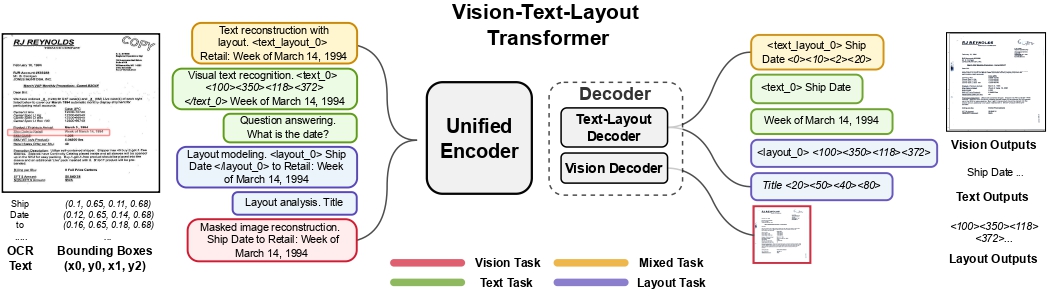 UDOP architecture. Taken from the original paper.
## Usage tips
- In addition to *input_ids*, [`UdopForConditionalGeneration`] also expects the input `bbox`, which are
the bounding boxes (i.e. 2D-positions) of the input tokens. These can be obtained using an external OCR engine such
as Google's [Tesseract](https://github.com/tesseract-ocr/tesseract) (there's a [Python wrapper](https://pypi.org/project/pytesseract/) available). Each bounding box should be in (x0, y0, x1, y1) format, where (x0, y0) corresponds to the position of the upper left corner in the bounding box, and (x1, y1) represents the
position of the lower right corner. Note that one first needs to normalize the bounding boxes to be on a 0-1000
scale. To normalize, you can use the following function:
```python
def normalize_bbox(bbox, width, height):
return [
int(1000 * (bbox[0] / width)),
int(1000 * (bbox[1] / height)),
int(1000 * (bbox[2] / width)),
int(1000 * (bbox[3] / height)),
]
```
Here, `width` and `height` correspond to the width and height of the original document in which the token
occurs. Those can be obtained using the Python Image Library (PIL) library for example, as follows:
```python
from PIL import Image
# Document can be a png, jpg, etc. PDFs must be converted to images.
image = Image.open(name_of_your_document).convert("RGB")
width, height = image.size
```
One can use [`UdopProcessor`] to prepare images and text for the model, which takes care of all of this. By default, this class uses the Tesseract engine to extract a list of words and boxes (coordinates) from a given document. Its functionality is equivalent to that of [`LayoutLMv3Processor`], hence it supports passing either `apply_ocr=False` in case you prefer to use your own OCR engine or `apply_ocr=True` in case you want the default OCR engine to be used. Refer to the [usage guide of LayoutLMv2](layoutlmv2#usage-layoutlmv2processor) regarding all possible use cases (the functionality of `UdopProcessor` is identical).
- If using an own OCR engine of choice, one recommendation is Azure's [Read API](https://learn.microsoft.com/en-us/azure/ai-services/computer-vision/how-to/call-read-api), which supports so-called line segments. Use of segment position embeddings typically results in better performance.
- At inference time, it's recommended to use the `generate` method to autoregressively generate text given a document image.
- The model has been pre-trained on both self-supervised and supervised objectives. One can use the various task prefixes (prompts) used during pre-training to test out the out-of-the-box capabilities. For instance, the model can be prompted with "Question answering. What is the date?", as "Question answering." is the task prefix used during pre-training for DocVQA. Refer to the [paper](https://huggingface.co/papers/2212.02623) (table 1) for all task prefixes.
- One can also fine-tune [`UdopEncoderModel`], which is the encoder-only part of UDOP, which can be seen as a LayoutLMv3-like Transformer encoder. For discriminative tasks, one can just add a linear classifier on top of it and fine-tune it on a labeled dataset.
This model was contributed by [nielsr](https://huggingface.co/nielsr).
The original code can be found [here](https://github.com/microsoft/UDOP).
## Resources
A list of official Hugging Face and community (indicated by 🌎) resources to help you get started with UDOP. If
you're interested in submitting a resource to be included here, please feel free to open a Pull Request and we'll
review it! The resource should ideally demonstrate something new instead of duplicating an existing resource.
- Demo notebooks regarding UDOP can be found [here](https://github.com/NielsRogge/Transformers-Tutorials/tree/master/UDOP) that show how
to fine-tune UDOP on a custom dataset as well as inference. 🌎
- [Document question answering task guide](../tasks/document_question_answering)
## UdopConfig
[[autodoc]] UdopConfig
## UdopTokenizer
[[autodoc]] UdopTokenizer
- build_inputs_with_special_tokens
- get_special_tokens_mask
- create_token_type_ids_from_sequences
- save_vocabulary
## UdopTokenizerFast
[[autodoc]] UdopTokenizerFast
## UdopProcessor
[[autodoc]] UdopProcessor
- __call__
## UdopModel
[[autodoc]] UdopModel
- forward
## UdopForConditionalGeneration
[[autodoc]] UdopForConditionalGeneration
- forward
## UdopEncoderModel
[[autodoc]] UdopEncoderModel
- forward
UDOP architecture. Taken from the original paper.
## Usage tips
- In addition to *input_ids*, [`UdopForConditionalGeneration`] also expects the input `bbox`, which are
the bounding boxes (i.e. 2D-positions) of the input tokens. These can be obtained using an external OCR engine such
as Google's [Tesseract](https://github.com/tesseract-ocr/tesseract) (there's a [Python wrapper](https://pypi.org/project/pytesseract/) available). Each bounding box should be in (x0, y0, x1, y1) format, where (x0, y0) corresponds to the position of the upper left corner in the bounding box, and (x1, y1) represents the
position of the lower right corner. Note that one first needs to normalize the bounding boxes to be on a 0-1000
scale. To normalize, you can use the following function:
```python
def normalize_bbox(bbox, width, height):
return [
int(1000 * (bbox[0] / width)),
int(1000 * (bbox[1] / height)),
int(1000 * (bbox[2] / width)),
int(1000 * (bbox[3] / height)),
]
```
Here, `width` and `height` correspond to the width and height of the original document in which the token
occurs. Those can be obtained using the Python Image Library (PIL) library for example, as follows:
```python
from PIL import Image
# Document can be a png, jpg, etc. PDFs must be converted to images.
image = Image.open(name_of_your_document).convert("RGB")
width, height = image.size
```
One can use [`UdopProcessor`] to prepare images and text for the model, which takes care of all of this. By default, this class uses the Tesseract engine to extract a list of words and boxes (coordinates) from a given document. Its functionality is equivalent to that of [`LayoutLMv3Processor`], hence it supports passing either `apply_ocr=False` in case you prefer to use your own OCR engine or `apply_ocr=True` in case you want the default OCR engine to be used. Refer to the [usage guide of LayoutLMv2](layoutlmv2#usage-layoutlmv2processor) regarding all possible use cases (the functionality of `UdopProcessor` is identical).
- If using an own OCR engine of choice, one recommendation is Azure's [Read API](https://learn.microsoft.com/en-us/azure/ai-services/computer-vision/how-to/call-read-api), which supports so-called line segments. Use of segment position embeddings typically results in better performance.
- At inference time, it's recommended to use the `generate` method to autoregressively generate text given a document image.
- The model has been pre-trained on both self-supervised and supervised objectives. One can use the various task prefixes (prompts) used during pre-training to test out the out-of-the-box capabilities. For instance, the model can be prompted with "Question answering. What is the date?", as "Question answering." is the task prefix used during pre-training for DocVQA. Refer to the [paper](https://huggingface.co/papers/2212.02623) (table 1) for all task prefixes.
- One can also fine-tune [`UdopEncoderModel`], which is the encoder-only part of UDOP, which can be seen as a LayoutLMv3-like Transformer encoder. For discriminative tasks, one can just add a linear classifier on top of it and fine-tune it on a labeled dataset.
This model was contributed by [nielsr](https://huggingface.co/nielsr).
The original code can be found [here](https://github.com/microsoft/UDOP).
## Resources
A list of official Hugging Face and community (indicated by 🌎) resources to help you get started with UDOP. If
you're interested in submitting a resource to be included here, please feel free to open a Pull Request and we'll
review it! The resource should ideally demonstrate something new instead of duplicating an existing resource.
- Demo notebooks regarding UDOP can be found [here](https://github.com/NielsRogge/Transformers-Tutorials/tree/master/UDOP) that show how
to fine-tune UDOP on a custom dataset as well as inference. 🌎
- [Document question answering task guide](../tasks/document_question_answering)
## UdopConfig
[[autodoc]] UdopConfig
## UdopTokenizer
[[autodoc]] UdopTokenizer
- build_inputs_with_special_tokens
- get_special_tokens_mask
- create_token_type_ids_from_sequences
- save_vocabulary
## UdopTokenizerFast
[[autodoc]] UdopTokenizerFast
## UdopProcessor
[[autodoc]] UdopProcessor
- __call__
## UdopModel
[[autodoc]] UdopModel
- forward
## UdopForConditionalGeneration
[[autodoc]] UdopForConditionalGeneration
- forward
## UdopEncoderModel
[[autodoc]] UdopEncoderModel
- forward
