*This model was released on 2020-04-05 and added to Hugging Face Transformers on 2020-12-15.*
# TAPAS
## Overview
The TAPAS model was proposed in [TAPAS: Weakly Supervised Table Parsing via Pre-training](https://huggingface.co/papers/2004.02349)
by Jonathan Herzig, Paweł Krzysztof Nowak, Thomas Müller, Francesco Piccinno and Julian Martin Eisenschlos. It's a BERT-based model specifically
designed (and pre-trained) for answering questions about tabular data. Compared to BERT, TAPAS uses relative position embeddings and has 7
token types that encode tabular structure. TAPAS is pre-trained on the masked language modeling (MLM) objective on a large dataset comprising
millions of tables from English Wikipedia and corresponding texts.
For question answering, TAPAS has 2 heads on top: a cell selection head and an aggregation head, for (optionally) performing aggregations (such as counting or summing) among selected cells. TAPAS has been fine-tuned on several datasets:
- [SQA](https://www.microsoft.com/en-us/download/details.aspx?id=54253) (Sequential Question Answering by Microsoft)
- [WTQ](https://github.com/ppasupat/WikiTableQuestions) (Wiki Table Questions by Stanford University)
- [WikiSQL](https://github.com/salesforce/WikiSQL) (by Salesforce).
It achieves state-of-the-art on both SQA and WTQ, while having comparable performance to SOTA on WikiSQL, with a much simpler architecture.
The abstract from the paper is the following:
*Answering natural language questions over tables is usually seen as a semantic parsing task. To alleviate the collection cost of full logical forms, one popular approach focuses on weak supervision consisting of denotations instead of logical forms. However, training semantic parsers from weak supervision poses difficulties, and in addition, the generated logical forms are only used as an intermediate step prior to retrieving the denotation. In this paper, we present TAPAS, an approach to question answering over tables without generating logical forms. TAPAS trains from weak supervision, and predicts the denotation by selecting table cells and optionally applying a corresponding aggregation operator to such selection. TAPAS extends BERT's architecture to encode tables as input, initializes from an effective joint pre-training of text segments and tables crawled from Wikipedia, and is trained end-to-end. We experiment with three different semantic parsing datasets, and find that TAPAS outperforms or rivals semantic parsing models by improving state-of-the-art accuracy on SQA from 55.1 to 67.2 and performing on par with the state-of-the-art on WIKISQL and WIKITQ, but with a simpler model architecture. We additionally find that transfer learning, which is trivial in our setting, from WIKISQL to WIKITQ, yields 48.7 accuracy, 4.2 points above the state-of-the-art.*
In addition, the authors have further pre-trained TAPAS to recognize **table entailment**, by creating a balanced dataset of millions of automatically created training examples which are learned in an intermediate step prior to fine-tuning. The authors of TAPAS call this further pre-training intermediate pre-training (since TAPAS is first pre-trained on MLM, and then on another dataset). They found that intermediate pre-training further improves performance on SQA, achieving a new state-of-the-art as well as state-of-the-art on [TabFact](https://github.com/wenhuchen/Table-Fact-Checking), a large-scale dataset with 16k Wikipedia tables for table entailment (a binary classification task). For more details, see their follow-up paper: [Understanding tables with intermediate pre-training](https://www.aclweb.org/anthology/2020.findings-emnlp.27/) by Julian Martin Eisenschlos, Syrine Krichene and Thomas Müller.
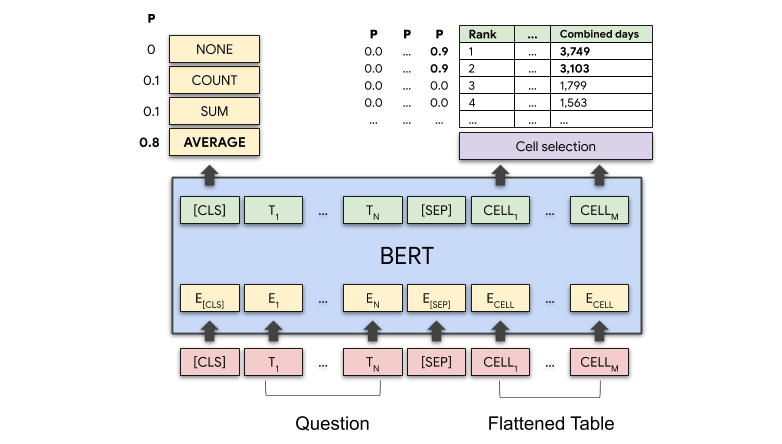 TAPAS architecture. Taken from the original blog post.
This model was contributed by [nielsr](https://huggingface.co/nielsr). The original code can be found [here](https://github.com/google-research/tapas).
## Usage tips
- TAPAS is a model that uses relative position embeddings by default (restarting the position embeddings at every cell of the table). Note that this is something that was added after the publication of the original TAPAS paper. According to the authors, this usually results in a slightly better performance, and allows you to encode longer sequences without running out of embeddings. This is reflected in the `reset_position_index_per_cell` parameter of [`TapasConfig`], which is set to `True` by default. The default versions of the models available on the [hub](https://huggingface.co/models?search=tapas) all use relative position embeddings. You can still use the ones with absolute position embeddings by passing in an additional argument `revision="no_reset"` when calling the `from_pretrained()` method. Note that it's usually advised to pad the inputs on the right rather than the left.
- TAPAS is based on BERT, so `TAPAS-base` for example corresponds to a `BERT-base` architecture. Of course, `TAPAS-large` will result in the best performance (the results reported in the paper are from `TAPAS-large`). Results of the various sized models are shown on the [original GitHub repository](https://github.com/google-research/tapas).
- TAPAS has checkpoints fine-tuned on SQA, which are capable of answering questions related to a table in a conversational set-up. This means that you can ask follow-up questions such as "what is his age?" related to the previous question. Note that the forward pass of TAPAS is a bit different in case of a conversational set-up: in that case, you have to feed every table-question pair one by one to the model, such that the `prev_labels` token type ids can be overwritten by the predicted `labels` of the model to the previous question. See "Usage" section for more info.
- TAPAS is similar to BERT and therefore relies on the masked language modeling (MLM) objective. It is therefore efficient at predicting masked tokens and at NLU in general, but is not optimal for text generation. Models trained with a causal language modeling (CLM) objective are better in that regard. Note that TAPAS can be used as an encoder in the EncoderDecoderModel framework, to combine it with an autoregressive text decoder such as GPT-2.
## Usage: fine-tuning
Here we explain how you can fine-tune [`TapasForQuestionAnswering`] on your own dataset.
**STEP 1: Choose one of the 3 ways in which you can use TAPAS - or experiment**
Basically, there are 3 different ways in which one can fine-tune [`TapasForQuestionAnswering`], corresponding to the different datasets on which Tapas was fine-tuned:
1. SQA: if you're interested in asking follow-up questions related to a table, in a conversational set-up. For example if you first ask "what's the name of the first actor?" then you can ask a follow-up question such as "how old is he?". Here, questions do not involve any aggregation (all questions are cell selection questions).
2. WTQ: if you're not interested in asking questions in a conversational set-up, but rather just asking questions related to a table, which might involve aggregation, such as counting a number of rows, summing up cell values or averaging cell values. You can then for example ask "what's the total number of goals Cristiano Ronaldo made in his career?". This case is also called **weak supervision**, since the model itself must learn the appropriate aggregation operator (SUM/COUNT/AVERAGE/NONE) given only the answer to the question as supervision.
3. WikiSQL-supervised: this dataset is based on WikiSQL with the model being given the ground truth aggregation operator during training. This is also called **strong supervision**. Here, learning the appropriate aggregation operator is much easier.
To summarize:
| **Task** | **Example dataset** | **Description** |
|-------------------------------------|---------------------|---------------------------------------------------------------------------------------------------------|
| Conversational | SQA | Conversational, only cell selection questions |
| Weak supervision for aggregation | WTQ | Questions might involve aggregation, and the model must learn this given only the answer as supervision |
| Strong supervision for aggregation | WikiSQL-supervised | Questions might involve aggregation, and the model must learn this given the gold aggregation operator |
Initializing a model with a pre-trained base and randomly initialized classification heads from the hub can be done as shown below.
```py
>>> from transformers import TapasConfig, TapasForQuestionAnswering
>>> # for example, the base sized model with default SQA configuration
>>> model = TapasForQuestionAnswering.from_pretrained("google/tapas-base")
>>> # or, the base sized model with WTQ configuration
>>> config = TapasConfig.from_pretrained("google/tapas-base-finetuned-wtq")
>>> model = TapasForQuestionAnswering.from_pretrained("google/tapas-base", config=config)
>>> # or, the base sized model with WikiSQL configuration
>>> config = TapasConfig("google-base-finetuned-wikisql-supervised")
>>> model = TapasForQuestionAnswering.from_pretrained("google/tapas-base", config=config)
```
Of course, you don't necessarily have to follow one of these three ways in which TAPAS was fine-tuned. You can also experiment by defining any hyperparameters you want when initializing [`TapasConfig`], and then create a [`TapasForQuestionAnswering`] based on that configuration. For example, if you have a dataset that has both conversational questions and questions that might involve aggregation, then you can do it this way. Here's an example:
```py
>>> from transformers import TapasConfig, TapasForQuestionAnswering
>>> # you can initialize the classification heads any way you want (see docs of TapasConfig)
>>> config = TapasConfig(num_aggregation_labels=3, average_logits_per_cell=True)
>>> # initializing the pre-trained base sized model with our custom classification heads
>>> model = TapasForQuestionAnswering.from_pretrained("google/tapas-base", config=config)
```
What you can also do is start from an already fine-tuned checkpoint. A note here is that the already fine-tuned checkpoint on WTQ has some issues due to the L2-loss which is somewhat brittle. See [here](https://github.com/google-research/tapas/issues/91#issuecomment-735719340) for more info.
For a list of all pre-trained and fine-tuned TAPAS checkpoints available on HuggingFace's hub, see [here](https://huggingface.co/models?search=tapas).
**STEP 2: Prepare your data in the SQA format**
Second, no matter what you picked above, you should prepare your dataset in the [SQA](https://www.microsoft.com/en-us/download/details.aspx?id=54253) format. This format is a TSV/CSV file with the following columns:
- `id`: optional, id of the table-question pair, for bookkeeping purposes.
- `annotator`: optional, id of the person who annotated the table-question pair, for bookkeeping purposes.
- `position`: integer indicating if the question is the first, second, third,... related to the table. Only required in case of conversational setup (SQA). You don't need this column in case you're going for WTQ/WikiSQL-supervised.
- `question`: string
- `table_file`: string, name of a csv file containing the tabular data
- `answer_coordinates`: list of one or more tuples (each tuple being a cell coordinate, i.e. row, column pair that is part of the answer)
- `answer_text`: list of one or more strings (each string being a cell value that is part of the answer)
- `aggregation_label`: index of the aggregation operator. Only required in case of strong supervision for aggregation (the WikiSQL-supervised case)
- `float_answer`: the float answer to the question, if there is one (np.nan if there isn't). Only required in case of weak supervision for aggregation (such as WTQ and WikiSQL)
The tables themselves should be present in a folder, each table being a separate csv file. Note that the authors of the TAPAS algorithm used conversion scripts with some automated logic to convert the other datasets (WTQ, WikiSQL) into the SQA format. The author explains this [here](https://github.com/google-research/tapas/issues/50#issuecomment-705465960). A conversion of this script that works with HuggingFace's implementation can be found [here](https://github.com/NielsRogge/tapas_utils). Interestingly, these conversion scripts are not perfect (the `answer_coordinates` and `float_answer` fields are populated based on the `answer_text`), meaning that WTQ and WikiSQL results could actually be improved.
**STEP 3: Convert your data into tensors using TapasTokenizer**
Third, given that you've prepared your data in this TSV/CSV format (and corresponding CSV files containing the tabular data), you can then use [`TapasTokenizer`] to convert table-question pairs into `input_ids`, `attention_mask`, `token_type_ids` and so on. Again, based on which of the three cases you picked above, [`TapasForQuestionAnswering`] requires different
inputs to be fine-tuned:
| **Task** | **Required inputs** |
|------------------------------------|---------------------------------------------------------------------------------------------------------------------|
| Conversational | `input_ids`, `attention_mask`, `token_type_ids`, `labels` |
| Weak supervision for aggregation | `input_ids`, `attention_mask`, `token_type_ids`, `labels`, `numeric_values`, `numeric_values_scale`, `float_answer` |
| Strong supervision for aggregation | `input ids`, `attention mask`, `token type ids`, `labels`, `aggregation_labels` |
[`TapasTokenizer`] creates the `labels`, `numeric_values` and `numeric_values_scale` based on the `answer_coordinates` and `answer_text` columns of the TSV file. The `float_answer` and `aggregation_labels` are already in the TSV file of step 2. Here's an example:
```py
>>> from transformers import TapasTokenizer
>>> import pandas as pd
>>> model_name = "google/tapas-base"
>>> tokenizer = TapasTokenizer.from_pretrained(model_name)
>>> data = {"Actors": ["Brad Pitt", "Leonardo Di Caprio", "George Clooney"], "Number of movies": ["87", "53", "69"]}
>>> queries = [
... "What is the name of the first actor?",
... "How many movies has George Clooney played in?",
... "What is the total number of movies?",
... ]
>>> answer_coordinates = [[(0, 0)], [(2, 1)], [(0, 1), (1, 1), (2, 1)]]
>>> answer_text = [["Brad Pitt"], ["69"], ["209"]]
>>> table = pd.DataFrame.from_dict(data)
>>> inputs = tokenizer(
... table=table,
... queries=queries,
... answer_coordinates=answer_coordinates,
... answer_text=answer_text,
... padding="max_length",
... return_tensors="pt",
... )
>>> inputs
{'input_ids': tensor([[ ... ]]), 'attention_mask': tensor([[...]]), 'token_type_ids': tensor([[[...]]]),
'numeric_values': tensor([[ ... ]]), 'numeric_values_scale: tensor([[ ... ]]), labels: tensor([[ ... ]])}
```
Note that [`TapasTokenizer`] expects the data of the table to be **text-only**. You can use `.astype(str)` on a dataframe to turn it into text-only data.
Of course, this only shows how to encode a single training example. It is advised to create a dataloader to iterate over batches:
```py
>>> import torch
>>> import pandas as pd
>>> tsv_path = "your_path_to_the_tsv_file"
>>> table_csv_path = "your_path_to_a_directory_containing_all_csv_files"
>>> class TableDataset(torch.utils.data.Dataset):
... def __init__(self, data, tokenizer):
... self.data = data
... self.tokenizer = tokenizer
... def __getitem__(self, idx):
... item = data.iloc[idx]
... table = pd.read_csv(table_csv_path + item.table_file).astype(
... str
... ) # be sure to make your table data text only
... encoding = self.tokenizer(
... table=table,
... queries=item.question,
... answer_coordinates=item.answer_coordinates,
... answer_text=item.answer_text,
... truncation=True,
... padding="max_length",
... return_tensors="pt",
... )
... # remove the batch dimension which the tokenizer adds by default
... encoding = {key: val.squeeze(0) for key, val in encoding.items()}
... # add the float_answer which is also required (weak supervision for aggregation case)
... encoding["float_answer"] = torch.tensor(item.float_answer)
... return encoding
... def __len__(self):
... return len(self.data)
>>> data = pd.read_csv(tsv_path, sep="\t")
>>> train_dataset = TableDataset(data, tokenizer)
>>> train_dataloader = torch.utils.data.DataLoader(train_dataset, batch_size=32)
```
Note that here, we encode each table-question pair independently. This is fine as long as your dataset is **not conversational**. In case your dataset involves conversational questions (such as in SQA), then you should first group together the `queries`, `answer_coordinates` and `answer_text` per table (in the order of their `position`
index) and batch encode each table with its questions. This will make sure that the `prev_labels` token types (see docs of [`TapasTokenizer`]) are set correctly. See [this notebook](https://github.com/NielsRogge/Transformers-Tutorials/blob/master/TAPAS/Fine_tuning_TapasForQuestionAnswering_on_SQA.ipynb) for more info.
**STEP 4: Train (fine-tune) the model
You can then fine-tune [`TapasForQuestionAnswering`] as follows (shown here for the weak supervision for aggregation case):
```py
>>> from transformers import TapasConfig, TapasForQuestionAnswering, AdamW
>>> # this is the default WTQ configuration
>>> config = TapasConfig(
... num_aggregation_labels=4,
... use_answer_as_supervision=True,
... answer_loss_cutoff=0.664694,
... cell_selection_preference=0.207951,
... huber_loss_delta=0.121194,
... init_cell_selection_weights_to_zero=True,
... select_one_column=True,
... allow_empty_column_selection=False,
... temperature=0.0352513,
... )
>>> model = TapasForQuestionAnswering.from_pretrained("google/tapas-base", config=config)
>>> optimizer = AdamW(model.parameters(), lr=5e-5)
>>> model.train()
>>> for epoch in range(2): # loop over the dataset multiple times
... for batch in train_dataloader:
... # get the inputs;
... input_ids = batch["input_ids"]
... attention_mask = batch["attention_mask"]
... token_type_ids = batch["token_type_ids"]
... labels = batch["labels"]
... numeric_values = batch["numeric_values"]
... numeric_values_scale = batch["numeric_values_scale"]
... float_answer = batch["float_answer"]
... # zero the parameter gradients
... optimizer.zero_grad()
... # forward + backward + optimize
... outputs = model(
... input_ids=input_ids,
... attention_mask=attention_mask,
... token_type_ids=token_type_ids,
... labels=labels,
... numeric_values=numeric_values,
... numeric_values_scale=numeric_values_scale,
... float_answer=float_answer,
... )
... loss = outputs.loss
... loss.backward()
... optimizer.step()
```
## Usage: inference
Here we explain how you can use [`TapasForQuestionAnswering`] for inference (i.e. making predictions on new data). For inference, only `input_ids`, `attention_mask` and `token_type_ids` (which you can obtain using [`TapasTokenizer`]) have to be provided to the model to obtain the logits. Next, you can use the handy [`~models.tapas.tokenization_tapas.convert_logits_to_predictions`] method to convert these into predicted coordinates and optional aggregation indices.
However, note that inference is **different** depending on whether or not the setup is conversational. In a non-conversational set-up, inference can be done in parallel on all table-question pairs of a batch. Here's an example of that:
```py
>>> from transformers import TapasTokenizer, TapasForQuestionAnswering
>>> import pandas as pd
>>> model_name = "google/tapas-base-finetuned-wtq"
>>> model = TapasForQuestionAnswering.from_pretrained(model_name)
>>> tokenizer = TapasTokenizer.from_pretrained(model_name)
>>> data = {"Actors": ["Brad Pitt", "Leonardo Di Caprio", "George Clooney"], "Number of movies": ["87", "53", "69"]}
>>> queries = [
... "What is the name of the first actor?",
... "How many movies has George Clooney played in?",
... "What is the total number of movies?",
... ]
>>> table = pd.DataFrame.from_dict(data)
>>> inputs = tokenizer(table=table, queries=queries, padding="max_length", return_tensors="pt")
>>> outputs = model(**inputs)
>>> predicted_answer_coordinates, predicted_aggregation_indices = tokenizer.convert_logits_to_predictions(
... inputs, outputs.logits.detach(), outputs.logits_aggregation.detach()
... )
>>> # let's print out the results:
>>> id2aggregation = {0: "NONE", 1: "SUM", 2: "AVERAGE", 3: "COUNT"}
>>> aggregation_predictions_string = [id2aggregation[x] for x in predicted_aggregation_indices]
>>> answers = []
>>> for coordinates in predicted_answer_coordinates:
... if len(coordinates) == 1:
... # only a single cell:
... answers.append(table.iat[coordinates[0]])
... else:
... # multiple cells
... cell_values = []
... for coordinate in coordinates:
... cell_values.append(table.iat[coordinate])
... answers.append(", ".join(cell_values))
>>> display(table)
>>> print("")
>>> for query, answer, predicted_agg in zip(queries, answers, aggregation_predictions_string):
... print(query)
... if predicted_agg == "NONE":
... print("Predicted answer: " + answer)
... else:
... print("Predicted answer: " + predicted_agg + " > " + answer)
What is the name of the first actor?
Predicted answer: Brad Pitt
How many movies has George Clooney played in?
Predicted answer: COUNT > 69
What is the total number of movies?
Predicted answer: SUM > 87, 53, 69
```
In case of a conversational set-up, then each table-question pair must be provided **sequentially** to the model, such that the `prev_labels` token types can be overwritten by the predicted `labels` of the previous table-question pair. Again, more info can be found in [this notebook](https://github.com/NielsRogge/Transformers-Tutorials/blob/master/TAPAS/Fine_tuning_TapasForQuestionAnswering_on_SQA.ipynb).
## Resources
- [Text classification task guide](../tasks/sequence_classification)
- [Masked language modeling task guide](../tasks/masked_language_modeling)
## TAPAS specific outputs
[[autodoc]] models.tapas.modeling_tapas.TableQuestionAnsweringOutput
## TapasConfig
[[autodoc]] TapasConfig
## TapasTokenizer
[[autodoc]] TapasTokenizer
- __call__
- convert_logits_to_predictions
- save_vocabulary
## TapasModel
[[autodoc]] TapasModel
- forward
## TapasForMaskedLM
[[autodoc]] TapasForMaskedLM
- forward
## TapasForSequenceClassification
[[autodoc]] TapasForSequenceClassification
- forward
## TapasForQuestionAnswering
[[autodoc]] TapasForQuestionAnswering
- forward
TAPAS architecture. Taken from the original blog post.
This model was contributed by [nielsr](https://huggingface.co/nielsr). The original code can be found [here](https://github.com/google-research/tapas).
## Usage tips
- TAPAS is a model that uses relative position embeddings by default (restarting the position embeddings at every cell of the table). Note that this is something that was added after the publication of the original TAPAS paper. According to the authors, this usually results in a slightly better performance, and allows you to encode longer sequences without running out of embeddings. This is reflected in the `reset_position_index_per_cell` parameter of [`TapasConfig`], which is set to `True` by default. The default versions of the models available on the [hub](https://huggingface.co/models?search=tapas) all use relative position embeddings. You can still use the ones with absolute position embeddings by passing in an additional argument `revision="no_reset"` when calling the `from_pretrained()` method. Note that it's usually advised to pad the inputs on the right rather than the left.
- TAPAS is based on BERT, so `TAPAS-base` for example corresponds to a `BERT-base` architecture. Of course, `TAPAS-large` will result in the best performance (the results reported in the paper are from `TAPAS-large`). Results of the various sized models are shown on the [original GitHub repository](https://github.com/google-research/tapas).
- TAPAS has checkpoints fine-tuned on SQA, which are capable of answering questions related to a table in a conversational set-up. This means that you can ask follow-up questions such as "what is his age?" related to the previous question. Note that the forward pass of TAPAS is a bit different in case of a conversational set-up: in that case, you have to feed every table-question pair one by one to the model, such that the `prev_labels` token type ids can be overwritten by the predicted `labels` of the model to the previous question. See "Usage" section for more info.
- TAPAS is similar to BERT and therefore relies on the masked language modeling (MLM) objective. It is therefore efficient at predicting masked tokens and at NLU in general, but is not optimal for text generation. Models trained with a causal language modeling (CLM) objective are better in that regard. Note that TAPAS can be used as an encoder in the EncoderDecoderModel framework, to combine it with an autoregressive text decoder such as GPT-2.
## Usage: fine-tuning
Here we explain how you can fine-tune [`TapasForQuestionAnswering`] on your own dataset.
**STEP 1: Choose one of the 3 ways in which you can use TAPAS - or experiment**
Basically, there are 3 different ways in which one can fine-tune [`TapasForQuestionAnswering`], corresponding to the different datasets on which Tapas was fine-tuned:
1. SQA: if you're interested in asking follow-up questions related to a table, in a conversational set-up. For example if you first ask "what's the name of the first actor?" then you can ask a follow-up question such as "how old is he?". Here, questions do not involve any aggregation (all questions are cell selection questions).
2. WTQ: if you're not interested in asking questions in a conversational set-up, but rather just asking questions related to a table, which might involve aggregation, such as counting a number of rows, summing up cell values or averaging cell values. You can then for example ask "what's the total number of goals Cristiano Ronaldo made in his career?". This case is also called **weak supervision**, since the model itself must learn the appropriate aggregation operator (SUM/COUNT/AVERAGE/NONE) given only the answer to the question as supervision.
3. WikiSQL-supervised: this dataset is based on WikiSQL with the model being given the ground truth aggregation operator during training. This is also called **strong supervision**. Here, learning the appropriate aggregation operator is much easier.
To summarize:
| **Task** | **Example dataset** | **Description** |
|-------------------------------------|---------------------|---------------------------------------------------------------------------------------------------------|
| Conversational | SQA | Conversational, only cell selection questions |
| Weak supervision for aggregation | WTQ | Questions might involve aggregation, and the model must learn this given only the answer as supervision |
| Strong supervision for aggregation | WikiSQL-supervised | Questions might involve aggregation, and the model must learn this given the gold aggregation operator |
Initializing a model with a pre-trained base and randomly initialized classification heads from the hub can be done as shown below.
```py
>>> from transformers import TapasConfig, TapasForQuestionAnswering
>>> # for example, the base sized model with default SQA configuration
>>> model = TapasForQuestionAnswering.from_pretrained("google/tapas-base")
>>> # or, the base sized model with WTQ configuration
>>> config = TapasConfig.from_pretrained("google/tapas-base-finetuned-wtq")
>>> model = TapasForQuestionAnswering.from_pretrained("google/tapas-base", config=config)
>>> # or, the base sized model with WikiSQL configuration
>>> config = TapasConfig("google-base-finetuned-wikisql-supervised")
>>> model = TapasForQuestionAnswering.from_pretrained("google/tapas-base", config=config)
```
Of course, you don't necessarily have to follow one of these three ways in which TAPAS was fine-tuned. You can also experiment by defining any hyperparameters you want when initializing [`TapasConfig`], and then create a [`TapasForQuestionAnswering`] based on that configuration. For example, if you have a dataset that has both conversational questions and questions that might involve aggregation, then you can do it this way. Here's an example:
```py
>>> from transformers import TapasConfig, TapasForQuestionAnswering
>>> # you can initialize the classification heads any way you want (see docs of TapasConfig)
>>> config = TapasConfig(num_aggregation_labels=3, average_logits_per_cell=True)
>>> # initializing the pre-trained base sized model with our custom classification heads
>>> model = TapasForQuestionAnswering.from_pretrained("google/tapas-base", config=config)
```
What you can also do is start from an already fine-tuned checkpoint. A note here is that the already fine-tuned checkpoint on WTQ has some issues due to the L2-loss which is somewhat brittle. See [here](https://github.com/google-research/tapas/issues/91#issuecomment-735719340) for more info.
For a list of all pre-trained and fine-tuned TAPAS checkpoints available on HuggingFace's hub, see [here](https://huggingface.co/models?search=tapas).
**STEP 2: Prepare your data in the SQA format**
Second, no matter what you picked above, you should prepare your dataset in the [SQA](https://www.microsoft.com/en-us/download/details.aspx?id=54253) format. This format is a TSV/CSV file with the following columns:
- `id`: optional, id of the table-question pair, for bookkeeping purposes.
- `annotator`: optional, id of the person who annotated the table-question pair, for bookkeeping purposes.
- `position`: integer indicating if the question is the first, second, third,... related to the table. Only required in case of conversational setup (SQA). You don't need this column in case you're going for WTQ/WikiSQL-supervised.
- `question`: string
- `table_file`: string, name of a csv file containing the tabular data
- `answer_coordinates`: list of one or more tuples (each tuple being a cell coordinate, i.e. row, column pair that is part of the answer)
- `answer_text`: list of one or more strings (each string being a cell value that is part of the answer)
- `aggregation_label`: index of the aggregation operator. Only required in case of strong supervision for aggregation (the WikiSQL-supervised case)
- `float_answer`: the float answer to the question, if there is one (np.nan if there isn't). Only required in case of weak supervision for aggregation (such as WTQ and WikiSQL)
The tables themselves should be present in a folder, each table being a separate csv file. Note that the authors of the TAPAS algorithm used conversion scripts with some automated logic to convert the other datasets (WTQ, WikiSQL) into the SQA format. The author explains this [here](https://github.com/google-research/tapas/issues/50#issuecomment-705465960). A conversion of this script that works with HuggingFace's implementation can be found [here](https://github.com/NielsRogge/tapas_utils). Interestingly, these conversion scripts are not perfect (the `answer_coordinates` and `float_answer` fields are populated based on the `answer_text`), meaning that WTQ and WikiSQL results could actually be improved.
**STEP 3: Convert your data into tensors using TapasTokenizer**
Third, given that you've prepared your data in this TSV/CSV format (and corresponding CSV files containing the tabular data), you can then use [`TapasTokenizer`] to convert table-question pairs into `input_ids`, `attention_mask`, `token_type_ids` and so on. Again, based on which of the three cases you picked above, [`TapasForQuestionAnswering`] requires different
inputs to be fine-tuned:
| **Task** | **Required inputs** |
|------------------------------------|---------------------------------------------------------------------------------------------------------------------|
| Conversational | `input_ids`, `attention_mask`, `token_type_ids`, `labels` |
| Weak supervision for aggregation | `input_ids`, `attention_mask`, `token_type_ids`, `labels`, `numeric_values`, `numeric_values_scale`, `float_answer` |
| Strong supervision for aggregation | `input ids`, `attention mask`, `token type ids`, `labels`, `aggregation_labels` |
[`TapasTokenizer`] creates the `labels`, `numeric_values` and `numeric_values_scale` based on the `answer_coordinates` and `answer_text` columns of the TSV file. The `float_answer` and `aggregation_labels` are already in the TSV file of step 2. Here's an example:
```py
>>> from transformers import TapasTokenizer
>>> import pandas as pd
>>> model_name = "google/tapas-base"
>>> tokenizer = TapasTokenizer.from_pretrained(model_name)
>>> data = {"Actors": ["Brad Pitt", "Leonardo Di Caprio", "George Clooney"], "Number of movies": ["87", "53", "69"]}
>>> queries = [
... "What is the name of the first actor?",
... "How many movies has George Clooney played in?",
... "What is the total number of movies?",
... ]
>>> answer_coordinates = [[(0, 0)], [(2, 1)], [(0, 1), (1, 1), (2, 1)]]
>>> answer_text = [["Brad Pitt"], ["69"], ["209"]]
>>> table = pd.DataFrame.from_dict(data)
>>> inputs = tokenizer(
... table=table,
... queries=queries,
... answer_coordinates=answer_coordinates,
... answer_text=answer_text,
... padding="max_length",
... return_tensors="pt",
... )
>>> inputs
{'input_ids': tensor([[ ... ]]), 'attention_mask': tensor([[...]]), 'token_type_ids': tensor([[[...]]]),
'numeric_values': tensor([[ ... ]]), 'numeric_values_scale: tensor([[ ... ]]), labels: tensor([[ ... ]])}
```
Note that [`TapasTokenizer`] expects the data of the table to be **text-only**. You can use `.astype(str)` on a dataframe to turn it into text-only data.
Of course, this only shows how to encode a single training example. It is advised to create a dataloader to iterate over batches:
```py
>>> import torch
>>> import pandas as pd
>>> tsv_path = "your_path_to_the_tsv_file"
>>> table_csv_path = "your_path_to_a_directory_containing_all_csv_files"
>>> class TableDataset(torch.utils.data.Dataset):
... def __init__(self, data, tokenizer):
... self.data = data
... self.tokenizer = tokenizer
... def __getitem__(self, idx):
... item = data.iloc[idx]
... table = pd.read_csv(table_csv_path + item.table_file).astype(
... str
... ) # be sure to make your table data text only
... encoding = self.tokenizer(
... table=table,
... queries=item.question,
... answer_coordinates=item.answer_coordinates,
... answer_text=item.answer_text,
... truncation=True,
... padding="max_length",
... return_tensors="pt",
... )
... # remove the batch dimension which the tokenizer adds by default
... encoding = {key: val.squeeze(0) for key, val in encoding.items()}
... # add the float_answer which is also required (weak supervision for aggregation case)
... encoding["float_answer"] = torch.tensor(item.float_answer)
... return encoding
... def __len__(self):
... return len(self.data)
>>> data = pd.read_csv(tsv_path, sep="\t")
>>> train_dataset = TableDataset(data, tokenizer)
>>> train_dataloader = torch.utils.data.DataLoader(train_dataset, batch_size=32)
```
Note that here, we encode each table-question pair independently. This is fine as long as your dataset is **not conversational**. In case your dataset involves conversational questions (such as in SQA), then you should first group together the `queries`, `answer_coordinates` and `answer_text` per table (in the order of their `position`
index) and batch encode each table with its questions. This will make sure that the `prev_labels` token types (see docs of [`TapasTokenizer`]) are set correctly. See [this notebook](https://github.com/NielsRogge/Transformers-Tutorials/blob/master/TAPAS/Fine_tuning_TapasForQuestionAnswering_on_SQA.ipynb) for more info.
**STEP 4: Train (fine-tune) the model
You can then fine-tune [`TapasForQuestionAnswering`] as follows (shown here for the weak supervision for aggregation case):
```py
>>> from transformers import TapasConfig, TapasForQuestionAnswering, AdamW
>>> # this is the default WTQ configuration
>>> config = TapasConfig(
... num_aggregation_labels=4,
... use_answer_as_supervision=True,
... answer_loss_cutoff=0.664694,
... cell_selection_preference=0.207951,
... huber_loss_delta=0.121194,
... init_cell_selection_weights_to_zero=True,
... select_one_column=True,
... allow_empty_column_selection=False,
... temperature=0.0352513,
... )
>>> model = TapasForQuestionAnswering.from_pretrained("google/tapas-base", config=config)
>>> optimizer = AdamW(model.parameters(), lr=5e-5)
>>> model.train()
>>> for epoch in range(2): # loop over the dataset multiple times
... for batch in train_dataloader:
... # get the inputs;
... input_ids = batch["input_ids"]
... attention_mask = batch["attention_mask"]
... token_type_ids = batch["token_type_ids"]
... labels = batch["labels"]
... numeric_values = batch["numeric_values"]
... numeric_values_scale = batch["numeric_values_scale"]
... float_answer = batch["float_answer"]
... # zero the parameter gradients
... optimizer.zero_grad()
... # forward + backward + optimize
... outputs = model(
... input_ids=input_ids,
... attention_mask=attention_mask,
... token_type_ids=token_type_ids,
... labels=labels,
... numeric_values=numeric_values,
... numeric_values_scale=numeric_values_scale,
... float_answer=float_answer,
... )
... loss = outputs.loss
... loss.backward()
... optimizer.step()
```
## Usage: inference
Here we explain how you can use [`TapasForQuestionAnswering`] for inference (i.e. making predictions on new data). For inference, only `input_ids`, `attention_mask` and `token_type_ids` (which you can obtain using [`TapasTokenizer`]) have to be provided to the model to obtain the logits. Next, you can use the handy [`~models.tapas.tokenization_tapas.convert_logits_to_predictions`] method to convert these into predicted coordinates and optional aggregation indices.
However, note that inference is **different** depending on whether or not the setup is conversational. In a non-conversational set-up, inference can be done in parallel on all table-question pairs of a batch. Here's an example of that:
```py
>>> from transformers import TapasTokenizer, TapasForQuestionAnswering
>>> import pandas as pd
>>> model_name = "google/tapas-base-finetuned-wtq"
>>> model = TapasForQuestionAnswering.from_pretrained(model_name)
>>> tokenizer = TapasTokenizer.from_pretrained(model_name)
>>> data = {"Actors": ["Brad Pitt", "Leonardo Di Caprio", "George Clooney"], "Number of movies": ["87", "53", "69"]}
>>> queries = [
... "What is the name of the first actor?",
... "How many movies has George Clooney played in?",
... "What is the total number of movies?",
... ]
>>> table = pd.DataFrame.from_dict(data)
>>> inputs = tokenizer(table=table, queries=queries, padding="max_length", return_tensors="pt")
>>> outputs = model(**inputs)
>>> predicted_answer_coordinates, predicted_aggregation_indices = tokenizer.convert_logits_to_predictions(
... inputs, outputs.logits.detach(), outputs.logits_aggregation.detach()
... )
>>> # let's print out the results:
>>> id2aggregation = {0: "NONE", 1: "SUM", 2: "AVERAGE", 3: "COUNT"}
>>> aggregation_predictions_string = [id2aggregation[x] for x in predicted_aggregation_indices]
>>> answers = []
>>> for coordinates in predicted_answer_coordinates:
... if len(coordinates) == 1:
... # only a single cell:
... answers.append(table.iat[coordinates[0]])
... else:
... # multiple cells
... cell_values = []
... for coordinate in coordinates:
... cell_values.append(table.iat[coordinate])
... answers.append(", ".join(cell_values))
>>> display(table)
>>> print("")
>>> for query, answer, predicted_agg in zip(queries, answers, aggregation_predictions_string):
... print(query)
... if predicted_agg == "NONE":
... print("Predicted answer: " + answer)
... else:
... print("Predicted answer: " + predicted_agg + " > " + answer)
What is the name of the first actor?
Predicted answer: Brad Pitt
How many movies has George Clooney played in?
Predicted answer: COUNT > 69
What is the total number of movies?
Predicted answer: SUM > 87, 53, 69
```
In case of a conversational set-up, then each table-question pair must be provided **sequentially** to the model, such that the `prev_labels` token types can be overwritten by the predicted `labels` of the previous table-question pair. Again, more info can be found in [this notebook](https://github.com/NielsRogge/Transformers-Tutorials/blob/master/TAPAS/Fine_tuning_TapasForQuestionAnswering_on_SQA.ipynb).
## Resources
- [Text classification task guide](../tasks/sequence_classification)
- [Masked language modeling task guide](../tasks/masked_language_modeling)
## TAPAS specific outputs
[[autodoc]] models.tapas.modeling_tapas.TableQuestionAnsweringOutput
## TapasConfig
[[autodoc]] TapasConfig
## TapasTokenizer
[[autodoc]] TapasTokenizer
- __call__
- convert_logits_to_predictions
- save_vocabulary
## TapasModel
[[autodoc]] TapasModel
- forward
## TapasForMaskedLM
[[autodoc]] TapasForMaskedLM
- forward
## TapasForSequenceClassification
[[autodoc]] TapasForSequenceClassification
- forward
## TapasForQuestionAnswering
[[autodoc]] TapasForQuestionAnswering
- forward
