*This model was released on 2023-06-16 and added to Hugging Face Transformers on 2023-10-13.*
# OWLv2
## Overview
OWLv2 was proposed in [Scaling Open-Vocabulary Object Detection](https://huggingface.co/papers/2306.09683) by Matthias Minderer, Alexey Gritsenko, Neil Houlsby. OWLv2 scales up [OWL-ViT](owlvit) using self-training, which uses an existing detector to generate pseudo-box annotations on image-text pairs. This results in large gains over the previous state-of-the-art for zero-shot object detection.
The abstract from the paper is the following:
*Open-vocabulary object detection has benefited greatly from pretrained vision-language models, but is still limited by the amount of available detection training data. While detection training data can be expanded by using Web image-text pairs as weak supervision, this has not been done at scales comparable to image-level pretraining. Here, we scale up detection data with self-training, which uses an existing detector to generate pseudo-box annotations on image-text pairs. Major challenges in scaling self-training are the choice of label space, pseudo-annotation filtering, and training efficiency. We present the OWLv2 model and OWL-ST self-training recipe, which address these challenges. OWLv2 surpasses the performance of previous state-of-the-art open-vocabulary detectors already at comparable training scales (~10M examples). However, with OWL-ST, we can scale to over 1B examples, yielding further large improvement: With an L/14 architecture, OWL-ST improves AP on LVIS rare classes, for which the model has seen no human box annotations, from 31.2% to 44.6% (43% relative improvement). OWL-ST unlocks Web-scale training for open-world localization, similar to what has been seen for image classification and language modelling.*
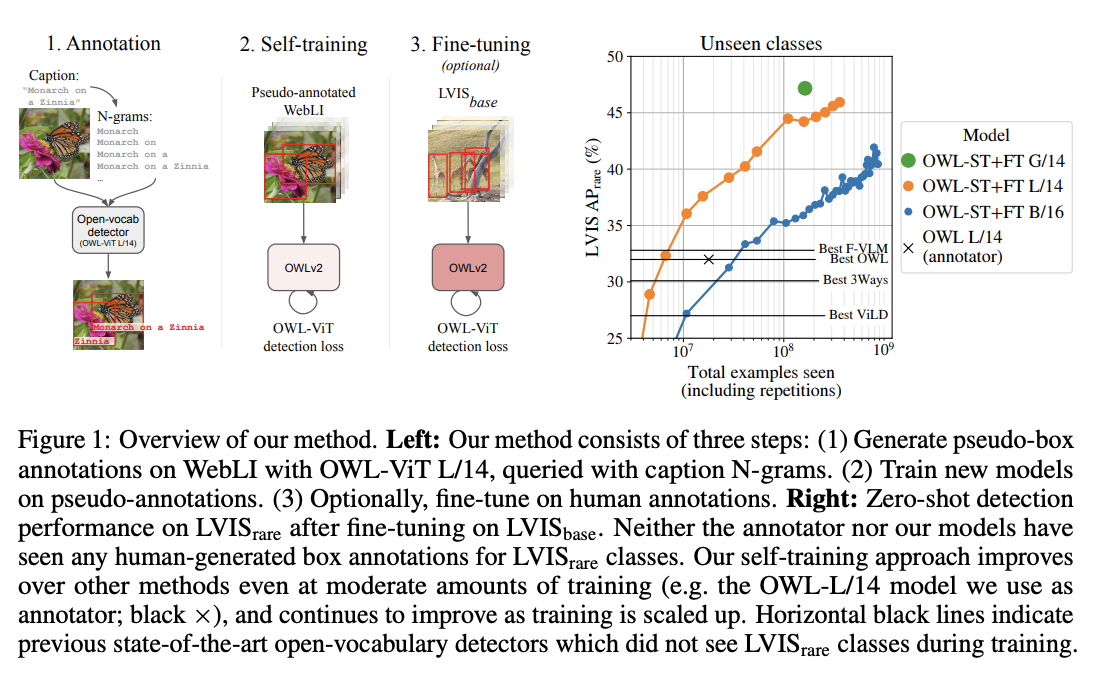 OWLv2 high-level overview. Taken from the original paper.
This model was contributed by [nielsr](https://huggingface.co/nielsr).
The original code can be found [here](https://github.com/google-research/scenic/tree/main/scenic/projects/owl_vit).
## Usage example
OWLv2 is, just like its predecessor [OWL-ViT](owlvit), a zero-shot text-conditioned object detection model. OWL-ViT uses [CLIP](clip) as its multi-modal backbone, with a ViT-like Transformer to get visual features and a causal language model to get the text features. To use CLIP for detection, OWL-ViT removes the final token pooling layer of the vision model and attaches a lightweight classification and box head to each transformer output token. Open-vocabulary classification is enabled by replacing the fixed classification layer weights with the class-name embeddings obtained from the text model. The authors first train CLIP from scratch and fine-tune it end-to-end with the classification and box heads on standard detection datasets using a bipartite matching loss. One or multiple text queries per image can be used to perform zero-shot text-conditioned object detection.
[`Owlv2ImageProcessor`] can be used to resize (or rescale) and normalize images for the model and [`CLIPTokenizer`] is used to encode the text. [`Owlv2Processor`] wraps [`Owlv2ImageProcessor`] and [`CLIPTokenizer`] into a single instance to both encode the text and prepare the images. The following example shows how to perform object detection using [`Owlv2Processor`] and [`Owlv2ForObjectDetection`].
```python
>>> import requests
>>> from PIL import Image
>>> import torch
>>> from transformers import Owlv2Processor, Owlv2ForObjectDetection
>>> processor = Owlv2Processor.from_pretrained("google/owlv2-base-patch16-ensemble")
>>> model = Owlv2ForObjectDetection.from_pretrained("google/owlv2-base-patch16-ensemble")
>>> url = "http://images.cocodataset.org/val2017/000000039769.jpg"
>>> image = Image.open(requests.get(url, stream=True).raw)
>>> text_labels = [["a photo of a cat", "a photo of a dog"]]
>>> inputs = processor(text=text_labels, images=image, return_tensors="pt")
>>> outputs = model(**inputs)
>>> # Target image sizes (height, width) to rescale box predictions [batch_size, 2]
>>> target_sizes = torch.tensor([(image.height, image.width)])
>>> # Convert outputs (bounding boxes and class logits) to Pascal VOC format (xmin, ymin, xmax, ymax)
>>> results = processor.post_process_grounded_object_detection(
... outputs=outputs, target_sizes=target_sizes, threshold=0.1, text_labels=text_labels
... )
>>> # Retrieve predictions for the first image for the corresponding text queries
>>> result = results[0]
>>> boxes, scores, text_labels = result["boxes"], result["scores"], result["text_labels"]
>>> for box, score, text_label in zip(boxes, scores, text_labels):
... box = [round(i, 2) for i in box.tolist()]
... print(f"Detected {text_label} with confidence {round(score.item(), 3)} at location {box}")
Detected a photo of a cat with confidence 0.614 at location [341.67, 23.39, 642.32, 371.35]
Detected a photo of a cat with confidence 0.665 at location [6.75, 51.96, 326.62, 473.13]
```
## Resources
- A demo notebook on using OWLv2 for zero- and one-shot (image-guided) object detection can be found [here](https://github.com/NielsRogge/Transformers-Tutorials/tree/master/OWLv2).
- [Zero-shot object detection task guide](../tasks/zero_shot_object_detection)
The architecture of OWLv2 is identical to [OWL-ViT](owlvit), however the object detection head now also includes an objectness classifier, which predicts the (query-agnostic) likelihood that a predicted box contains an object (as opposed to background). The objectness score can be used to rank or filter predictions independently of text queries.
Usage of OWLv2 is identical to [OWL-ViT](owlvit) with a new, updated image processor ([`Owlv2ImageProcessor`]).
## Owlv2Config
[[autodoc]] Owlv2Config
## Owlv2TextConfig
[[autodoc]] Owlv2TextConfig
## Owlv2VisionConfig
[[autodoc]] Owlv2VisionConfig
## Owlv2ImageProcessor
[[autodoc]] Owlv2ImageProcessor
- preprocess
- post_process_object_detection
- post_process_image_guided_detection
## Owlv2ImageProcessorFast
[[autodoc]] Owlv2ImageProcessorFast
- preprocess
- post_process_object_detection
- post_process_image_guided_detection
## Owlv2Processor
[[autodoc]] Owlv2Processor
- __call__
- post_process_grounded_object_detection
- post_process_image_guided_detection
## Owlv2Model
[[autodoc]] Owlv2Model
- forward
- get_text_features
- get_image_features
## Owlv2TextModel
[[autodoc]] Owlv2TextModel
- forward
## Owlv2VisionModel
[[autodoc]] Owlv2VisionModel
- forward
## Owlv2ForObjectDetection
[[autodoc]] Owlv2ForObjectDetection
- forward
- image_guided_detection
OWLv2 high-level overview. Taken from the original paper.
This model was contributed by [nielsr](https://huggingface.co/nielsr).
The original code can be found [here](https://github.com/google-research/scenic/tree/main/scenic/projects/owl_vit).
## Usage example
OWLv2 is, just like its predecessor [OWL-ViT](owlvit), a zero-shot text-conditioned object detection model. OWL-ViT uses [CLIP](clip) as its multi-modal backbone, with a ViT-like Transformer to get visual features and a causal language model to get the text features. To use CLIP for detection, OWL-ViT removes the final token pooling layer of the vision model and attaches a lightweight classification and box head to each transformer output token. Open-vocabulary classification is enabled by replacing the fixed classification layer weights with the class-name embeddings obtained from the text model. The authors first train CLIP from scratch and fine-tune it end-to-end with the classification and box heads on standard detection datasets using a bipartite matching loss. One or multiple text queries per image can be used to perform zero-shot text-conditioned object detection.
[`Owlv2ImageProcessor`] can be used to resize (or rescale) and normalize images for the model and [`CLIPTokenizer`] is used to encode the text. [`Owlv2Processor`] wraps [`Owlv2ImageProcessor`] and [`CLIPTokenizer`] into a single instance to both encode the text and prepare the images. The following example shows how to perform object detection using [`Owlv2Processor`] and [`Owlv2ForObjectDetection`].
```python
>>> import requests
>>> from PIL import Image
>>> import torch
>>> from transformers import Owlv2Processor, Owlv2ForObjectDetection
>>> processor = Owlv2Processor.from_pretrained("google/owlv2-base-patch16-ensemble")
>>> model = Owlv2ForObjectDetection.from_pretrained("google/owlv2-base-patch16-ensemble")
>>> url = "http://images.cocodataset.org/val2017/000000039769.jpg"
>>> image = Image.open(requests.get(url, stream=True).raw)
>>> text_labels = [["a photo of a cat", "a photo of a dog"]]
>>> inputs = processor(text=text_labels, images=image, return_tensors="pt")
>>> outputs = model(**inputs)
>>> # Target image sizes (height, width) to rescale box predictions [batch_size, 2]
>>> target_sizes = torch.tensor([(image.height, image.width)])
>>> # Convert outputs (bounding boxes and class logits) to Pascal VOC format (xmin, ymin, xmax, ymax)
>>> results = processor.post_process_grounded_object_detection(
... outputs=outputs, target_sizes=target_sizes, threshold=0.1, text_labels=text_labels
... )
>>> # Retrieve predictions for the first image for the corresponding text queries
>>> result = results[0]
>>> boxes, scores, text_labels = result["boxes"], result["scores"], result["text_labels"]
>>> for box, score, text_label in zip(boxes, scores, text_labels):
... box = [round(i, 2) for i in box.tolist()]
... print(f"Detected {text_label} with confidence {round(score.item(), 3)} at location {box}")
Detected a photo of a cat with confidence 0.614 at location [341.67, 23.39, 642.32, 371.35]
Detected a photo of a cat with confidence 0.665 at location [6.75, 51.96, 326.62, 473.13]
```
## Resources
- A demo notebook on using OWLv2 for zero- and one-shot (image-guided) object detection can be found [here](https://github.com/NielsRogge/Transformers-Tutorials/tree/master/OWLv2).
- [Zero-shot object detection task guide](../tasks/zero_shot_object_detection)
The architecture of OWLv2 is identical to [OWL-ViT](owlvit), however the object detection head now also includes an objectness classifier, which predicts the (query-agnostic) likelihood that a predicted box contains an object (as opposed to background). The objectness score can be used to rank or filter predictions independently of text queries.
Usage of OWLv2 is identical to [OWL-ViT](owlvit) with a new, updated image processor ([`Owlv2ImageProcessor`]).
## Owlv2Config
[[autodoc]] Owlv2Config
## Owlv2TextConfig
[[autodoc]] Owlv2TextConfig
## Owlv2VisionConfig
[[autodoc]] Owlv2VisionConfig
## Owlv2ImageProcessor
[[autodoc]] Owlv2ImageProcessor
- preprocess
- post_process_object_detection
- post_process_image_guided_detection
## Owlv2ImageProcessorFast
[[autodoc]] Owlv2ImageProcessorFast
- preprocess
- post_process_object_detection
- post_process_image_guided_detection
## Owlv2Processor
[[autodoc]] Owlv2Processor
- __call__
- post_process_grounded_object_detection
- post_process_image_guided_detection
## Owlv2Model
[[autodoc]] Owlv2Model
- forward
- get_text_features
- get_image_features
## Owlv2TextModel
[[autodoc]] Owlv2TextModel
- forward
## Owlv2VisionModel
[[autodoc]] Owlv2VisionModel
- forward
## Owlv2ForObjectDetection
[[autodoc]] Owlv2ForObjectDetection
- forward
- image_guided_detection
