
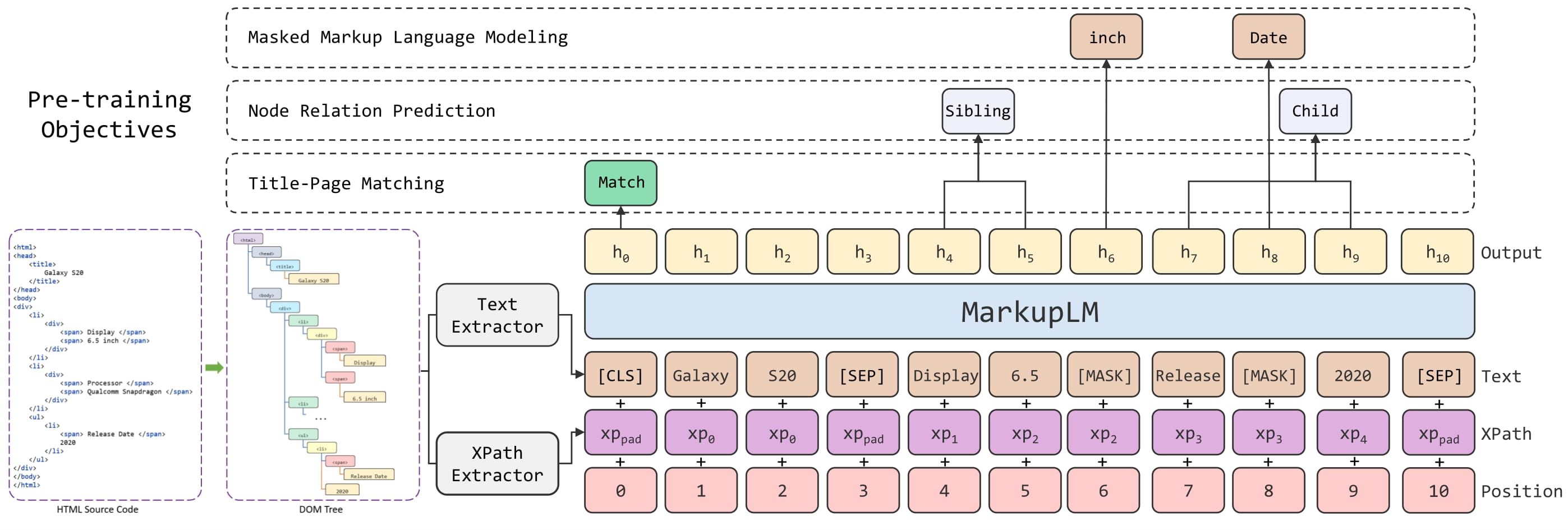
 MarkupLM architecture. Taken from the original paper.
## Usage: MarkupLMProcessor
The easiest way to prepare data for the model is to use [`MarkupLMProcessor`], which internally combines a feature extractor
([`MarkupLMFeatureExtractor`]) and a tokenizer ([`MarkupLMTokenizer`] or [`MarkupLMTokenizerFast`]). The feature extractor is
used to extract all nodes and xpaths from the HTML strings, which are then provided to the tokenizer, which turns them into the
token-level inputs of the model (`input_ids` etc.). Note that you can still use the feature extractor and tokenizer separately,
if you only want to handle one of the two tasks.
```python
from transformers import MarkupLMFeatureExtractor, MarkupLMTokenizerFast, MarkupLMProcessor
feature_extractor = MarkupLMFeatureExtractor()
tokenizer = MarkupLMTokenizerFast.from_pretrained("microsoft/markuplm-base")
processor = MarkupLMProcessor(feature_extractor, tokenizer)
```
In short, one can provide HTML strings (and possibly additional data) to [`MarkupLMProcessor`],
and it will create the inputs expected by the model. Internally, the processor first uses
[`MarkupLMFeatureExtractor`] to get a list of nodes and corresponding xpaths. The nodes and
xpaths are then provided to [`MarkupLMTokenizer`] or [`MarkupLMTokenizerFast`], which converts them
to token-level `input_ids`, `attention_mask`, `token_type_ids`, `xpath_subs_seq`, `xpath_tags_seq`.
Optionally, one can provide node labels to the processor, which are turned into token-level `labels`.
[`MarkupLMFeatureExtractor`] uses [Beautiful Soup](https://www.crummy.com/software/BeautifulSoup/bs4/doc/), a Python library for
pulling data out of HTML and XML files, under the hood. Note that you can still use your own parsing solution of
choice, and provide the nodes and xpaths yourself to [`MarkupLMTokenizer`] or [`MarkupLMTokenizerFast`].
In total, there are 5 use cases that are supported by the processor. Below, we list them all. Note that each of these
use cases work for both batched and non-batched inputs (we illustrate them for non-batched inputs).
**Use case 1: web page classification (training, inference) + token classification (inference), parse_html = True**
This is the simplest case, in which the processor will use the feature extractor to get all nodes and xpaths from the HTML.
```python
>>> from transformers import MarkupLMProcessor
>>> processor = MarkupLMProcessor.from_pretrained("microsoft/markuplm-base")
>>> html_string = """
...
...
...
...
MarkupLM architecture. Taken from the original paper.
## Usage: MarkupLMProcessor
The easiest way to prepare data for the model is to use [`MarkupLMProcessor`], which internally combines a feature extractor
([`MarkupLMFeatureExtractor`]) and a tokenizer ([`MarkupLMTokenizer`] or [`MarkupLMTokenizerFast`]). The feature extractor is
used to extract all nodes and xpaths from the HTML strings, which are then provided to the tokenizer, which turns them into the
token-level inputs of the model (`input_ids` etc.). Note that you can still use the feature extractor and tokenizer separately,
if you only want to handle one of the two tasks.
```python
from transformers import MarkupLMFeatureExtractor, MarkupLMTokenizerFast, MarkupLMProcessor
feature_extractor = MarkupLMFeatureExtractor()
tokenizer = MarkupLMTokenizerFast.from_pretrained("microsoft/markuplm-base")
processor = MarkupLMProcessor(feature_extractor, tokenizer)
```
In short, one can provide HTML strings (and possibly additional data) to [`MarkupLMProcessor`],
and it will create the inputs expected by the model. Internally, the processor first uses
[`MarkupLMFeatureExtractor`] to get a list of nodes and corresponding xpaths. The nodes and
xpaths are then provided to [`MarkupLMTokenizer`] or [`MarkupLMTokenizerFast`], which converts them
to token-level `input_ids`, `attention_mask`, `token_type_ids`, `xpath_subs_seq`, `xpath_tags_seq`.
Optionally, one can provide node labels to the processor, which are turned into token-level `labels`.
[`MarkupLMFeatureExtractor`] uses [Beautiful Soup](https://www.crummy.com/software/BeautifulSoup/bs4/doc/), a Python library for
pulling data out of HTML and XML files, under the hood. Note that you can still use your own parsing solution of
choice, and provide the nodes and xpaths yourself to [`MarkupLMTokenizer`] or [`MarkupLMTokenizerFast`].
In total, there are 5 use cases that are supported by the processor. Below, we list them all. Note that each of these
use cases work for both batched and non-batched inputs (we illustrate them for non-batched inputs).
**Use case 1: web page classification (training, inference) + token classification (inference), parse_html = True**
This is the simplest case, in which the processor will use the feature extractor to get all nodes and xpaths from the HTML.
```python
>>> from transformers import MarkupLMProcessor
>>> processor = MarkupLMProcessor.from_pretrained("microsoft/markuplm-base")
>>> html_string = """
...
...
...
... Here is my website.
... ... """ >>> # note that you can also add provide all tokenizer parameters here such as padding, truncation >>> encoding = processor(html_string, return_tensors="pt") >>> print(encoding.keys()) dict_keys(['input_ids', 'token_type_ids', 'attention_mask', 'xpath_tags_seq', 'xpath_subs_seq']) ``` **Use case 2: web page classification (training, inference) + token classification (inference), parse_html=False** In case one already has obtained all nodes and xpaths, one doesn't need the feature extractor. In that case, one should provide the nodes and corresponding xpaths themselves to the processor, and make sure to set `parse_html` to `False`. ```python >>> from transformers import MarkupLMProcessor >>> processor = MarkupLMProcessor.from_pretrained("microsoft/markuplm-base") >>> processor.parse_html = False >>> nodes = ["hello", "world", "how", "are"] >>> xpaths = ["/html/body/div/li[1]/div/span", "/html/body/div/li[1]/div/span", "html/body", "html/body/div"] >>> encoding = processor(nodes=nodes, xpaths=xpaths, return_tensors="pt") >>> print(encoding.keys()) dict_keys(['input_ids', 'token_type_ids', 'attention_mask', 'xpath_tags_seq', 'xpath_subs_seq']) ``` **Use case 3: token classification (training), parse_html=False** For token classification tasks (such as [SWDE](https://paperswithcode.com/dataset/swde)), one can also provide the corresponding node labels in order to train a model. The processor will then convert these into token-level `labels`. By default, it will only label the first wordpiece of a word, and label the remaining wordpieces with -100, which is the `ignore_index` of PyTorch's CrossEntropyLoss. In case you want all wordpieces of a word to be labeled, you can initialize the tokenizer with `only_label_first_subword` set to `False`. ```python >>> from transformers import MarkupLMProcessor >>> processor = MarkupLMProcessor.from_pretrained("microsoft/markuplm-base") >>> processor.parse_html = False >>> nodes = ["hello", "world", "how", "are"] >>> xpaths = ["/html/body/div/li[1]/div/span", "/html/body/div/li[1]/div/span", "html/body", "html/body/div"] >>> node_labels = [1, 2, 2, 1] >>> encoding = processor(nodes=nodes, xpaths=xpaths, node_labels=node_labels, return_tensors="pt") >>> print(encoding.keys()) dict_keys(['input_ids', 'token_type_ids', 'attention_mask', 'xpath_tags_seq', 'xpath_subs_seq', 'labels']) ``` **Use case 4: web page question answering (inference), parse_html=True** For question answering tasks on web pages, you can provide a question to the processor. By default, the processor will use the feature extractor to get all nodes and xpaths, and create [CLS] question tokens [SEP] word tokens [SEP]. ```python >>> from transformers import MarkupLMProcessor >>> processor = MarkupLMProcessor.from_pretrained("microsoft/markuplm-base") >>> html_string = """ ... ... ... ...My name is Niels.
... ... """ >>> question = "What's his name?" >>> encoding = processor(html_string, questions=question, return_tensors="pt") >>> print(encoding.keys()) dict_keys(['input_ids', 'token_type_ids', 'attention_mask', 'xpath_tags_seq', 'xpath_subs_seq']) ``` **Use case 5: web page question answering (inference), parse_html=False** For question answering tasks (such as WebSRC), you can provide a question to the processor. If you have extracted all nodes and xpaths yourself, you can provide them directly to the processor. Make sure to set `parse_html` to `False`. ```python >>> from transformers import MarkupLMProcessor >>> processor = MarkupLMProcessor.from_pretrained("microsoft/markuplm-base") >>> processor.parse_html = False >>> nodes = ["hello", "world", "how", "are"] >>> xpaths = ["/html/body/div/li[1]/div/span", "/html/body/div/li[1]/div/span", "html/body", "html/body/div"] >>> question = "What's his name?" >>> encoding = processor(nodes=nodes, xpaths=xpaths, questions=question, return_tensors="pt") >>> print(encoding.keys()) dict_keys(['input_ids', 'token_type_ids', 'attention_mask', 'xpath_tags_seq', 'xpath_subs_seq']) ``` ## Resources - [Demo notebooks](https://github.com/NielsRogge/Transformers-Tutorials/tree/master/MarkupLM) - [Text classification task guide](../tasks/sequence_classification) - [Token classification task guide](../tasks/token_classification) - [Question answering task guide](../tasks/question_answering) ## MarkupLMConfig [[autodoc]] MarkupLMConfig - all ## MarkupLMFeatureExtractor [[autodoc]] MarkupLMFeatureExtractor - __call__ ## MarkupLMTokenizer [[autodoc]] MarkupLMTokenizer - build_inputs_with_special_tokens - get_special_tokens_mask - create_token_type_ids_from_sequences - save_vocabulary ## MarkupLMTokenizerFast [[autodoc]] MarkupLMTokenizerFast - all ## MarkupLMProcessor [[autodoc]] MarkupLMProcessor - __call__ ## MarkupLMModel [[autodoc]] MarkupLMModel - forward ## MarkupLMForSequenceClassification [[autodoc]] MarkupLMForSequenceClassification - forward ## MarkupLMForTokenClassification [[autodoc]] MarkupLMForTokenClassification - forward ## MarkupLMForQuestionAnswering [[autodoc]] MarkupLMForQuestionAnswering - forward