*This model was released on 2023-03-09 and added to Hugging Face Transformers on 2024-04-11.*
# Grounding DINO
## Overview
The Grounding DINO model was proposed in [Grounding DINO: Marrying DINO with Grounded Pre-Training for Open-Set Object Detection](https://huggingface.co/papers/2303.05499) by Shilong Liu, Zhaoyang Zeng, Tianhe Ren, Feng Li, Hao Zhang, Jie Yang, Chunyuan Li, Jianwei Yang, Hang Su, Jun Zhu, Lei Zhang. Grounding DINO extends a closed-set object detection model with a text encoder, enabling open-set object detection. The model achieves remarkable results, such as 52.5 AP on COCO zero-shot.
The abstract from the paper is the following:
*In this paper, we present an open-set object detector, called Grounding DINO, by marrying Transformer-based detector DINO with grounded pre-training, which can detect arbitrary objects with human inputs such as category names or referring expressions. The key solution of open-set object detection is introducing language to a closed-set detector for open-set concept generalization. To effectively fuse language and vision modalities, we conceptually divide a closed-set detector into three phases and propose a tight fusion solution, which includes a feature enhancer, a language-guided query selection, and a cross-modality decoder for cross-modality fusion. While previous works mainly evaluate open-set object detection on novel categories, we propose to also perform evaluations on referring expression comprehension for objects specified with attributes. Grounding DINO performs remarkably well on all three settings, including benchmarks on COCO, LVIS, ODinW, and RefCOCO/+/g. Grounding DINO achieves a 52.5 AP on the COCO detection zero-shot transfer benchmark, i.e., without any training data from COCO. It sets a new record on the ODinW zero-shot benchmark with a mean 26.1 AP.*
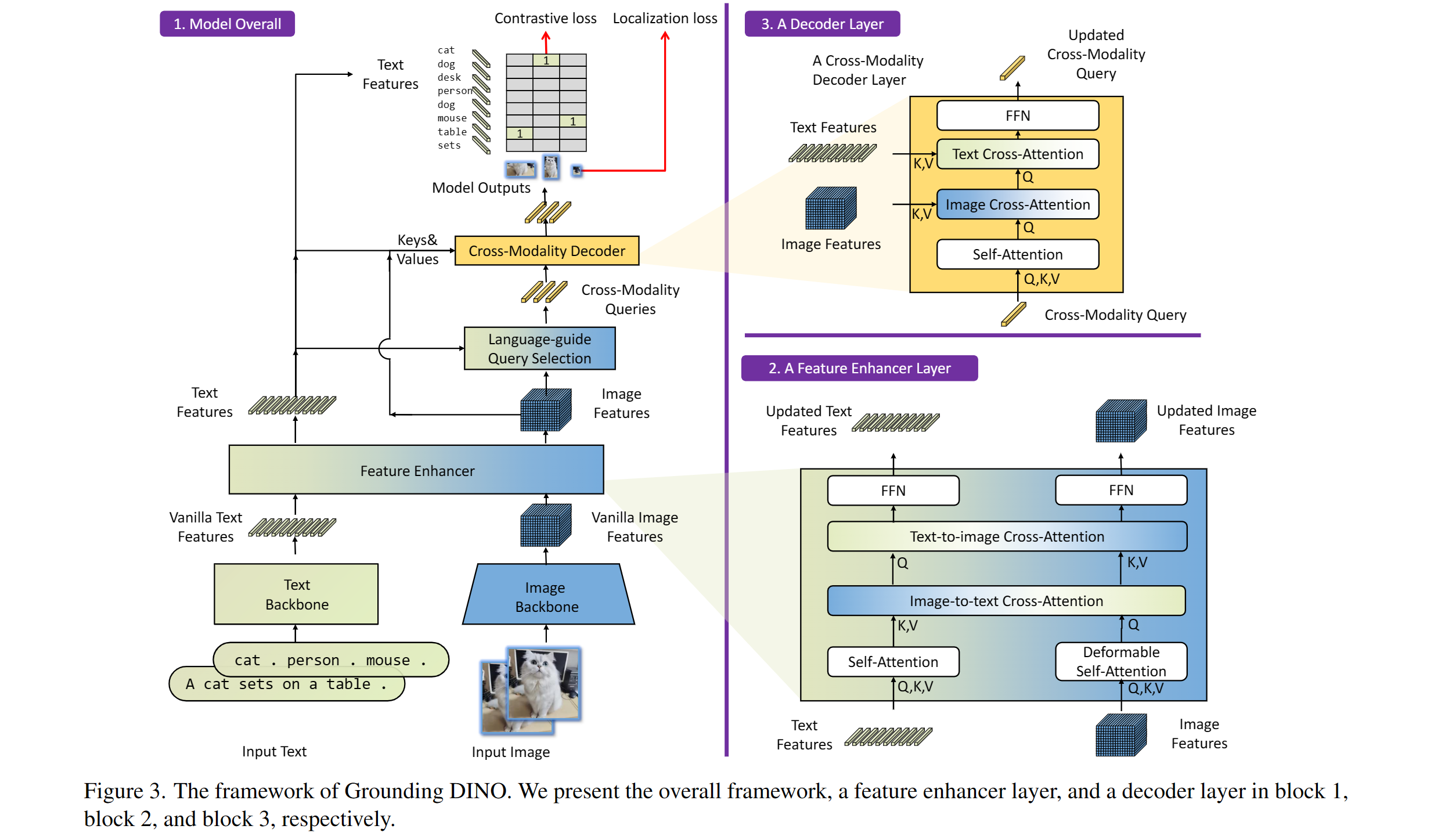 Grounding DINO overview. Taken from the original paper.
This model was contributed by [EduardoPacheco](https://huggingface.co/EduardoPacheco) and [nielsr](https://huggingface.co/nielsr).
The original code can be found [here](https://github.com/IDEA-Research/GroundingDINO).
## Usage tips
- One can use [`GroundingDinoProcessor`] to prepare image-text pairs for the model.
- To separate classes in the text use a period e.g. "a cat. a dog."
- When using multiple classes (e.g. `"a cat. a dog."`), use `post_process_grounded_object_detection` from [`GroundingDinoProcessor`] to post process outputs. Since, the labels returned from `post_process_object_detection` represent the indices from the model dimension where prob > threshold.
Here's how to use the model for zero-shot object detection:
```python
>>> import requests
>>> import torch
>>> from PIL import Image
>>> from transformers import AutoProcessor, AutoModelForZeroShotObjectDetection
from accelerate import Accelerator
>>> model_id = "IDEA-Research/grounding-dino-tiny"
>>> device = Accelerator().device
>>> processor = AutoProcessor.from_pretrained(model_id)
>>> model = AutoModelForZeroShotObjectDetection.from_pretrained(model_id).to(device)
>>> image_url = "http://images.cocodataset.org/val2017/000000039769.jpg"
>>> image = Image.open(requests.get(image_url, stream=True).raw)
>>> # Check for cats and remote controls
>>> text_labels = [["a cat", "a remote control"]]
>>> inputs = processor(images=image, text=text_labels, return_tensors="pt").to(model.device)
>>> with torch.no_grad():
... outputs = model(**inputs)
>>> results = processor.post_process_grounded_object_detection(
... outputs,
... inputs.input_ids,
... threshold=0.4,
... text_threshold=0.3,
... target_sizes=[image.size[::-1]]
... )
# Retrieve the first image result
>>> result = results[0]
>>> for box, score, labels in zip(result["boxes"], result["scores"], result["labels"]):
... box = [round(x, 2) for x in box.tolist()]
... print(f"Detected {labels} with confidence {round(score.item(), 3)} at location {box}")
Detected a cat with confidence 0.468 at location [344.78, 22.9, 637.3, 373.62]
Detected a cat with confidence 0.426 at location [11.74, 51.55, 316.51, 473.22]
```
## Grounded SAM
One can combine Grounding DINO with the [Segment Anything](sam) model for text-based mask generation as introduced in [Grounded SAM: Assembling Open-World Models for Diverse Visual Tasks](https://huggingface.co/papers/2401.14159). You can refer to this [demo notebook](https://github.com/NielsRogge/Transformers-Tutorials/blob/master/Grounding%20DINO/GroundingDINO_with_Segment_Anything.ipynb) 🌍 for details.
Grounding DINO overview. Taken from the original paper.
This model was contributed by [EduardoPacheco](https://huggingface.co/EduardoPacheco) and [nielsr](https://huggingface.co/nielsr).
The original code can be found [here](https://github.com/IDEA-Research/GroundingDINO).
## Usage tips
- One can use [`GroundingDinoProcessor`] to prepare image-text pairs for the model.
- To separate classes in the text use a period e.g. "a cat. a dog."
- When using multiple classes (e.g. `"a cat. a dog."`), use `post_process_grounded_object_detection` from [`GroundingDinoProcessor`] to post process outputs. Since, the labels returned from `post_process_object_detection` represent the indices from the model dimension where prob > threshold.
Here's how to use the model for zero-shot object detection:
```python
>>> import requests
>>> import torch
>>> from PIL import Image
>>> from transformers import AutoProcessor, AutoModelForZeroShotObjectDetection
from accelerate import Accelerator
>>> model_id = "IDEA-Research/grounding-dino-tiny"
>>> device = Accelerator().device
>>> processor = AutoProcessor.from_pretrained(model_id)
>>> model = AutoModelForZeroShotObjectDetection.from_pretrained(model_id).to(device)
>>> image_url = "http://images.cocodataset.org/val2017/000000039769.jpg"
>>> image = Image.open(requests.get(image_url, stream=True).raw)
>>> # Check for cats and remote controls
>>> text_labels = [["a cat", "a remote control"]]
>>> inputs = processor(images=image, text=text_labels, return_tensors="pt").to(model.device)
>>> with torch.no_grad():
... outputs = model(**inputs)
>>> results = processor.post_process_grounded_object_detection(
... outputs,
... inputs.input_ids,
... threshold=0.4,
... text_threshold=0.3,
... target_sizes=[image.size[::-1]]
... )
# Retrieve the first image result
>>> result = results[0]
>>> for box, score, labels in zip(result["boxes"], result["scores"], result["labels"]):
... box = [round(x, 2) for x in box.tolist()]
... print(f"Detected {labels} with confidence {round(score.item(), 3)} at location {box}")
Detected a cat with confidence 0.468 at location [344.78, 22.9, 637.3, 373.62]
Detected a cat with confidence 0.426 at location [11.74, 51.55, 316.51, 473.22]
```
## Grounded SAM
One can combine Grounding DINO with the [Segment Anything](sam) model for text-based mask generation as introduced in [Grounded SAM: Assembling Open-World Models for Diverse Visual Tasks](https://huggingface.co/papers/2401.14159). You can refer to this [demo notebook](https://github.com/NielsRogge/Transformers-Tutorials/blob/master/Grounding%20DINO/GroundingDINO_with_Segment_Anything.ipynb) 🌍 for details.
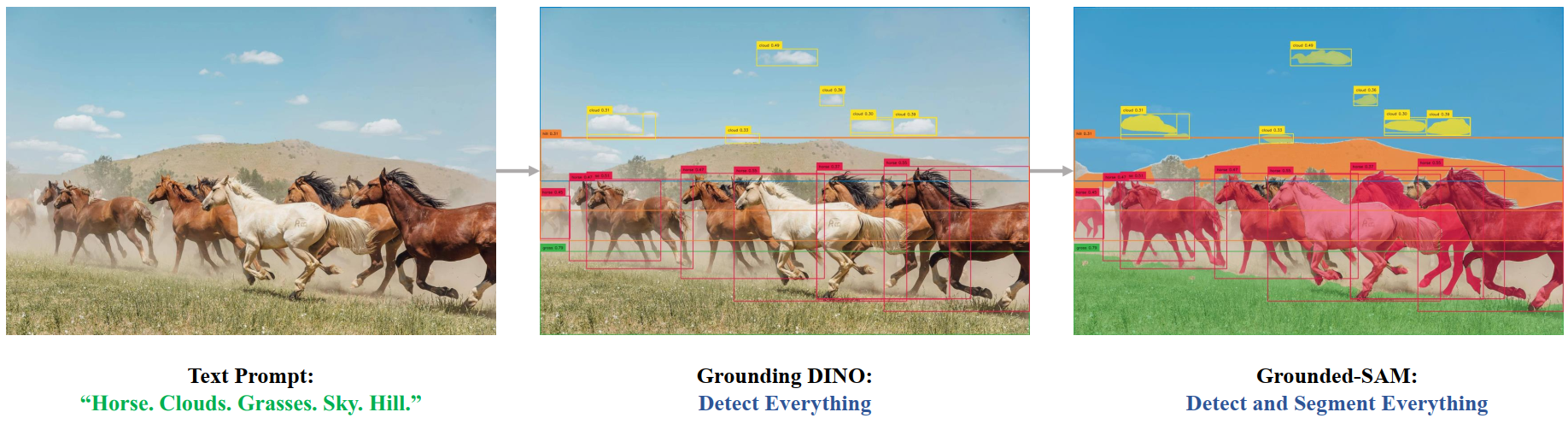 Grounded SAM overview. Taken from the original repository.
## Resources
A list of official Hugging Face and community (indicated by 🌎) resources to help you get started with Grounding DINO. If you're interested in submitting a resource to be included here, please feel free to open a Pull Request and we'll review it! The resource should ideally demonstrate something new instead of duplicating an existing resource.
- Demo notebooks regarding inference with Grounding DINO as well as combining it with [SAM](sam) can be found [here](https://github.com/NielsRogge/Transformers-Tutorials/tree/master/Grounding%20DINO). 🌎
## GroundingDinoImageProcessor
[[autodoc]] GroundingDinoImageProcessor
- preprocess
## GroundingDinoImageProcessorFast
[[autodoc]] GroundingDinoImageProcessorFast
- preprocess
- post_process_object_detection
## GroundingDinoProcessor
[[autodoc]] GroundingDinoProcessor
- post_process_grounded_object_detection
## GroundingDinoConfig
[[autodoc]] GroundingDinoConfig
## GroundingDinoModel
[[autodoc]] GroundingDinoModel
- forward
## GroundingDinoForObjectDetection
[[autodoc]] GroundingDinoForObjectDetection
- forward
Grounded SAM overview. Taken from the original repository.
## Resources
A list of official Hugging Face and community (indicated by 🌎) resources to help you get started with Grounding DINO. If you're interested in submitting a resource to be included here, please feel free to open a Pull Request and we'll review it! The resource should ideally demonstrate something new instead of duplicating an existing resource.
- Demo notebooks regarding inference with Grounding DINO as well as combining it with [SAM](sam) can be found [here](https://github.com/NielsRogge/Transformers-Tutorials/tree/master/Grounding%20DINO). 🌎
## GroundingDinoImageProcessor
[[autodoc]] GroundingDinoImageProcessor
- preprocess
## GroundingDinoImageProcessorFast
[[autodoc]] GroundingDinoImageProcessorFast
- preprocess
- post_process_object_detection
## GroundingDinoProcessor
[[autodoc]] GroundingDinoProcessor
- post_process_grounded_object_detection
## GroundingDinoConfig
[[autodoc]] GroundingDinoConfig
## GroundingDinoModel
[[autodoc]] GroundingDinoModel
- forward
## GroundingDinoForObjectDetection
[[autodoc]] GroundingDinoForObjectDetection
- forward
