*This model was released on 2023-04-09 and added to Hugging Face Transformers on 2023-07-17.*
# Bark
## Overview
[Bark](https://huggingface.co/suno/bark) is a transformer-based text-to-speech model proposed by Suno AI in [suno-ai/bark](https://github.com/suno-ai/bark).
Bark is made of 4 main models:
- [`BarkSemanticModel`] (also referred to as the 'text' model): a causal auto-regressive transformer model that takes as input tokenized text, and predicts semantic text tokens that capture the meaning of the text.
- [`BarkCoarseModel`] (also referred to as the 'coarse acoustics' model): a causal autoregressive transformer, that takes as input the results of the [`BarkSemanticModel`] model. It aims at predicting the first two audio codebooks necessary for EnCodec.
- [`BarkFineModel`] (the 'fine acoustics' model), this time a non-causal autoencoder transformer, which iteratively predicts the last codebooks based on the sum of the previous codebooks embeddings.
- having predicted all the codebook channels from the [`EncodecModel`], Bark uses it to decode the output audio array.
It should be noted that each of the first three modules can support conditional speaker embeddings to condition the output sound according to specific predefined voice.
This model was contributed by [Yoach Lacombe (ylacombe)](https://huggingface.co/ylacombe) and [Sanchit Gandhi (sanchit-gandhi)](https://github.com/sanchit-gandhi).
The original code can be found [here](https://github.com/suno-ai/bark).
### Optimizing Bark
Bark can be optimized with just a few extra lines of code, which **significantly reduces its memory footprint** and **accelerates inference**.
#### Using half-precision
You can speed up inference and reduce memory footprint by 50% simply by loading the model in half-precision.
```python
from transformers import BarkModel
from accelerate import Accelerator
import torch
device = Accelerator().device
model = BarkModel.from_pretrained("suno/bark-small", dtype=torch.float16).to(device)
```
#### Using CPU offload
As mentioned above, Bark is made up of 4 sub-models, which are called up sequentially during audio generation. In other words, while one sub-model is in use, the other sub-models are idle.
If you're using a CUDA GPU or Intel XPU, a simple solution to benefit from an 80% reduction in memory footprint is to offload the submodels from device to CPU when they're idle. This operation is called *CPU offloading*. You can use it with one line of code as follows:
```python
model.enable_cpu_offload()
```
Note that 🤗 Accelerate must be installed before using this feature. [Here's how to install it.](https://huggingface.co/docs/accelerate/basic_tutorials/install)
#### Using Flash Attention 2
Flash Attention 2 is an even faster, optimized version of the previous optimization.
##### Installation
First, check whether your hardware is compatible with Flash Attention 2. The latest list of compatible hardware can be found in the [official documentation](https://github.com/Dao-AILab/flash-attention#installation-and-features).
Next, [install](https://github.com/Dao-AILab/flash-attention#installation-and-features) the latest version of Flash Attention 2:
```bash
pip install -U flash-attn --no-build-isolation
```
##### Usage
To load a model using Flash Attention 2, we can pass the `attn_implementation="flash_attention_2"` flag to [`.from_pretrained`](https://huggingface.co/docs/transformers/main/en/main_classes/model#transformers.PreTrainedModel.from_pretrained). We'll also load the model in half-precision (e.g. `torch.float16`), since it results in almost no degradation to audio quality but significantly lower memory usage and faster inference:
```python
model = BarkModel.from_pretrained("suno/bark-small", dtype=torch.float16, attn_implementation="flash_attention_2").to(device)
```
##### Performance comparison
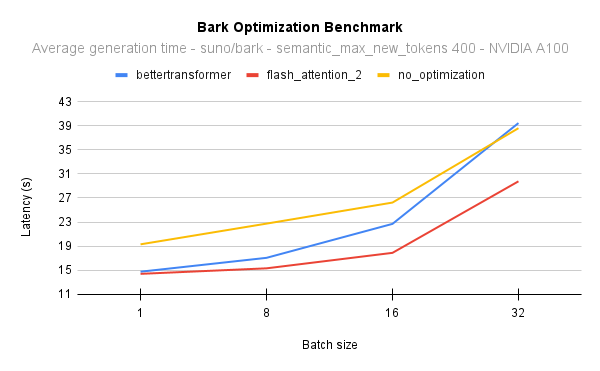
The following diagram shows the latency for the native attention implementation (no optimisation) against Flash Attention 2. In all cases, we generate 400 semantic tokens on a 40GB A100 GPU with PyTorch 2.1:
To put this into perspective, on an NVIDIA A100 and when generating 400 semantic tokens with a batch size of 16, you can get 17 times the [throughput](https://huggingface.co/blog/optimizing-bark#throughput) and still be 2 seconds faster than generating sentences one by one with the native model implementation. In other words, all the samples will be generated 17 times faster.
#### Combining optimization techniques
You can combine optimization techniques, and use CPU offload, half-precision and Flash Attention 2 all at once.
```python
from transformers import BarkModel
from accelerate import Accelerator
import torch
device = Accelerator().device
# load in fp16 and use Flash Attention 2
model = BarkModel.from_pretrained("suno/bark-small", dtype=torch.float16, attn_implementation="flash_attention_2").to(device)
# enable CPU offload
model.enable_cpu_offload()
```
Find out more on inference optimization techniques [here](https://huggingface.co/docs/transformers/perf_infer_gpu_one).
### Usage tips
Suno offers a library of voice presets in a number of languages [here](https://suno-ai.notion.site/8b8e8749ed514b0cbf3f699013548683?v=bc67cff786b04b50b3ceb756fd05f68c).
These presets are also uploaded in the hub [here](https://huggingface.co/suno/bark-small/tree/main/speaker_embeddings) or [here](https://huggingface.co/suno/bark/tree/main/speaker_embeddings).
```python
>>> from transformers import AutoProcessor, BarkModel
>>> processor = AutoProcessor.from_pretrained("suno/bark")
>>> model = BarkModel.from_pretrained("suno/bark")
>>> voice_preset = "v2/en_speaker_6"
>>> inputs = processor("Hello, my dog is cute", voice_preset=voice_preset)
>>> audio_array = model.generate(**inputs)
>>> audio_array = audio_array.cpu().numpy().squeeze()
```
Bark can generate highly realistic, **multilingual** speech as well as other audio - including music, background noise and simple sound effects.
```python
>>> # Multilingual speech - simplified Chinese
>>> inputs = processor("惊人的!我会说中文")
>>> # Multilingual speech - French - let's use a voice_preset as well
>>> inputs = processor("Incroyable! Je peux générer du son.", voice_preset="fr_speaker_5")
>>> # Bark can also generate music. You can help it out by adding music notes around your lyrics.
>>> inputs = processor("♪ Hello, my dog is cute ♪")
>>> audio_array = model.generate(**inputs)
>>> audio_array = audio_array.cpu().numpy().squeeze()
```
The model can also produce **nonverbal communications** like laughing, sighing and crying.
```python
>>> # Adding non-speech cues to the input text
>>> inputs = processor("Hello uh ... [clears throat], my dog is cute [laughter]")
>>> audio_array = model.generate(**inputs)
>>> audio_array = audio_array.cpu().numpy().squeeze()
```
To save the audio, simply take the sample rate from the model config and some scipy utility:
```python
>>> from scipy.io.wavfile import write as write_wav
>>> # save audio to disk, but first take the sample rate from the model config
>>> sample_rate = model.generation_config.sample_rate
>>> write_wav("bark_generation.wav", sample_rate, audio_array)
```
## BarkConfig
[[autodoc]] BarkConfig
- all
## BarkProcessor
[[autodoc]] BarkProcessor
- all
- __call__
## BarkModel
[[autodoc]] BarkModel
- generate
- enable_cpu_offload
## BarkSemanticModel
[[autodoc]] BarkSemanticModel
- forward
## BarkCoarseModel
[[autodoc]] BarkCoarseModel
- forward
## BarkFineModel
[[autodoc]] BarkFineModel
- forward
## BarkCausalModel
[[autodoc]] BarkCausalModel
- forward
## BarkCoarseConfig
[[autodoc]] BarkCoarseConfig
- all
## BarkFineConfig
[[autodoc]] BarkFineConfig
- all
## BarkSemanticConfig
[[autodoc]] BarkSemanticConfig
- all