# FastPitch 1.1 for PyTorch
This repository provides a script and recipe to train the FastPitch model to achieve state-of-the-art accuracy and is tested and maintained by NVIDIA.
## Table Of Contents
- [Model overview](#model-overview)
* [Model architecture](#model-architecture)
* [Default configuration](#default-configuration)
* [Feature support matrix](#feature-support-matrix)
* [Features](#features)
* [Mixed precision training](#mixed-precision-training)
* [Enabling mixed precision](#enabling-mixed-precision)
* [Enabling TF32](#enabling-tf32)
* [Glossary](#glossary)
- [Setup](#setup)
* [Requirements](#requirements)
- [Quick Start Guide](#quick-start-guide)
- [Advanced](#advanced)
* [Scripts and sample code](#scripts-and-sample-code)
* [Parameters](#parameters)
* [Command-line options](#command-line-options)
* [Getting the data](#getting-the-data)
* [Dataset guidelines](#dataset-guidelines)
* [Multi-dataset](#multi-dataset)
* [Training process](#training-process)
* [Inference process](#inference-process)
- [Performance](#performance)
* [Benchmarking](#benchmarking)
* [Training performance benchmark](#training-performance-benchmark)
* [Inference performance benchmark](#inference-performance-benchmark)
* [Results](#results)
* [Training accuracy results](#training-accuracy-results)
* [Training accuracy: NVIDIA DGX A100 (8x A100 80GB)](#training-accuracy-nvidia-dgx-a100-8x-a100-80gb)
* [Training accuracy: NVIDIA DGX-1 (8x V100 16GB)](#training-accuracy-nvidia-dgx-1-8x-v100-16gb)
* [Training performance results](#training-performance-results)
* [Training performance: NVIDIA DGX A100 (8x A100 80GB)](#training-performance-nvidia-dgx-a100-8x-a100-80gb)
* [Training performance: NVIDIA DGX-1 (8x V100 16GB)](#training-performance-nvidia-dgx-1-8x-v100-16gb)
* [Expected training time](#expected-training-time)
* [Inference performance results](#inference-performance-results)
* [Inference performance: NVIDIA DGX A100 (1x A100 80GB)](#inference-performance-nvidia-dgx-a100-gpu-1x-a100-80gb)
* [Inference performance: NVIDIA DGX-1 (1x V100 16GB)](#inference-performance-nvidia-dgx-1-1x-v100-16gb)
* [Inference performance: NVIDIA T4](#inference-performance-nvidia-t4)
- [Release notes](#release-notes)
* [Changelog](#changelog)
* [Known issues](#known-issues)
## Model overview
[FastPitch](https://arxiv.org/abs/2006.06873) is one of two major components in a neural, text-to-speech (TTS) system:
* a mel-spectrogram generator such as [FastPitch](https://arxiv.org/abs/2006.06873) or [Tacotron 2](https://arxiv.org/abs/1712.05884), and
* a waveform synthesizer such as [WaveGlow](https://arxiv.org/abs/1811.00002) (see [NVIDIA example code](https://github.com/NVIDIA/DeepLearningExamples/tree/master/PyTorch/SpeechSynthesis/Tacotron2)).
Such two-component TTS system is able to synthesize natural sounding speech from raw transcripts.
The FastPitch model generates mel-spectrograms and predicts a pitch contour from raw input text.
In version 1.1, it does not need any pre-trained aligning model to bootstrap from.
It allows to exert additional control over the synthesized utterances, such as:
* modify the pitch contour to control the prosody,
* increase or decrease the fundamental frequency in a naturally sounding way, that preserves the perceived identity of the speaker,
* alter the rate of speech,
* adjust the energy,
* specify input as graphemes or phonemes,
* switch speakers when the model has been trained with data from multiple speakers.
Some of the capabilities of FastPitch are presented on the website with [samples](https://fastpitch.github.io/).
Speech synthesized with FastPitch has state-of-the-art quality, and does not suffer from missing/repeating phrases like Tacotron 2 does.
This is reflected in Mean Opinion Scores ([details](https://arxiv.org/abs/2006.06873)).
| Model | Mean Opinion Score (MOS) |
|:---------------|:-------------------------|
| Tacotron 2 | 3.946 ± 0.134 |
| FastPitch 1.0 | 4.080 ± 0.133 |
The current version of the model offers even higher quality, as reflected
in the pairwise preference scores ([details](https://arxiv.org/abs/2108.10447)).
| Model | Average preference |
|:---------------|:-------------------|
| FastPitch 1.0 | 0.435 ± 0.068 |
| FastPitch 1.1 | 0.565 ± 0.068 |
The FastPitch model is based on the [FastSpeech](https://arxiv.org/abs/1905.09263) model. The main differences between FastPitch and FastSpeech are that FastPitch:
* no dependence on external aligner (Transformer TTS, Tacotron 2); in version 1.1, FastPitch aligns audio to transcriptions by itself as in [One TTS Alignment To Rule Them All](https://arxiv.org/abs/2108.10447),
* explicitly learns to predict the pitch contour,
* pitch conditioning removes harsh sounding artifacts and provides faster convergence,
* no need for distilling mel-spectrograms with a teacher model,
* capabilities to train a multi-speaker model.
The FastPitch model is similar to [FastSpeech2](https://arxiv.org/abs/2006.04558), which has been developed concurrently. FastPitch averages pitch/energy values over input tokens, and treats energy as optional.
FastPitch is trained on a publicly
available [LJ Speech dataset](https://keithito.com/LJ-Speech-Dataset/).
This model is trained with mixed precision using Tensor Cores on Volta, Turing, and the NVIDIA Ampere GPU architectures. Therefore, researchers can get results from 2.0x to 2.7x faster than training without Tensor Cores, while experiencing the benefits of mixed precision training. This model is tested against each NGC monthly container release to ensure consistent accuracy and performance over time.
### Model architecture
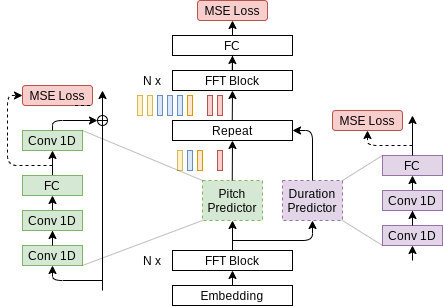
FastPitch is a fully feedforward [Transformer](#glossary) model that predicts mel-spectrograms
from raw text (Figure 1). The entire process is parallel, which means that all input letters are processed simultaneously to produce a full mel-spectrogram in a single forward pass.
Figure 1. Architecture of FastPitch (source). The model is composed of a bidirectional Transformer backbone (also known as a Transformer encoder), a pitch predictor, and a duration predictor. After passing through the first *N* Transformer blocks, encoding, the signal is augmented with pitch information and discretely upsampled. Then it goes through another set of *N* Transformer blocks, with the goal of
smoothing out the upsampled signal, and constructing a mel-spectrogram.
### Default configuration
The FastPitch model supports multi-GPU and mixed precision training with dynamic loss
scaling (see Apex code
[here](https://github.com/NVIDIA/apex/blob/master/apex/fp16_utils/loss_scaler.py)),
as well as mixed precision inference.
The following features were implemented in this model:
* data-parallel multi-GPU training,
* dynamic loss scaling with backoff for Tensor Cores (mixed precision)
training,
* gradient accumulation for reproducible results regardless of the number of GPUs.
Pitch contours and mel-spectrograms can be generated on-line during training.
To speed-up training, those could be generated during the pre-processing step and read
directly from the disk during training. For more information on data pre-processing refer to [Dataset guidelines
](#dataset-guidelines) and the [paper](https://arxiv.org/abs/2006.06873).
### Feature support matrix
The following features are supported by this model.
| Feature | FastPitch |
| :-------------------------------|----------:|
| Automatic mixed precision (AMP) | Yes |
| Distributed data parallel (DDP) | Yes |
#### Features
Automatic Mixed Precision (AMP) - This implementation uses native PyTorch AMP
implementation of mixed precision training. It allows us to use FP16 training
with FP32 master weights by modifying just a few lines of code.
DistributedDataParallel (DDP) - The model uses PyTorch Lightning implementation
of distributed data parallelism at the module level which can run across
multiple machines.
### Mixed precision training
Mixed precision is the combined use of different numerical precisions in a computational method. [Mixed precision](https://arxiv.org/abs/1710.03740) training offers significant computational speedup by performing operations in half-precision format while storing minimal information in single-precision to retain as much information as possible in critical parts of the network. Since the introduction of [Tensor Cores](https://developer.nvidia.com/tensor-cores) in Volta, and following with both the Turing and Ampere architectures, significant training speedups are experienced by switching to mixed precision -- up to 3x overall speedup on the most arithmetically intense model architectures. Using mixed precision training requires two steps:
1. Porting the model to use the FP16 data type where appropriate.
2. Adding loss scaling to preserve small gradient values.
The ability to train deep learning networks with lower precision was introduced in the Pascal architecture and first supported in [CUDA 8](https://devblogs.nvidia.com/parallelforall/tag/fp16/) in the NVIDIA Deep Learning SDK.
For information about:
- How to train using mixed precision, see the [Mixed Precision Training](https://arxiv.org/abs/1710.03740) paper and [Training With Mixed Precision](https://docs.nvidia.com/deeplearning/performance/mixed-precision-training/index.html) documentation.
- Techniques used for mixed precision training, see the [Mixed-Precision Training of Deep Neural Networks](https://devblogs.nvidia.com/mixed-precision-training-deep-neural-networks/) blog.
- APEX tools for mixed precision training, see the [NVIDIA Apex: Tools for Easy Mixed-Precision Training in PyTorch](https://devblogs.nvidia.com/apex-pytorch-easy-mixed-precision-training/).
#### Enabling mixed precision
For training and inference, mixed precision can be enabled by adding the `--amp` flag.
Mixed precision is using [native PyTorch implementation](https://pytorch.org/blog/accelerating-training-on-nvidia-gpus-with-pytorch-automatic-mixed-precision/).
#### Enabling TF32
TensorFloat-32 (TF32) is the new math mode in [NVIDIA A100](https://www.nvidia.com/en-us/data-center/a100/) GPUs for handling the matrix math also called tensor operations. TF32 running on Tensor Cores in A100 GPUs can provide up to 10x speedups compared to single-precision floating-point math (FP32) on Volta GPUs.
TF32 Tensor Cores can speed up networks using FP32, typically with no loss of accuracy. It is more robust than FP16 for models which require high dynamic range for weights or activations.
For more information, refer to the [TensorFloat-32 in the A100 GPU Accelerates AI Training, HPC up to 20x](https://blogs.nvidia.com/blog/2020/05/14/tensorfloat-32-precision-format/) blog post.
TF32 is supported in the NVIDIA Ampere GPU architecture and is enabled by default.
### Glossary
**Character duration**
The time during which a character is being articulated. Could be measured in milliseconds, mel-spectrogram frames, etc. Some characters are not pronounced, and thus have 0 duration.
**Fundamental frequency**
The lowest vibration frequency of a periodic soundwave, for example, produced by a vibrating instrument. It is perceived as the loudest. In the context of speech, it refers to the frequency of vibration of vocal chords. Abbreviated as *f0*.
**Pitch**
A perceived frequency of vibration of music or sound.
**Transformer**
The paper [Attention Is All You Need](https://arxiv.org/abs/1706.03762) introduces a novel architecture called Transformer, which repeatedly applies the attention mechanism. It transforms one sequence into another.
## Setup
The following section lists the requirements that you need to meet in order to start training the FastPitch model.
### Requirements
This repository contains Dockerfile which extends the PyTorch NGC container and encapsulates some dependencies. Aside from these dependencies, ensure you have the following components:
- [NVIDIA Docker](https://github.com/NVIDIA/nvidia-docker)
- [PyTorch 21.05-py3 NGC container](https://ngc.nvidia.com/registry/nvidia-pytorch)
or newer
- supported GPUs:
- [NVIDIA Volta architecture](https://www.nvidia.com/en-us/data-center/volta-gpu-architecture/)
- [NVIDIA Turing architecture](https://www.nvidia.com/en-us/geforce/turing/)
- [NVIDIA Ampere architecture](https://www.nvidia.com/en-us/data-center/nvidia-ampere-gpu-architecture/)
For more information about how to get started with NGC containers, see the following sections from the NVIDIA GPU Cloud Documentation and the Deep Learning Documentation:
- [Getting Started Using NVIDIA GPU Cloud](https://docs.nvidia.com/ngc/ngc-getting-started-guide/index.html)
- [Accessing And Pulling From The NGC Container Registry](https://docs.nvidia.com/deeplearning/frameworks/user-guide/index.html#accessing_registry)
- [Running PyTorch](https://docs.nvidia.com/deeplearning/frameworks/pytorch-release-notes/running.html#running)
For those unable to use the PyTorch NGC container, to set up the required environment or create your own container, see the versioned [NVIDIA Container Support Matrix](https://docs.nvidia.com/deeplearning/frameworks/support-matrix/index.html).
## Quick Start Guide
To train your model using mixed or TF32 precision with Tensor Cores or using FP32, perform the following steps using the default parameters of the FastPitch model on the LJSpeech 1.1 dataset. For the specifics concerning training and inference, see the [Advanced](#advanced) section. Pre-trained FastPitch models are available for download on [NGC](https://ngc.nvidia.com/catalog/models?query=FastPitch&quickFilter=models).
1. Clone the repository.
```bash
git clone https://github.com/NVIDIA/DeepLearningExamples.git
cd DeepLearningExamples/PyTorch/SpeechSynthesis/FastPitch
```
2. Build and run the FastPitch PyTorch NGC container.
By default the container will use all available GPUs.
```bash
bash scripts/docker/build.sh
bash scripts/docker/interactive.sh
```
3. Download and preprocess the dataset.
Use the scripts to automatically download and preprocess the training, validation and test datasets:
```bash
bash scripts/download_dataset.sh
bash scripts/prepare_dataset.sh
```
The data is downloaded to the `./LJSpeech-1.1` directory (on the host). The
`./LJSpeech-1.1` directory is mounted under the `/workspace/fastpitch/LJSpeech-1.1`
location in the NGC container. The complete dataset has the following structure:
```bash
./LJSpeech-1.1
├── mels # (optional) Pre-calculated target mel-spectrograms; may be calculated on-line
├── metadata.csv # Mapping of waveforms to utterances
├── pitch # Fundamental frequency countours for input utterances; may be calculated on-line
├── README
└── wavs # Raw waveforms
```
4. Start training.
```bash
bash scripts/train.sh
```
The training will produce a FastPitch model capable of generating mel-spectrograms from raw text.
It will be serialized as a single `.pt` checkpoint file, along with a series of intermediate checkpoints.
The script is configured for 8x GPU with at least 16GB of memory. Consult [Training process](#training-process) and [example configs](#training-performance-benchmark) to adjust to a different configuration or enable Automatic Mixed Precision.
5. Start validation/evaluation.
Ensure your training loss values are comparable to those listed in the table in the
[Results](#results) section. Note that the validation loss is evaluated with ground truth durations for letters (not the predicted ones). The loss values are stored in the `./output/nvlog.json` log file, `./output/{train,val,test}` as TensorBoard logs, and printed to the standard output (`stdout`) during training.
The main reported loss is a weighted sum of losses for mel-, pitch-, and duration- predicting modules.
The audio can be generated by following the [Inference process](#inference-process) section below.
The synthesized audio should be similar to the samples in the `./audio` directory.
6. Start inference/predictions.
To synthesize audio, you will need a WaveGlow model, which generates waveforms based on mel-spectrograms generated with FastPitch. By now, a pre-trained model should have been downloaded by the `scripts/download_dataset.sh` script. Alternatively, to train WaveGlow from scratch, follow the instructions in [NVIDIA/DeepLearningExamples/Tacotron2](https://github.com/NVIDIA/DeepLearningExamples/tree/master/PyTorch/SpeechSynthesis/Tacotron2) and replace the checkpoint in the `./pretrained_models/waveglow` directory.
You can perform inference using the respective `.pt` checkpoints that are passed as `--fastpitch`
and `--waveglow` arguments:
```bash
python inference.py \
--cuda \
--fastpitch output/ \
--energy-conditioning \
--waveglow pretrained_models/waveglow/ \
--wn-channels 256 \
-i phrases/devset10.tsv \
-o output/wavs_devset10
```
The speech is generated from a file passed with the `-i` argument, with one utterance per line:
```bash
`