# Tile Language
Tile Language (**tile-lang**) is a concise domain-specific language designed to streamline the development of high-performance GPU/CPU kernels (e.g., GEMM, Dequant GEMM, FlashAttention, LinearAttention). By employing a Pythonic syntax with an underlying compiler infrastructure on top of [TVM](https://tvm.apache.org/), tile-lang allows developers to focus on productivity without sacrificing the low-level optimizations necessary for state-of-the-art performance.
 ## Latest News
- 01/20/2025 ✨: We are excited to announce that tile-lang, a dsl for high performance AI workloads, is now open source and available to the public!
## Tested Devices
Although tile-lang aims to be portable across a range of Devices, it has been specifically tested and validated on the following devices: for NVIDIA GPUs, this includes the H100 (with Auto TMA/WGMMA support), A100, V100, RTX 4090, RTX 3090, and RTX A6000; for AMD GPUs, it includes the MI250 (with Auto MatrixCore support) and the MI300X (with Async Copy support).
## OP Implementation Examples
**tile-lang** provides the building blocks to implement a wide variety of operators. Some examples include:
- [Matrix Multiplication](./examples/gemm/)
- [Dequantization GEMM](./examples/dequantize_gemm/)
- [Flash Attention](./examples/flash_attention/)
- [Flash Linear Attention](./examples/linear_attention/)
Within the `examples` directory, you will also find additional complex kernels—such as convolutions, forward/backward passes for FlashAttention, more operators will continuously be added.
## Benchmark Summary
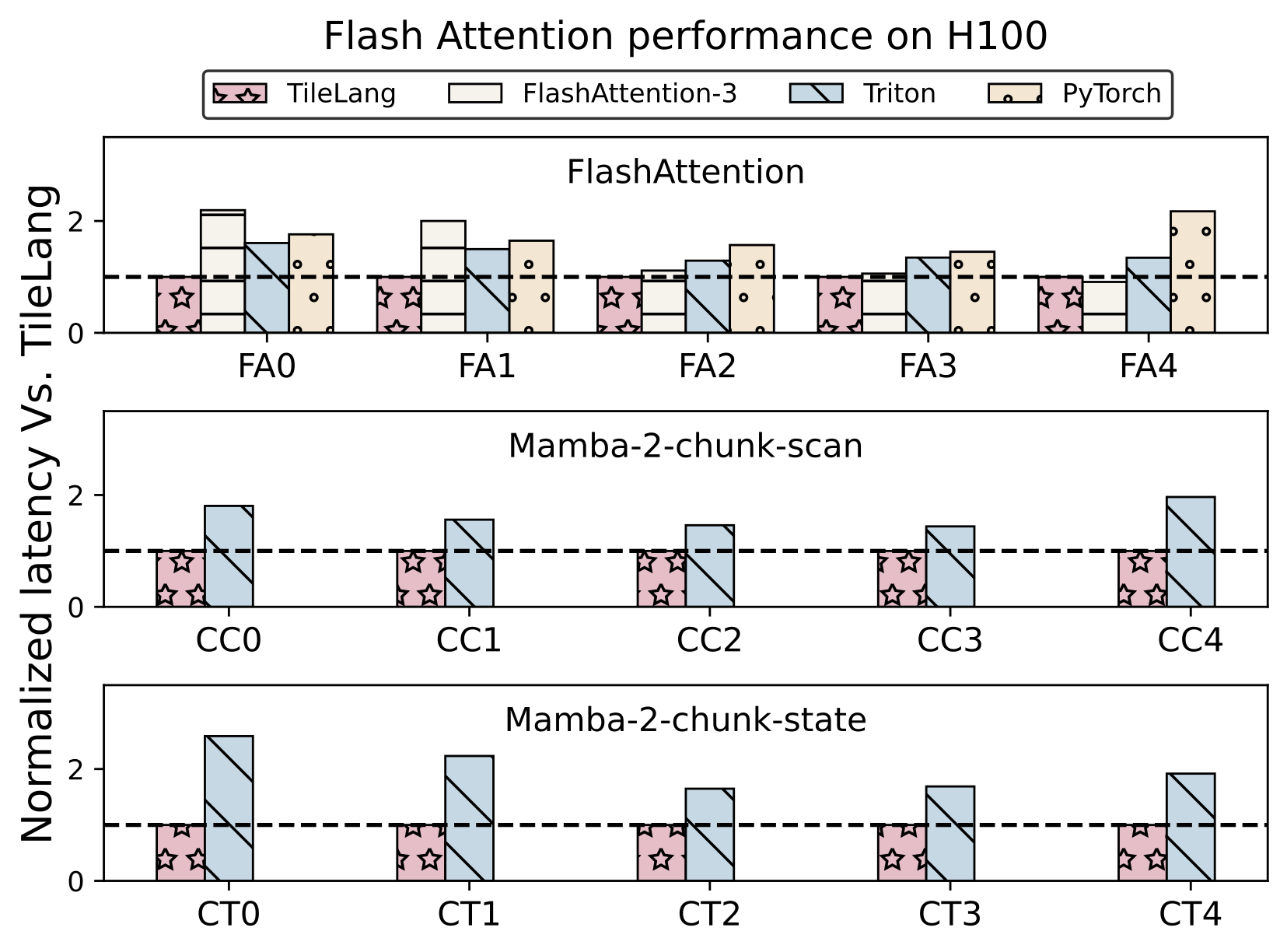
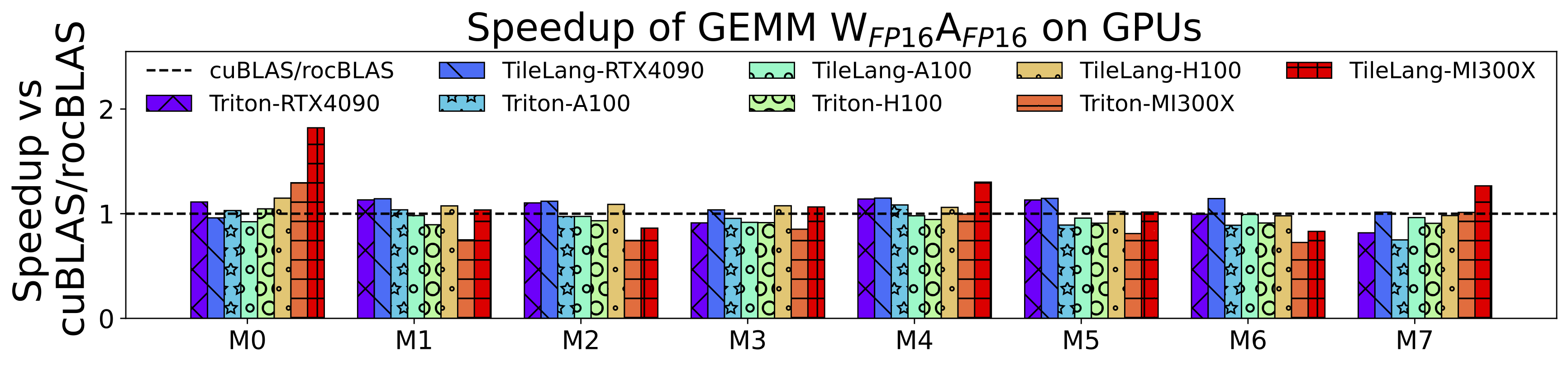
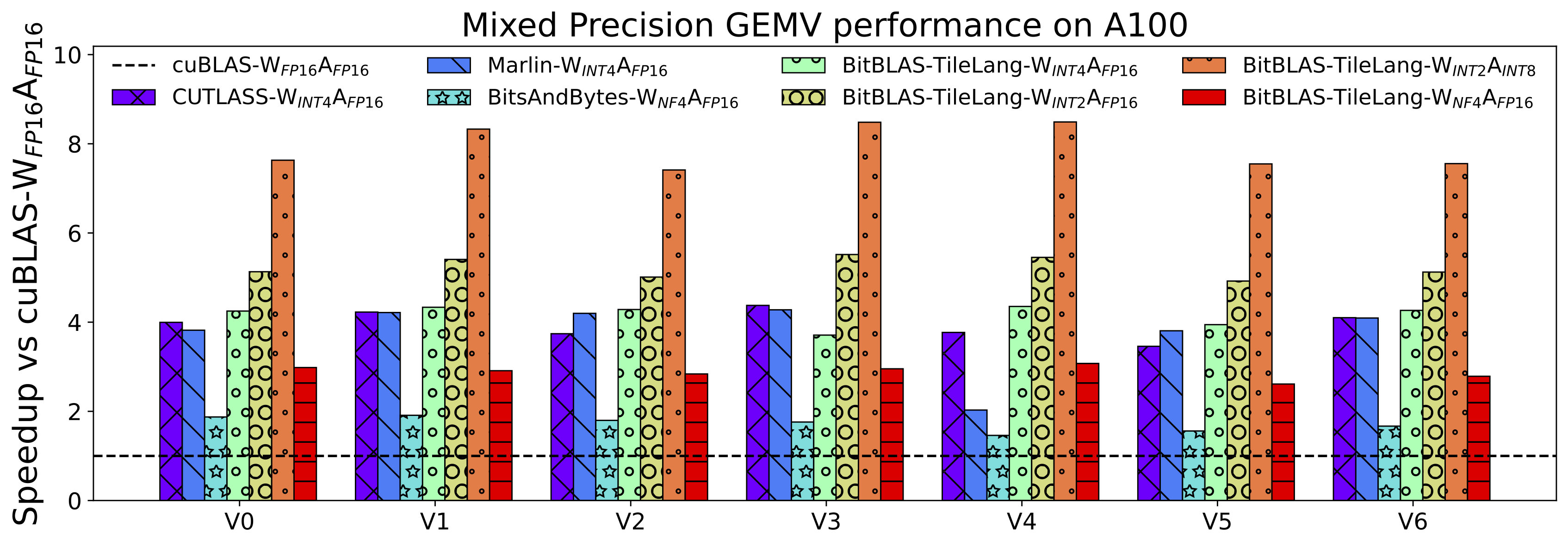
TileLang achieves exceptional performance across a variety of computational patterns. Comprehensive benchmark scripts and settings are available at [tilelang-benchmark](https://github.com/tile-ai/tilelang-benchmark). Below are selected results showcasing its capabilities:
- Flash Attention Performance on H100
- Matmul Performance on GPUs (RTX 4090, A100, H100, MI300X)
- Dequantize Matmul Performance on A100
## Installation
### Method 1: Install with Pip
The quickest way to get started is to install the latest release from PyPI:
```bash
pip install tilelang
```
Alternatively, you can install directly from the GitHub repository:
```bash
pip install git+https://github.com/tile-ai/tilelang
```
Or install locally:
```bash
pip install . # with -e option if you want to install in editable mode
```
### Method 2: Build from Source
We currently provide three ways to install **tile-lang** from source:
- [Install from Source (using your own TVM installation)](./docs/get_started/Installation.rst#method-1-install-from-source-using-your-own-tvm-installation)
- [Install from Source (using the bundled TVM submodule)](./docs/get_started/Installation.rst#method-2-install-from-source-with-our-tvm-submodule)
- [Install Using the Provided Script](./docs/get_started/Installation.rst##method-3-install-using-the-provided-script)
## Quick Start
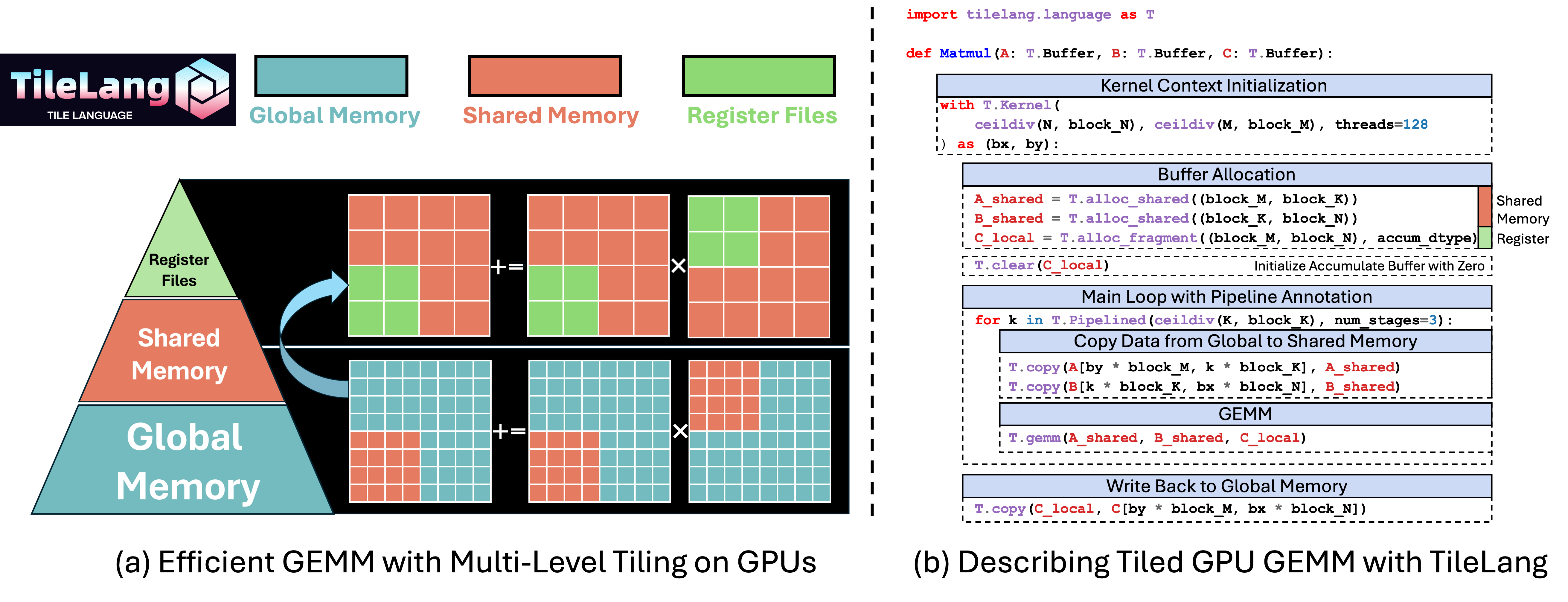
In this section, you’ll learn how to write and execute a straightforward GEMM (matrix multiplication) kernel using tile-lang, followed by techniques for layout optimizations, pipelining, and L2-cache–friendly swizzling.
### GEMM Example with Annotations (Layout, L2 Cache Swizzling, and Pipelining, etc.)
Below is an example that demonstrates more advanced features: layout annotation, parallelized copy, and swizzle for improved L2 cache locality. This snippet shows how to adapt your kernel to maximize performance on complex hardware.
```python
import tilelang
import tilelang.language as T
# `make_mma_swizzle_layout` is a python defined layout function
# specifically designed for for MMA operations
# which ensures the consistency with the nvidia CUTLASS Library.
# to avoid bank conflicts and maximize the performance.
from tilelang.intrinsics import (
make_mma_swizzle_layout as make_swizzle_layout,)
def matmul(M, N, K, block_M, block_N, block_K, dtype="float16", accum_dtype="float"):
# add decorator @tilelang.jit if you want to return a torch function
@T.prim_func
def main(
A: T.Buffer((M, K), dtype),
B: T.Buffer((K, N), dtype),
C: T.Buffer((M, N), dtype),
):
# Initialize Kernel Context
with T.Kernel(T.ceildiv(N, block_N), T.ceildiv(M, block_M), threads=128) as (bx, by):
A_shared = T.alloc_shared((block_M, block_K), dtype)
B_shared = T.alloc_shared((block_K, block_N), dtype)
C_local = T.alloc_fragment((block_M, block_N), accum_dtype)
# Apply layout optimizations or define your own layout (Optional)
# If not specified, we will deduce the layout automatically
# T.annotate_layout({
# A_shared: make_swizzle_layout(A_shared),
# B_shared: make_swizzle_layout(B_shared),
# })
# Enable rasterization for better L2 cache locality (Optional)
# T.use_swizzle(panel_size=10, enable=True)
# Clear local accumulation
T.clear(C_local)
for ko in T.Pipelined(T.ceildiv(K, block_K), num_stages=3):
# Copy tile of A
# This is a sugar syntax for parallelized copy
T.copy(A[by * block_M, ko * block_K], A_shared)
# Demonstrate parallelized copy from global to shared for B
for k, j in T.Parallel(block_K, block_N):
B_shared[k, j] = B[ko * block_K + k, bx * block_N + j]
# Perform a tile-level GEMM on the shared buffers
# Currently we dispatch to the cute/hip on Nvidia/AMD GPUs
T.gemm(A_shared, B_shared, C_local)
# Copy result back to global memory
T.copy(C_local, C[by * block_M, bx * block_N])
return main
# 1. Define the kernel (matmul) with the desired dimensions
func = matmul(1024, 1024, 1024, 128, 128, 32)
# 2. Compile the kernel into a torch function
# out_idx specifies the index of the output buffer in the argument list
# if out_idx is specified, the tensor will be created during runtime
# target currently can be "cuda" or "hip" or "cpu".
jit_kernel = tilelang.JITKernel(func, out_idx=[2], target="cuda")
# 3. Test the kernel in Python with PyTorch data
import torch
# Create random input tensors on the GPU
a = torch.randn(1024, 1024, device="cuda", dtype=torch.float16)
b = torch.randn(1024, 1024, device="cuda", dtype=torch.float16)
# Run the kernel through the JIT-compiled function
c = jit_kernel(a, b)
# Reference multiplication using PyTorch
ref_c = a @ b
# Validate correctness
torch.testing.assert_close(c, ref_c, rtol=1e-2, atol=1e-2)
print("Kernel output matches PyTorch reference.")
# 4. Retrieve and inspect the generated CUDA source (optional)
cuda_source = jit_kernel.get_kernel_source()
print("Generated CUDA kernel:\n", cuda_source)
# 5.Pofile latency with the profiler
profiler = jit_kernel.get_profiler()
latency = profiler.do_bench()
print(f"Latency: {latency} ms")
```
### Dive Deep into TileLang Beyond GEMM
In addition to GEMM, we provide a variety of examples to showcase the versatility and power of TileLang, including:
- [Dequantize GEMM](./examples/dequantize_gemm/): Achieve high-performance dequantization by **fine-grained control over per-thread operations**, with many features now adopted as default behaviors in [BitBLAS](https://github.com/microsoft/BitBLAS), which utilizing magic layout transformation and intrins to accelerate dequantize gemm.
- [FlashAttention](./examples/flash_attention/): Enable cross-operator fusion with simple and intuitive syntax, and we also provide an example of auto tuning.
- [LinearAttention](./examples/linear_attention/): Examples include RetNet and Mamba implementations.
- [Convolution](./examples/convolution/): Implementations of Convolution with IM2Col.
---
TileLang has now been used in project [BitBLAS](https://github.com/microsoft/BitBLAS) and [AttentionEngine](https://github.com/microsoft/AttentionEngine).
## Join the Discussion
Welcome to join our Discord community for discussions, support, and collaboration!
[](https://discord.gg/TUrHyJnKPG)
## Acknowledgements
We learned a lot from the [TVM](https://github.com/apache/tvm) community and would like to thank them for their contributions. The initial version of this project is mainly contributed by [LeiWang1999](https://github.com/LeiWang1999), [chengyupku](https://github.com/chengyupku) and [nox-410](https://github.com/nox-410). Part of this work was done during the internship at Microsoft Research, under the supervision of Dr. Lingxiao Ma, Dr. Yuqing Xia, Dr. Jilong Xue, and Dr. Fan Yang.
## Latest News
- 01/20/2025 ✨: We are excited to announce that tile-lang, a dsl for high performance AI workloads, is now open source and available to the public!
## Tested Devices
Although tile-lang aims to be portable across a range of Devices, it has been specifically tested and validated on the following devices: for NVIDIA GPUs, this includes the H100 (with Auto TMA/WGMMA support), A100, V100, RTX 4090, RTX 3090, and RTX A6000; for AMD GPUs, it includes the MI250 (with Auto MatrixCore support) and the MI300X (with Async Copy support).
## OP Implementation Examples
**tile-lang** provides the building blocks to implement a wide variety of operators. Some examples include:
- [Matrix Multiplication](./examples/gemm/)
- [Dequantization GEMM](./examples/dequantize_gemm/)
- [Flash Attention](./examples/flash_attention/)
- [Flash Linear Attention](./examples/linear_attention/)
Within the `examples` directory, you will also find additional complex kernels—such as convolutions, forward/backward passes for FlashAttention, more operators will continuously be added.
## Benchmark Summary
TileLang achieves exceptional performance across a variety of computational patterns. Comprehensive benchmark scripts and settings are available at [tilelang-benchmark](https://github.com/tile-ai/tilelang-benchmark). Below are selected results showcasing its capabilities:
- Flash Attention Performance on H100
- Matmul Performance on GPUs (RTX 4090, A100, H100, MI300X)
- Dequantize Matmul Performance on A100
## Installation
### Method 1: Install with Pip
The quickest way to get started is to install the latest release from PyPI:
```bash
pip install tilelang
```
Alternatively, you can install directly from the GitHub repository:
```bash
pip install git+https://github.com/tile-ai/tilelang
```
Or install locally:
```bash
pip install . # with -e option if you want to install in editable mode
```
### Method 2: Build from Source
We currently provide three ways to install **tile-lang** from source:
- [Install from Source (using your own TVM installation)](./docs/get_started/Installation.rst#method-1-install-from-source-using-your-own-tvm-installation)
- [Install from Source (using the bundled TVM submodule)](./docs/get_started/Installation.rst#method-2-install-from-source-with-our-tvm-submodule)
- [Install Using the Provided Script](./docs/get_started/Installation.rst##method-3-install-using-the-provided-script)
## Quick Start
In this section, you’ll learn how to write and execute a straightforward GEMM (matrix multiplication) kernel using tile-lang, followed by techniques for layout optimizations, pipelining, and L2-cache–friendly swizzling.
### GEMM Example with Annotations (Layout, L2 Cache Swizzling, and Pipelining, etc.)
Below is an example that demonstrates more advanced features: layout annotation, parallelized copy, and swizzle for improved L2 cache locality. This snippet shows how to adapt your kernel to maximize performance on complex hardware.
```python
import tilelang
import tilelang.language as T
# `make_mma_swizzle_layout` is a python defined layout function
# specifically designed for for MMA operations
# which ensures the consistency with the nvidia CUTLASS Library.
# to avoid bank conflicts and maximize the performance.
from tilelang.intrinsics import (
make_mma_swizzle_layout as make_swizzle_layout,)
def matmul(M, N, K, block_M, block_N, block_K, dtype="float16", accum_dtype="float"):
# add decorator @tilelang.jit if you want to return a torch function
@T.prim_func
def main(
A: T.Buffer((M, K), dtype),
B: T.Buffer((K, N), dtype),
C: T.Buffer((M, N), dtype),
):
# Initialize Kernel Context
with T.Kernel(T.ceildiv(N, block_N), T.ceildiv(M, block_M), threads=128) as (bx, by):
A_shared = T.alloc_shared((block_M, block_K), dtype)
B_shared = T.alloc_shared((block_K, block_N), dtype)
C_local = T.alloc_fragment((block_M, block_N), accum_dtype)
# Apply layout optimizations or define your own layout (Optional)
# If not specified, we will deduce the layout automatically
# T.annotate_layout({
# A_shared: make_swizzle_layout(A_shared),
# B_shared: make_swizzle_layout(B_shared),
# })
# Enable rasterization for better L2 cache locality (Optional)
# T.use_swizzle(panel_size=10, enable=True)
# Clear local accumulation
T.clear(C_local)
for ko in T.Pipelined(T.ceildiv(K, block_K), num_stages=3):
# Copy tile of A
# This is a sugar syntax for parallelized copy
T.copy(A[by * block_M, ko * block_K], A_shared)
# Demonstrate parallelized copy from global to shared for B
for k, j in T.Parallel(block_K, block_N):
B_shared[k, j] = B[ko * block_K + k, bx * block_N + j]
# Perform a tile-level GEMM on the shared buffers
# Currently we dispatch to the cute/hip on Nvidia/AMD GPUs
T.gemm(A_shared, B_shared, C_local)
# Copy result back to global memory
T.copy(C_local, C[by * block_M, bx * block_N])
return main
# 1. Define the kernel (matmul) with the desired dimensions
func = matmul(1024, 1024, 1024, 128, 128, 32)
# 2. Compile the kernel into a torch function
# out_idx specifies the index of the output buffer in the argument list
# if out_idx is specified, the tensor will be created during runtime
# target currently can be "cuda" or "hip" or "cpu".
jit_kernel = tilelang.JITKernel(func, out_idx=[2], target="cuda")
# 3. Test the kernel in Python with PyTorch data
import torch
# Create random input tensors on the GPU
a = torch.randn(1024, 1024, device="cuda", dtype=torch.float16)
b = torch.randn(1024, 1024, device="cuda", dtype=torch.float16)
# Run the kernel through the JIT-compiled function
c = jit_kernel(a, b)
# Reference multiplication using PyTorch
ref_c = a @ b
# Validate correctness
torch.testing.assert_close(c, ref_c, rtol=1e-2, atol=1e-2)
print("Kernel output matches PyTorch reference.")
# 4. Retrieve and inspect the generated CUDA source (optional)
cuda_source = jit_kernel.get_kernel_source()
print("Generated CUDA kernel:\n", cuda_source)
# 5.Pofile latency with the profiler
profiler = jit_kernel.get_profiler()
latency = profiler.do_bench()
print(f"Latency: {latency} ms")
```
### Dive Deep into TileLang Beyond GEMM
In addition to GEMM, we provide a variety of examples to showcase the versatility and power of TileLang, including:
- [Dequantize GEMM](./examples/dequantize_gemm/): Achieve high-performance dequantization by **fine-grained control over per-thread operations**, with many features now adopted as default behaviors in [BitBLAS](https://github.com/microsoft/BitBLAS), which utilizing magic layout transformation and intrins to accelerate dequantize gemm.
- [FlashAttention](./examples/flash_attention/): Enable cross-operator fusion with simple and intuitive syntax, and we also provide an example of auto tuning.
- [LinearAttention](./examples/linear_attention/): Examples include RetNet and Mamba implementations.
- [Convolution](./examples/convolution/): Implementations of Convolution with IM2Col.
---
TileLang has now been used in project [BitBLAS](https://github.com/microsoft/BitBLAS) and [AttentionEngine](https://github.com/microsoft/AttentionEngine).
## Join the Discussion
Welcome to join our Discord community for discussions, support, and collaboration!
[](https://discord.gg/TUrHyJnKPG)
## Acknowledgements
We learned a lot from the [TVM](https://github.com/apache/tvm) community and would like to thank them for their contributions. The initial version of this project is mainly contributed by [LeiWang1999](https://github.com/LeiWang1999), [chengyupku](https://github.com/chengyupku) and [nox-410](https://github.com/nox-410). Part of this work was done during the internship at Microsoft Research, under the supervision of Dr. Lingxiao Ma, Dr. Yuqing Xia, Dr. Jilong Xue, and Dr. Fan Yang.