[![docs](https://img.shields.io/badge/docs-latest-blue)](https://lmdeploy.readthedocs.io/en/latest/) [![codecov](https://codecov.io/gh/open-mmlab/lmdeploy/branch/main/graph/badge.svg)](https://codecov.io/gh/open-mmlab/lmdeploy) [![license](https://img.shields.io/github/license/open-mmlab/lmdeploy.svg)](https://github.com/open-mmlab/mmdeploy/tree/main/LICENSE) [![issue resolution](https://img.shields.io/github/issues-closed-raw/open-mmlab/lmdeploy)](https://github.com/open-mmlab/lmdeploy/issues) [![open issues](https://img.shields.io/github/issues-raw/open-mmlab/lmdeploy)](https://github.com/open-mmlab/lmdeploy/issues) English | [简体中文](README_zh-CN.md)



## Introduction LMDeploy is a toolkit for compressing, deploying, and serving LLM, developed by the [MMRazor](https://github.com/open-mmlab/mmrazor) and [MMDeploy](https://github.com/open-mmlab/mmdeploy) teams. It has the following core features: - **Efficient Inference Engine (TurboMind)**: Based on [FasterTransformer](https://github.com/NVIDIA/FasterTransformer), we have implemented an efficient inference engine - TurboMind, which supports the inference of LLaMA and its variant models on NVIDIA GPUs. - **Interactive Inference Mode**: By caching the k/v of attention during multi-round dialogue processes, it remembers dialogue history, thus avoiding repetitive processing of historical sessions.
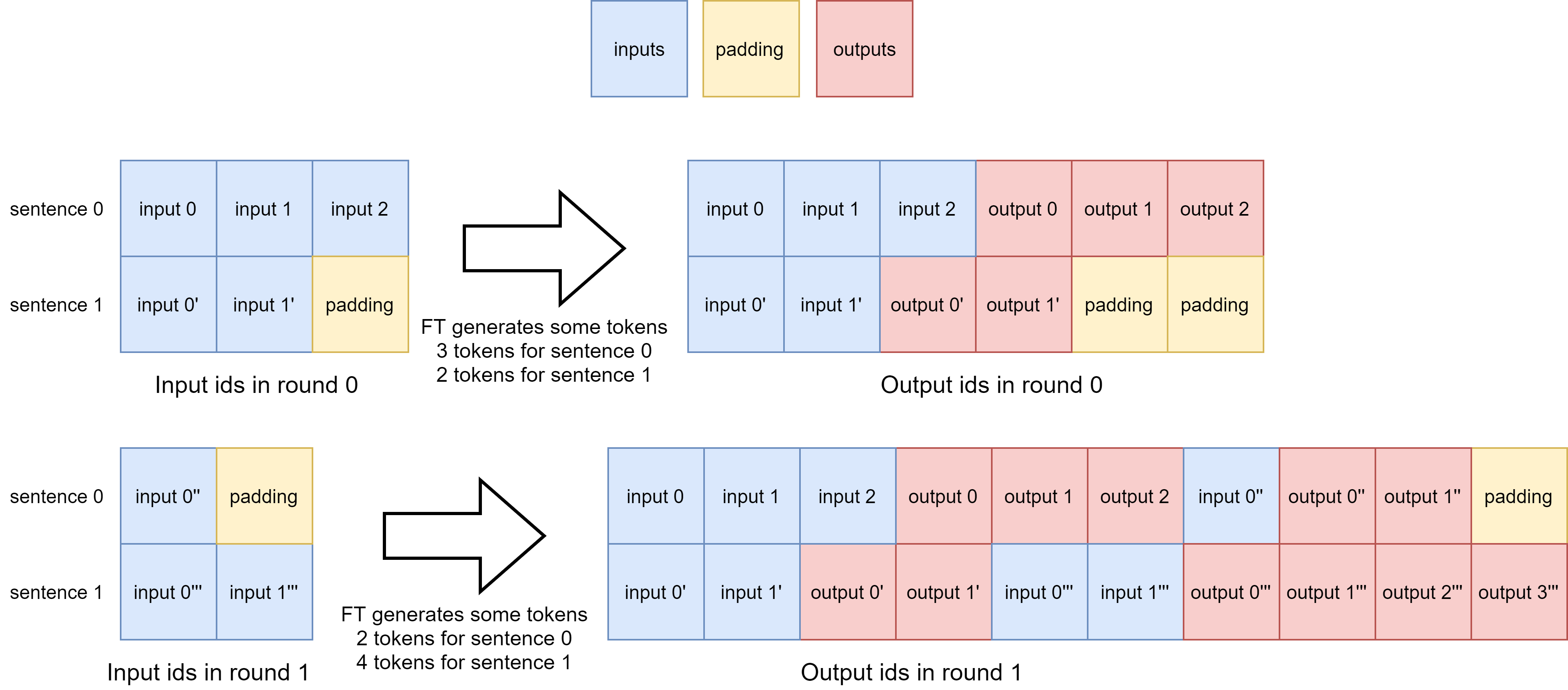
- **Multi-GPU Model Deployment and Quantization**: We provide comprehensive support for model deployment and quantization, and have successfully validated it on models ranging from 7B to 100B parameters. - **Persistent Batch Inference**: Further optimization of model execution efficiency. ![PersistentBatchInference](https://github.com/open-mmlab/lmdeploy/assets/25839884/8f8b57b8-42af-4b71-ad74-e75f39b10694) ## Quick Start ### Installation Below are quick steps for installation: ```shell conda create -n open-mmlab python=3.8 conda activate open-mmlab git clone https://github.com/open-mmlab/lmdeploy.git cd lmdeploy pip install -e . ``` ### Build Pull docker image `openmmlab/lmdeploy:latest` and build lmdeploy libs in its launched container ```shell mkdir build && cd build ../generate.sh make -j$(nproc) && make install ``` ### Serving [LLaMA](https://github.com/facebookresearch/llama) Weights for the LLaMA models can be obtained from by filling out [this form](https://docs.google.com/forms/d/e/1FAIpQLSfqNECQnMkycAp2jP4Z9TFX0cGR4uf7b_fBxjY_OjhJILlKGA/viewform?usp=send_form) Run one of the following commands to serve a LLaMA model on NVIDIA GPU server:
7B ```shell python3 lmdeploy/serve/turbomind/deploy.py llama-7B /path/to/llama-7b llama \ --tokenizer_path /path/to/tokenizer/model bash workspace/service_docker_up.sh --lib-dir $(pwd)/build/install/backends/turbomind ```
13B ```shell python3 lmdeploy/serve/turbomind/deploy.py llama-13B /path/to/llama-13b llama \ --tokenizer_path /path/to/tokenizer/model --tp 2 bash workspace/service_docker_up.sh --lib-dir $(pwd)/build/install/backends/turbomind ```
### Serving [Vicuna](https://lmsys.org/blog/2023-03-30-vicuna/)
7B ```shell python3 -m pip install fschat python3 -m fastchat.model.apply_delta \ --base-model-path /path/to/llama-7b \ --target-model-path /path/to/vicuna-7b \ --delta-path lmsys/vicuna-7b-delta-v1.1 python3 lmdeploy/serve/turbomind/deploy.py vicuna-7B /path/to/vicuna-7b hf bash workspace/service_docker_up.sh --lib-dir $(pwd)/build/install/backends/turbomind ```
13B ```shell python3 -m pip install fschat python3 -m fastchat.model.apply_delta \ --base-model-path /path/to/llama-13b \ --target-model-path /path/to/vicuna-13b \ --delta-path lmsys/vicuna-13b-delta-v1.1 python3 lmdeploy/serve/turbomind/deploy.py vicuna-13B /path/to/vicuna-13b hf bash workspace/service_docker_up.sh --lib-dir $(pwd)/build/install/backends/turbomind ```
## Inference with Command Line Interface ```shell python3 lmdeploy/serve/client.py {server_ip_addresss}:33337 ``` ## Inference with Web UI ```shell python3 lmdeploy/app.py {server_ip_addresss}:33337 {model_name} ``` ## User Guide ## Quantization In fp16 mode, kv_cache int8 quantization can be enabled, and a single card can serve more users. First execute the quantization script, and the quantization parameters are stored in the weight directory transformed by `deploy.py`. ``` python3 -m lmdeploy.lite.apis.kv_qparams \ --model $HF_MODEL \ --output_dir $DEPLOY_WEIGHT_DIR \ --symmetry True \ # Whether to use symmetric or asymmetric quantization. --offload False \ # Whether to offload some modules to CPU to save GPU memory. --num_tp 1 \ # The number of GPUs used for tensor parallelism ``` Then adjust `config.ini` - `use_context_fmha` changed to 0, means off - `quant_policy` is set to 4. This parameter defaults to 0, which means it is not enabled Here is [quantization test results](./docs/zh_cn/quantization.md). ## Contributing We appreciate all contributions to LMDeploy. Please refer to [CONTRIBUTING.md](.github/CONTRIBUTING.md) for the contributing guideline. ## Acknowledgement - [FasterTransformer](https://github.com/NVIDIA/FasterTransformer) ## License This project is released under the [Apache 2.0 license](LICENSE).