# Planner
The planner monitors the state of the system and adjusts workers to ensure that the system runs efficiently.
Currently, the planner can scale the number of vllm workers up and down based on the kv cache load and prefill queue size:
| | | Feature |
| :------------------ | - | :------------------------------------------------------------------ |
| **Backend** | ✅ | Local |
| | ✅ | Kubernetes |
| **LLM Framework** | ✅ | vLLM |
| | ❌ | TensorRT-LLM |
| | ❌ | SGLang |
| | ❌ | llama.cpp |
| **Serving Type** | ✅ | Aggregated |
| | ✅ | Disaggregated |
| **Planner Actions** | ✅ | Load-based scaling up/down prefill/decode workers |
| | ✅ | SLA-based scaling up/down prefill/decode workers **[1]** |
| | ✅ | Adjusting engine knobs |
**[1]** Supported with some limitations.
## Load-based Scaling Up/Down Prefill/Decode Workers
To adjust the number of prefill/decode workers, planner monitors the following metrics:
* Prefill worker: planner monitors the number of requests pending in the prefill queue to estimate the prefill workload.
* Decode/aggregated worker: planner monitors the average KV cache utilization rate to estimate the decode/aggregated workload.
Every `metric-pulling-interval`, planner gathers the aforementioned metrics.
Every `adjustment-interval`, planner compares the aggregated metrics in this interval with pre-set thresholds and decide to scale up/down prefill/decode workers.
To avoid over-compensation, planner only changes the number of workers by 1 in one adjustment interval.
In addition, when the number of workers is being adjusted, the planner blocks the metric pulling and adjustment.
To scale up a prefill/decode worker, planner just need to launch the worker in the correct namespace.
The auto-discovery mechanism picks up the workers and add them to the routers.
To scale down a prefill worker, planner send a SIGTERM signal to the prefill worker.
The prefill worker store the signal and exit when it finishes the current request pulled from the prefill queue.
This ensures that no remote prefill request is dropped.
To scale down a decode worker, planner revokes the etcd lease of the decode worker.
When the etcd lease is revoked, the corresponding decode worker is immediately removed from the router and won't get any new requests.
The decode worker then finishes all the current requests in their original stream and exits gracefully.
There are two additional rules set by planner to prevent over-compensation:
1. After a new decode worker is added, since it needs time to populate the kv cache,
planner doesn't scale down the number of decode workers in the next `NEW_DECODE_WORKER_GRACE_PERIOD=3` adjustment intervals.
2. We do not scale up prefill worker if the prefill queue size is estimated to reduce below the `--prefill-queue-scale-up-threshold` within the next `NEW_PREFILL_WORKER_QUEUE_BUFFER_PERIOD=3` adjustment intervals following the trend observed in the current adjustment interval.
For benchmarking recommendations, see the [Planner benchmark example](../../docs/guides/planner_benchmark/benchmark_planner.md).
## Comply with SLA
To ensure dynamo serve complies with the SLA, we provide a pre-deployment script to profile the model performance with different parallelization mappings, and recommend the parallelization mapping for prefill and decode workers and planner configurations.
To use this script, the user needs to provide the target ISL, OSL, TTFT SLA, and ITL SLA.
> [!Note]
> The script considers a fixed ISL/OSL without KV cache reuse.
> If the real ISL/OSL has a large variance or a significant amount of KV cache can be reused, the result might be inaccurate.
>
> We assume there are no piggybacked prefill requests in the decode engine.
> Even if there are some short piggybacked prefill requests in the decode engine, it should not affect the ITL in most cases.
> However, if the piggybacked prefill requests are too much, the ITL might be inaccurate.
```bash
python -m utils.profile_sla \
--config \
--output-dir \
--isl \
--osl \
--ttft \
--itl
```
The script first detects the number of available GPUs on the current nodes (multi-node engine not supported yet).
Then, it profiles the prefill and decode performance with different TP sizes.
For prefill, since there is no in-flight batching (assume isl is long enough to saturate the GPU), the script directly measures the TTFT for a request with given isl without kv-reuse.
For decode, since the ITL (or iteration time) is relevant to how many requests are in-flight, the script measures the ITL under a different number of in-flight requests.
The range of the number of in-flight requests is from 1 to the maximum number of requests that the kv cache of the engine can hold.
To measure the ITL without being affected by piggybacked prefill requests, the script enables kv-reuse and warm up the engine by issuing the same prompts before measuring the ITL.
Since the kv cache is sufficient for all the requests, it can hold the kv cache of the pre-computed prompts and skip the prefill phase when measuring the ITL.
After the profiling finishes, two plots are generated in the `output-dir`.
For example, here are the profiling results for `examples/llm/configs/disagg.yaml`:
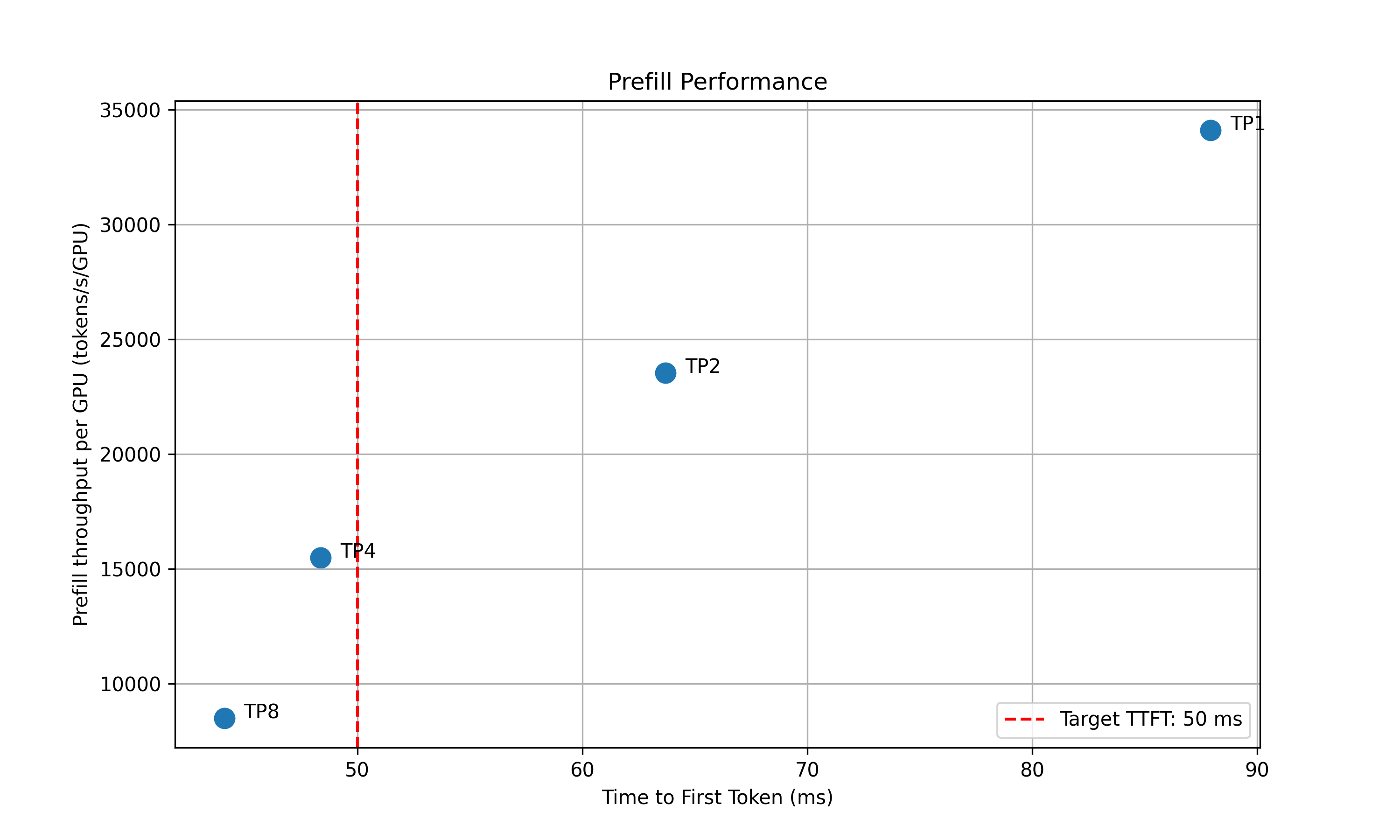
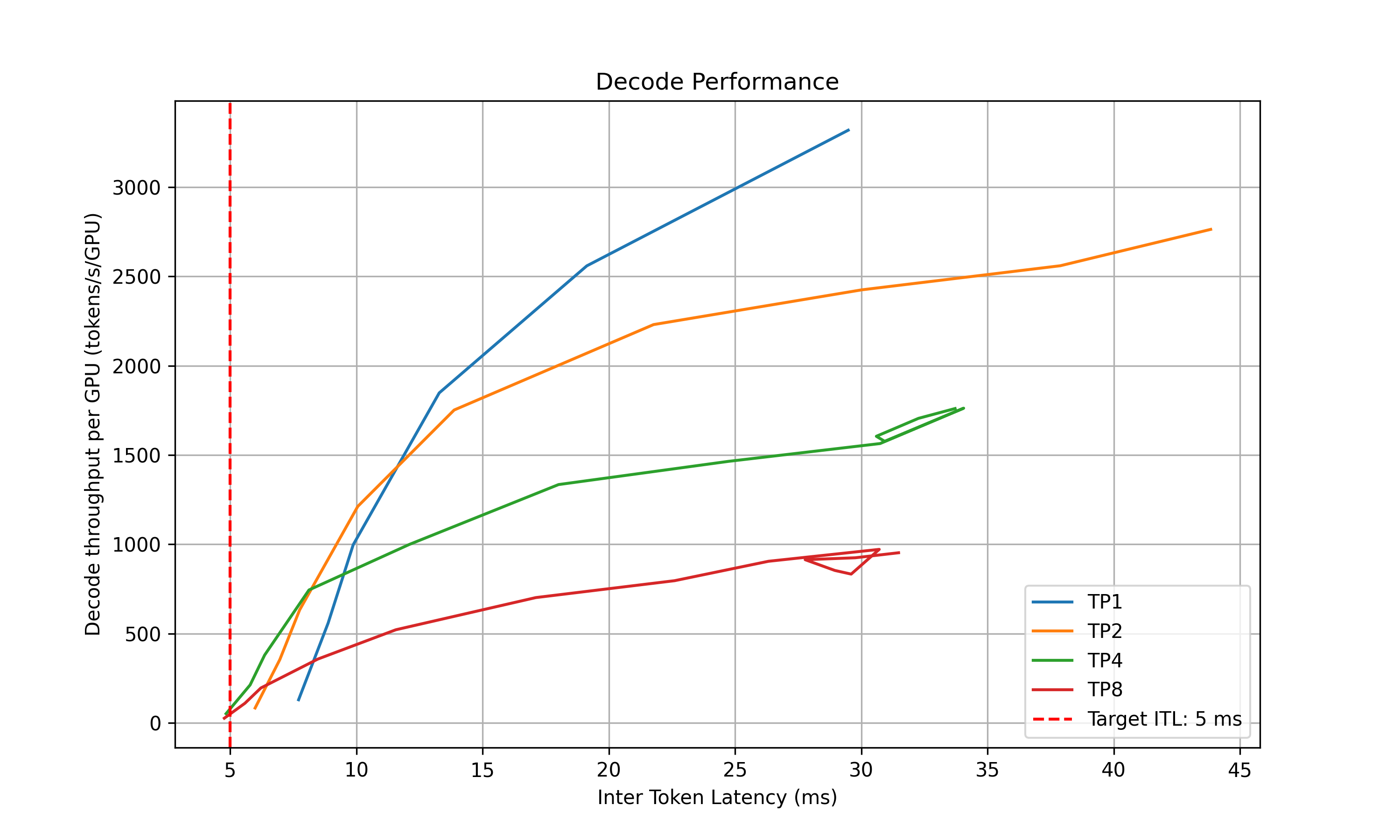
For the prefill performance, the script plots the TTFT for different TP sizes and selects the best TP size that meets the target TTFT SLA and delivers the best throughput per GPU.
Based on how close the TTFT of the selected TP size is to the SLA, the script also recommends the upper and lower bounds of the prefill queue size to be used in planner.
For the decode performance, the script plots the ITL for different TP sizes and different in-flight requests.
Similarly, it selects the best point that satisfies the ITL SLA and delivers the best throughput per GPU
and recommends the upper and lower bounds of the kv cache utilization rate to be used in planner.
The following information is printed out in the terminal:
```text
2025-05-16 15:20:24 - __main__ - INFO - Analyzing results and generate recommendations...
2025-05-16 15:20:24 - __main__ - INFO - Suggested prefill TP:4 (TTFT 48.37 ms, throughput 15505.23 tokens/s/GPU)
2025-05-16 15:20:24 - __main__ - INFO - Suggested planner upper/lower bound for prefill queue size: 0.24/0.10
2025-05-16 15:20:24 - __main__ - INFO - Suggested decode TP:4 (ITL 4.83 ms, throughput 51.22 tokens/s/GPU)
2025-05-16 15:20:24 - __main__ - INFO - Suggested planner upper/lower bound for decode kv cache utilization: 0.20/0.10
```
After finding the best TP size for prefill and decode, the script interpolates the TTFT with ISL and ITL with active KV cache and decode context length.
This is to provide a more accurate estimation of the performance when ISL and OSL changes.
The results are saved to `/_tp_interpolation`.
## Usage
`dynamo serve` automatically starts the planner.
Configure it through YAML files or command-line arguments:
Usage:
```bash
# YAML configuration
dynamo serve graphs.disagg:Frontend -f disagg.yaml
# disagg.yaml
Planner:
environment: local
no-operation: false
log-dir: log/planner
# Configure the planner through CLI arguments
dynamo serve graphs.disagg:Frontend \
-f disagg.yaml \
--Planner.environment=local \
--Planner.no-operation=false \
--Planner.log-dir=log/planner
```
The planner accepts the following options:
- `namespace` (str, default: "dynamo"):
Namespace planner will look at
- `environment` (str, default: "local"):
Environment to run the planner in (local, kubernetes)
- `no-operation` (bool, default: false):
Do not make any adjustments, just observe the metrics and log to tensorboard
- `log-dir` (str, default: None):
Tensorboard logging directory
- `adjustment-interval` (int, default: 30):
Interval in seconds between scaling adjustments
- `metric-pulling-interval` (int, default: 1):
Interval in seconds between metric pulls
- `max-gpu-budget` (int, default: 8):
Maximum number of GPUs to use, planner will not scale up more than this number of GPUs for prefill plus decode workers
- `min-gpu-budget` (int, default: 1):
Minimum number of GPUs to use, planner will not scale down below this number of GPUs for prefill or decode workers
- `decode-kv-scale-up-threshold` (float, default: 0.9):
KV cache utilization threshold to scale up decode workers
- `decode-kv-scale-down-threshold` (float, default: 0.5):
KV cache utilization threshold to scale down decode workers
- `prefill-queue-scale-up-threshold` (float, default: 0.5):
Queue utilization threshold to scale up prefill workers
- `prefill-queue-scale-down-threshold` (float, default: 0.2):
Queue utilization threshold to scale down prefill workers
- `decode-engine-num-gpu` (int, default: 1):
Number of GPUs per decode engine
- `prefill-engine-num-gpu` (int, default: 1):
Number of GPUs per prefill engine
Run as standalone process:
```bash
PYTHONPATH=/workspace/examples/llm python components/planner.py \
--namespace=dynamo \
--served-model-name=vllm \
--no-operation \
--log-dir=log/planner
```
Monitor metrics with Tensorboard:
### Tensorboard
Planner logs to tensorboard to visualize the metrics and the scaling actions.
You can start tensorboard with the following command:
```bash
tensorboard --logdir=
```
## Backends
The planner supports local and kubernetes backends for worker management.
### Local Backend
The local backend uses Circus to control worker processes. A Watcher tracks each `serve_dynamo.py` process.
The planner adds or removes watchers to scale workers.
Note: Circus's `increment` feature doesn't support GPU scheduling variables, so we create separate watchers per process.
#### State Management
The planner maintains state in a JSON file at `~/.dynamo/state/{namespace}.json`. This file:
- Tracks worker names as `{namespace}_{component_name}`.
- Records GPU allocations from the allocator.
- Updates after each planner action.
- Cleans up automatically when the arbiter exits.
Example state file evolution:
```none
# Initial decode worker
{
"dynamo_VllmWorker": {..., resources={...}}
}
# After adding worker
{
"dynamo_VllmWorker": {..., resources={...}},
"dynamo_VllmWorker_1": {..., resources={...}}
}
# After removing worker
{
"dynamo_VllmWorker": {..., resources={...}}
}
# After removing last worker
{
"dynamo_VllmWorker": {...}
}
```
> [!Note]
> Start with one replica per worker.
> Multiple initial replicas currently share a single watcher.
### Kubernetes Backend
The Kubernetes backend scales workers by updating DynamoGraphDeployment replica counts.
When scaling needs change, the planner:
1. Updates the deployment's replica count
2. Lets the Kubernetes operator create/remove pods
3. Maintains seamless scaling without manual intervention