SURF: Speeded Up Robust Features By Herbert Bay, Tinne Tuytelaars, and Luc Van Gool
Also note that there are numerous flavors of the SURF algorithm you can put together using the functions in dlib. The get_surf_points() function is just an example of one way you might do so.
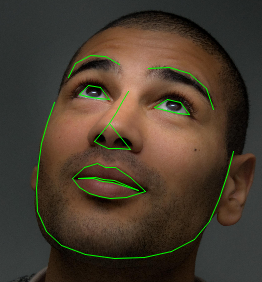
To create useful instantiations of this object you need to use the shape_predictor_trainer object to train a shape_predictor using a set of training images, each annotated with shapes you want to predict. To do this, the shape_predictor_trainer uses the state-of-the-art method from the paper:
One Millisecond Face Alignment with an Ensemble of Regression Trees by Vahid Kazemi and Josephine Sullivan, CVPR 2014
Histograms of Oriented Gradients for Human Detection by Navneet Dalal and Bill Triggs
Object Detection with Discriminatively Trained Part Based Models by P. Felzenszwalb, R. Girshick, D. McAllester, D. Ramanan in IEEE Transactions on Pattern Analysis and Machine Intelligence, Vol. 32, No. 9, Sep. 2010This means that it takes an input image and outputs Felzenszwalb's 31 dimensional version of HOG features.
The following feature extractors can be wrapped by the hashed_feature_image:
[0,0,0,0, 3,4,5,1, 0,0,0,0, 0,0,0,0].That is, the output vector has a dimensionality that is equal to the number of hash bins times the dimensionality of the lower level vector plus one. The value in the extra dimension concatenated onto the end of the vector is always a constant value of 1 and serves as a bias value. This means that, if there are N hash bins, these vectors are capable of representing N different linear functions, each operating on the vectors that fall into their corresponding hash bin.
The following feature extractors can be wrapped by the binned_vector_feature_image:
The following feature extractors can be wrapped by the nearest_neighbor_feature_image:
This object is an implementation of the fast Hessian pyramid as described in the paper:
SURF: Speeded Up Robust Features By Herbert Bay, Tinne Tuytelaars, and Luc Van GoolThis implementation was also influenced by the very well documented OpenSURF library and its corresponding description of how the fast Hessian algorithm functions:
Notes on the OpenSURF Library by Christopher Evans
The difference between this object and the rgb_alpha_pixel is just that this struct lays its pixels down in memory in BGR order rather than RGB order. You only care about this if you are doing something like using the cv_image object to map an OpenCV image into a more object oriented form.
The difference between this object and the rgb_pixel is just that this struct lays its pixels down in memory in BGR order rather than RGB order. You only care about this if you are doing something like using the cv_image object to map an OpenCV image into a more object oriented form.
So you should be able to use cv_image objects with many of the image processing functions in dlib as well as the GUI tools for displaying images on the screen.
Note that you can do the reverse conversion, from dlib to OpenCV, using the toMat routine.
Note that you can do the reverse conversion, from OpenCV to dlib, using the cv_image object.


This function is useful for displaying the results of some image segmentation. For example, the output of label_connected_blobs, label_connected_blobs_watershed, or segment_image.
Note that you must define DLIB_PNG_SUPPORT if you want to use this object. You must also set your build environment to link to the libpng library. However, if you use CMake and dlib's default CMakeLists.txt file then it will get setup automatically.
Note that you must define DLIB_JPEG_SUPPORT if you want to use this object. You must also set your build environment to link to the libjpeg library. However, if you use CMake and dlib's default CMakeLists.txt file then it will get setup automatically.
Note that you must define DLIB_WEBP_SUPPORT if you want to use this object. You must also set your build environment to link to the libwebp library. However, if you use CMake and dlib's default CMakeLists.txt file then it will get setup automatically.
Note that you must define DLIB_JPEG_SUPPORT if you want to use this function. You must also set your build environment to link to the libjpeg library. However, if you use CMake and dlib's default CMakeLists.txt file then it will get setup automatically.
Note that you must define DLIB_WEBP_SUPPORT if you want to use this function. You must also set your build environment to link to the libwebp library. However, if you use CMake and dlib's default CMakeLists.txt file then it will get setup automatically.
This routine can save images containing any type of pixel. However, the DNG format can natively store only the following pixel types: rgb_pixel, hsi_pixel, rgb_alpha_pixel, uint8, uint16, float, and double. All other pixel types will be converted into one of these types as appropriate before being saved to disk.
Note that you must define DLIB_PNG_SUPPORT if you want to use this function. You must also set your build environment to link to the libpng library. However, if you use CMake and dlib's default CMakeLists.txt file then it will get setup automatically.
This routine can save images containing any type of pixel. However, save_png() can only natively store the following pixel types: rgb_pixel, rgb_alpha_pixel, uint8, and uint16. All other pixel types will be converted into one of these types as appropriate before being saved to disk.
Note that you must define DLIB_JPEG_SUPPORT if you want to use this function. You must also set your build environment to link to the libjpeg library. However, if you use CMake and dlib's default CMakeLists.txt file then it will get setup automatically.
This routine can save images containing any type of pixel. However, save_jpeg() can only natively store the following pixel types: rgb_pixel and uint8. All other pixel types will be converted into one of these types as appropriate before being saved to disk.
Note that you must define DLIB_WEBP_SUPPORT if you want to use this function. You must also set your build environment to link to the libwebp library. However, if you use CMake and dlib's default CMakeLists.txt file then it will get setup automatically.
This routine can save images containing any type of pixel. However, save_webp() can only natively store the following pixel types: rgb_pixel, rgb_alpha_pixel, bgr_pixel, and bgr_alpha_pixel. All other pixel types will be converted into one of these types as appropriate before being saved to disk.
Note that you can only load PNG, JPEG, and GIF files if you link against libpng, libjpeg, and libgif respectively. You will also need to #define DLIB_PNG_SUPPORT, DLIB_JPEG_SUPPORT, and DLIB_GIF_SUPPORT. Or use CMake and it will do all this for you.
Note that you must define DLIB_PNG_SUPPORT if you want to use this function. You must also set your build environment to link to the libpng library. However, if you use CMake and dlib's default CMakeLists.txt file then it will get setup automatically.
This routine can save images containing any type of pixel. However, it will convert all color pixels into rgb_pixel and grayscale pixels into uint8 type before saving to disk.
For example, it will take the output of a shape_predictor that uses this facial landmarking scheme and will produce visualizations like this:
Quadratic models for curved line detection in SAR CCD by Davis E. King and Rhonda D. PhillipsThis technique gives very accurate gradient estimates and is also very fast since the entire gradient estimation procedure, for each type of gradient, is accomplished by cross-correlating the image with a single separable filter. This means you can compute gradients at very large scales (e.g. by fitting the quadratic to a large window, like a 99x99 window) and it still runs very quickly.
For example, the filters used to compute the X, Y, XX, XY, and YY gradients at a scale of 130 are shown below:
| X: |  |
Y: |  |
||
| XX: |  |
XY: | 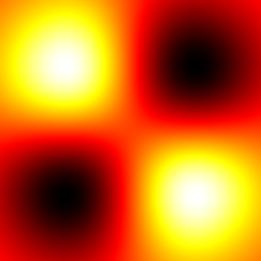 |
YY: |  |

Also, you can use the image_to_tiled_pyramid() and tiled_pyramid_to_image() routines to convert between the input image coordinate space and the tiled pyramid coordinate space.
 |
 |
For example, given an image like this, which shows part of the Hubble ultra deep field:

The algorithm would flood fill it and produce the following segmentation. If you play the video you can see the actual execution of the algorithm where it starts by flooding from the brightest areas and progressively fills each region.
Efficient Graph-Based Image Segmentation by Felzenszwalb and Huttenlocher.
Segmentation as Selective Search for Object Recognition by Koen E. A. van de Sande, et al.Note that this function deviates from what is described in the paper slightly. See the code for details.
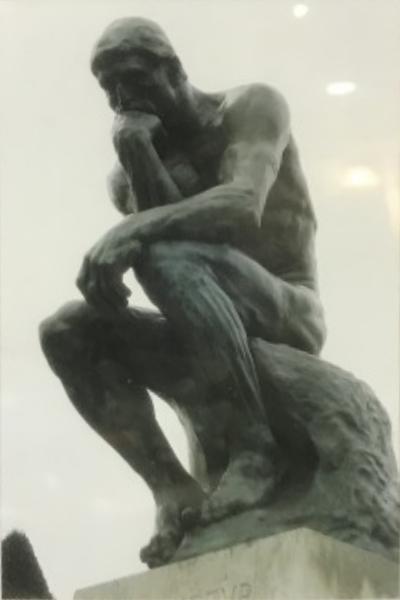
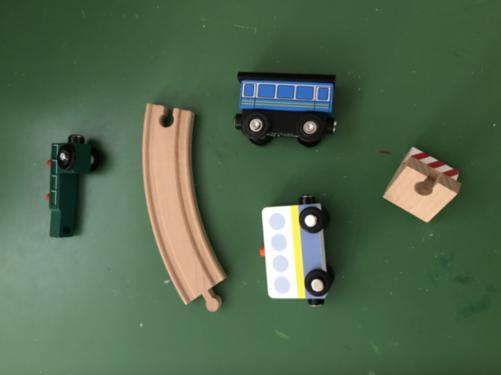
"Minimum barrier salient object detection at 80 fps" by Zhang, Jianming, et al.This routine takes an image as input and creates a new image where objects that are visually distinct from the borders of the image have bright pixels while everything else is dark. This is useful because you can then threshold the resulting image to detect objects. For example, given the left image as input you get the right image as output:
 |
 |
Beyond Bags of Features: Spatial Pyramid Matching for Recognizing Natural Scene Categories by Svetlana Lazebnik, Cordelia Schmid, and Jean PonceIt also includes the ability to represent movable part models.
The following feature extractors can be used with the scan_image_pyramid object:
Histograms of Oriented Gradients for Human Detection by Navneet Dalal and Bill Triggs, CVPR 2005However, we augment the method slightly to use the version of HOG features from:
Object Detection with Discriminatively Trained Part Based Models by P. Felzenszwalb, R. Girshick, D. McAllester, D. Ramanan IEEE Transactions on Pattern Analysis and Machine Intelligence, Vol. 32, No. 9, Sep. 2010Since these HOG features have been shown to give superior performance.
Unlike the scan_image_pyramid object which scans a fixed sized window over an image pyramid, the scan_image_boxes tool allows you to define your own list of "candidate object locations" which should be evaluated. This is simply a list of rectangle objects which might contain objects of interest. The scan_image_boxes object will then evaluate the classifier at each of these locations and return the subset of rectangles which appear to have objects in them.
This object can also be understood as a general tool for implementing the spatial pyramid models described in the paper:Beyond Bags of Features: Spatial Pyramid Matching for Recognizing Natural Scene Categories by Svetlana Lazebnik, Cordelia Schmid, and Jean Ponce
The following feature extractors can be used with the scan_image_boxes object:
Unlike the scan_image_pyramid and scan_image_boxes objects, this image scanner delegates all the work of constructing the object feature vector to a user supplied feature extraction object. That is, scan_image_custom simply asks the supplied feature extractor what boxes in the image we should investigate and then asks the feature extractor for the complete feature vector for each box. That is, scan_image_custom does not apply any kind of pyramiding or other higher level processing to the features coming out of the feature extractor. That means that when you use scan_image_custom it is completely up to you to define the feature vector used with each image box.
Note that you can use the structural_object_detection_trainer to learn the parameters of an object_detector. See the example programs for an introduction.
Also note that dlib contains more powerful CNN based object detection tooling, which will usually run slower but produce much more general and accurate detectors.
This tool is an implementation of the method described in the following paper:
Danelljan, Martin, et al. "Accurate scale estimation for robust visual tracking." Proceedings of the British Machine Vision Conference BMVC. 2014.
Face Description with Local Binary Patterns: Application to Face Recognition by Ahonen, Hadid, and Pietikainen.
Face Description with Local Binary Patterns: Application to Face Recognition by Ahonen, Hadid, and Pietikainen.
Blessing of Dimensionality: High-dimensional Feature and Its Efficient Compression for Face Verification by Dong Chen, Xudong Cao, Fang Wen, and Jian Sun