[](https://arxiv.org/abs/2412.21037) [](https://huggingface.co/declare-lab/TangoFlux) [](https://tangoflux.github.io/) [](https://huggingface.co/spaces/declare-lab/TangoFlux) [](https://huggingface.co/datasets/declare-lab/CRPO) [](https://replicate.com/chenxwh/tangoflux)
## Quickstart on Google Colab
| Colab |
| --- |
[](https://colab.research.google.com/drive/1j__4fl_BlaVS_225M34d-EKxsVDJPRiR?usp=sharing)
## Overall Pipeline
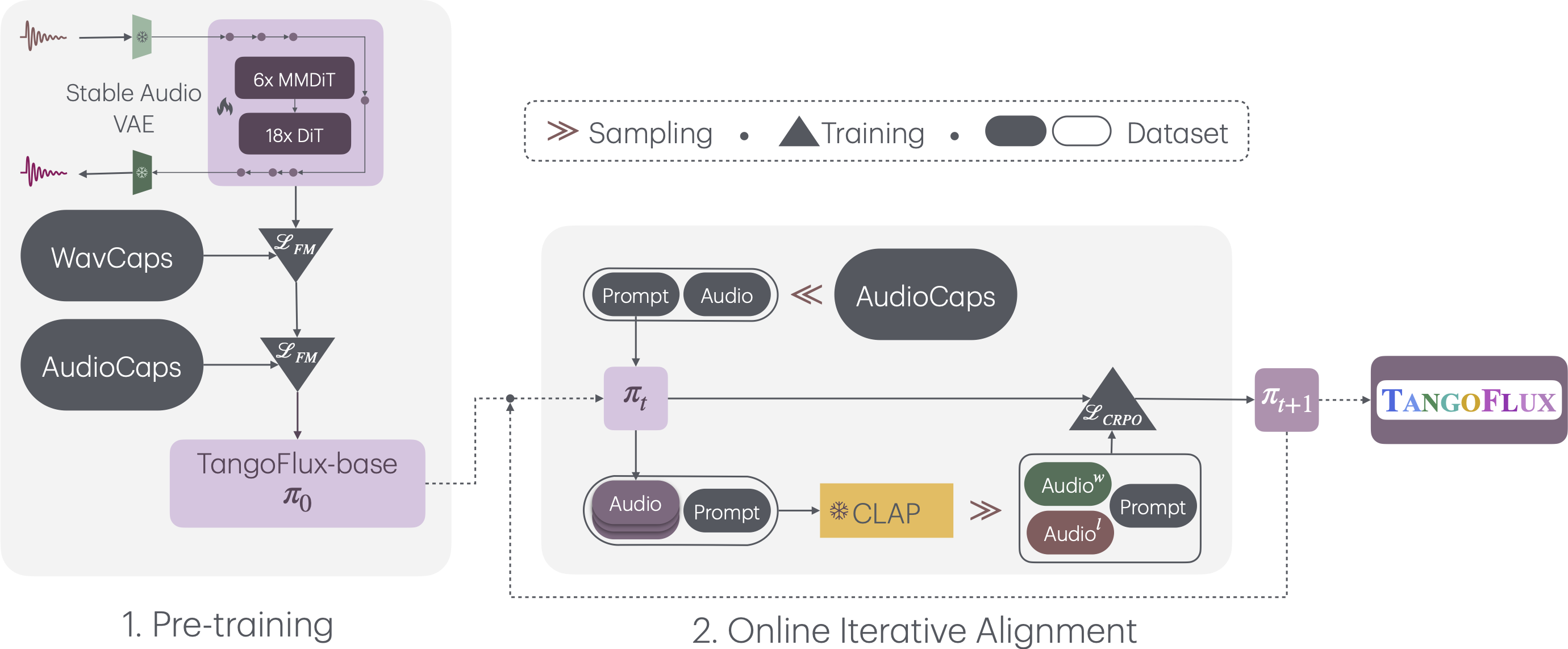
TangoFlux consists of FluxTransformer blocks, which are Diffusion Transformers (DiT) and Multimodal Diffusion Transformers (MMDiT) conditioned on a textual prompt and a duration embedding to generate a 44.1kHz audio up to 30 seconds long. TangoFlux learns a rectified flow trajectory to an audio latent representation encoded by a variational autoencoder (VAE). TangoFlux training pipeline consists of three stages: pre-training, fine-tuning, and preference optimization with CRPO. CRPO, particularly, iteratively generates new synthetic data and constructs preference pairs for preference optimization using DPO loss for flow matching.
🚀 **TangoFlux can generate up to 30 seconds long 44.1kHz stereo audios in about 3 seconds.**
## Training TangoFlux
We use the accelerate package from HuggingFace for multi-gpu training. Run accelerate config from terminal and set up your run configuration by the answering the questions asked. We have placed the default accelerator config in the `configs` folder. Please specify the path to your training files in the configs/tangoflux_config.yaml. A sample of train.json and val.json has been provided. Replace them with your own audio.
`tangoflux_config.yaml` defines the training file paths and model hyperparameters:
```bash
CUDA_VISIBLE_DEVICES=0,1 accelerate launch --config_file='configs/accelerator_config.yaml' src/train.py --checkpointing_steps="best" --save_every=5 --config='configs/tangoflux_config.yaml'
```
## Inference with TangoFlux
Download the TangoFlux model and generate audio from a text prompt.
TangoFlux can generate audios up to 30 second long through passing in a duration variable in the `model.generate` function. Please note that duration should be strictly greather than 1 and lesser than 30.
```python
import torchaudio
from tangoflux import TangoFluxInference
from IPython.display import Audio
model = TangoFluxInference(name='declare-lab/TangoFlux')
audio = model.generate('Hammer slowly hitting the wooden table', steps=50, duration=10)
Audio(data=audio, rate=44100)
```
Our evaluation shows that inferring with 50 steps yield the best results. A CFG scale of 3.5, 4, and 4.5 yield simliar quality output.
For faster inference, consider setting steps to 25 that yield similar audio quality.
## Evaluation Scripts
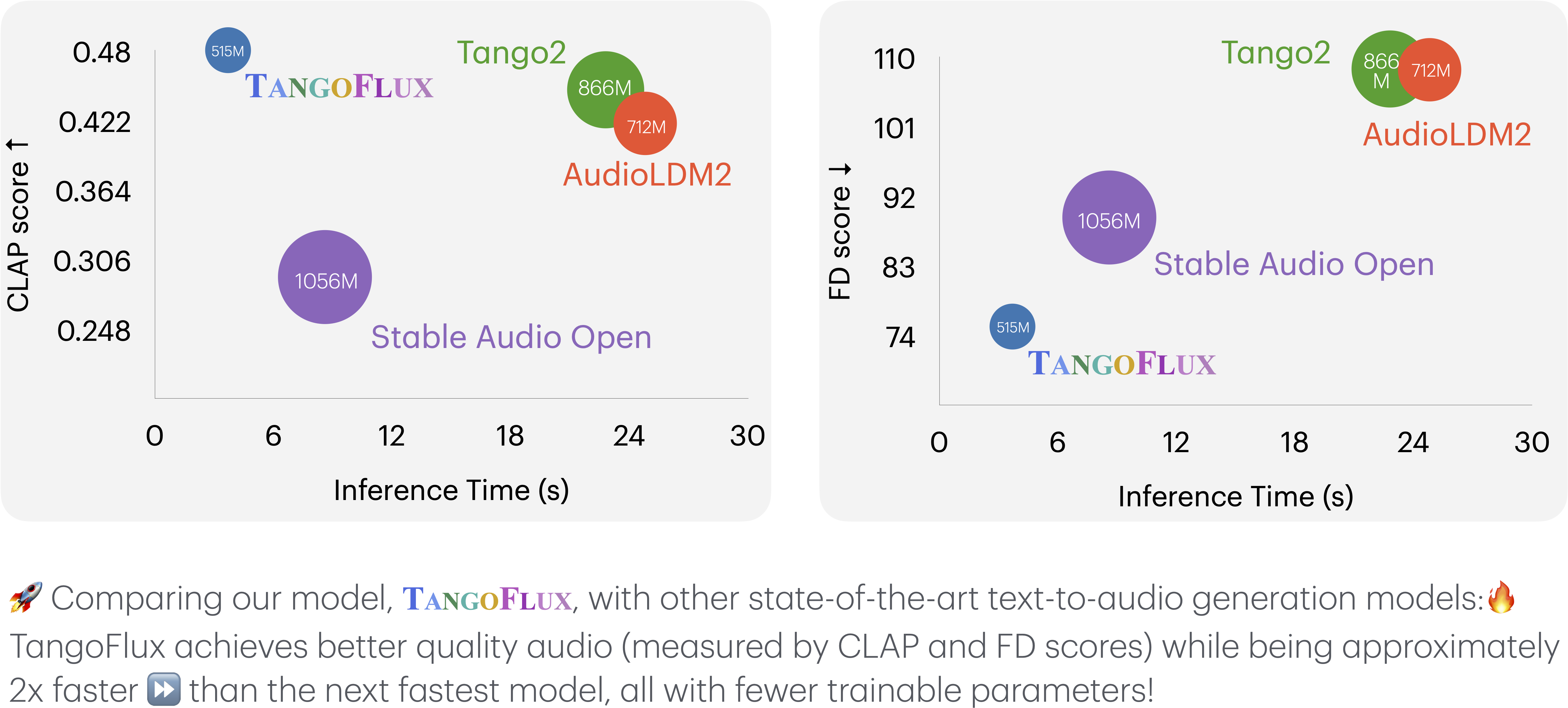
## TangoFlux vs. Other Audio Generation Models
This key comparison metrics include:
- **Output Length**: Represents the duration of the generated audio.
- **FD**